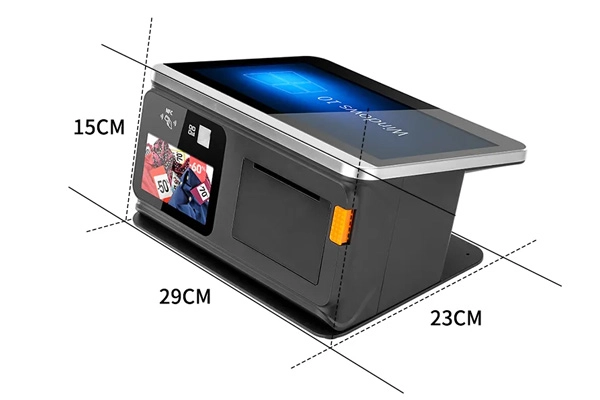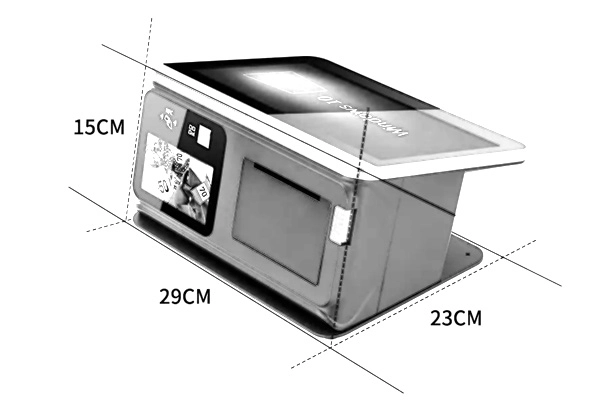
POS Hardware for Government & Public Services

Explore FAVORPOS POS hardware for government offices, public service counters and other public-facing environments. Review terminals, printers, scanners and connected peripherals for your proposed workflow. Payment, ticketing, permit issuance, data security and system integration depend on the complete solution and must be verified for your project.
Government and Public Sector POS Solutions

POS Hardware Considerations for Public Services

Integrated Payment Solutions

Payment Hardware and Compatibility

Discuss terminals, payment interfaces and connected peripherals for public-facing transactions. Accepted payment types, encryption and payment compliance depend on the complete device, payment software, network and service-provider arrangement; request documentation for the exact configuration.
Ticketing and admission management

Ticketing and Permit Workflows

For ticketing, permits and license-related service counters, review device interfaces, scanners, printers and compatible peripherals. Issuance, approvals, records and real-time updates are software-dependent functions that must be verified with the relevant solution provider.
Public Service Fee Collection

Public Service Fee Collection

Explore POS hardware for counters collecting eligible service or facility fees. Fee calculations, utility billing, payment acceptance and transaction records depend on compatible software, payment services and applicable agency requirements.
Real-time Data and Reporting

Reporting and Analytics Requirements

Reporting, revenue analysis and service-demand insights are functions of the selected business software and data environment. Confirm the hardware, operating system and connectivity requirements with your reporting or system provider.
Integrated Citizen Service CRM

Citizen-Service Software Compatibility

Citizen profiles, feedback records and service histories require appropriate application software, data controls and authorized workflows. Ask FAVORPOS about available device specifications, then confirm privacy and application requirements with the responsible system provider.
Room expenses and bill integration

Security, Compliance and Audit Requirements

Request model-specific specifications and available documents for the proposed hardware. Data protection, audit trails, payment security and compliance with public-sector rules depend on the complete solution, deployment environment and applicable legal or procurement requirements.
Multi-department management

Multi-Site and Remote Management

Discuss device quantities, connectivity and operating-system needs across service locations. Centralized reporting, remote access and device management require compatible software, network infrastructure and appropriate security controls.
User-friendly Interface

Interface and Accessibility Requirements

Share requirements for screen size, interaction method, languages and accessibility. Available device features vary by model, while application-level language and accessibility functions must be verified with the software provider.

Public-Sector Hardware Application Scenarios

Government Offices

Government Offices

Review terminals, printers and peripherals for service counters. Government fee collection, licensing and records processing depend on authorized payment and application software.
Get a quote
Public Transportation Departments

Public Transportation Departments

Discuss handheld and counter-based hardware for transport-related service points. Ticket sales, validation and payment processing depend on compatible scanners, software and service-provider arrangements.
Get a quote
Municipal Facilities

Municipal Facilities

Explore terminals and receipt printers for facility service counters. Reservations, utility payments and financial reporting require the selected management and payment software.
Get a quote
Public Health Departments

Public Health Departments

Review POS hardware needs for administrative or payment counters in public health settings. Medical information, patient privacy and healthcare software functions must be assessed for the complete system with the relevant providers.
Get a quote
Educational Institutions

Educational Institutions

Discuss POS hardware and peripherals for campus service or payment counters. Student records, tuition processing and financial reporting depend on compatible software and authorized service arrangements.
Get a quote

Public-Sector Hardware Project Discussion Process

Step 01

Define Your Requirements

Share the service-counter workflow, intended application, destination market, proposed quantity, peripherals and applicable procurement requirements.
Demand Analysis

Step 02

Review Hardware and Integration Scope

Discuss suitable device models, operating systems, interfaces and software compatibility. Any customization or new development is subject to technical feasibility and the agreed project scope.
Solution Design

Step 03

Confirm Samples and Documentation
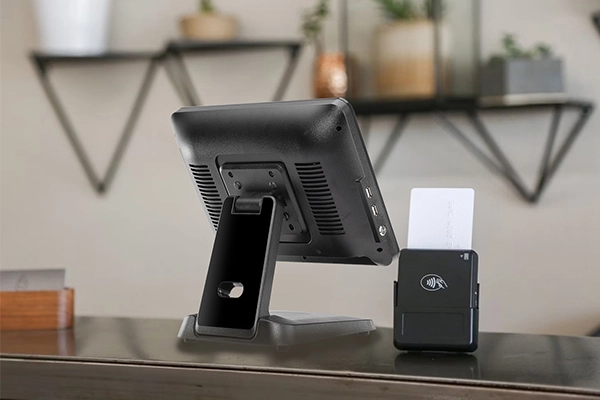
Ask about available product information and whether a sample or prototype is appropriate for your project. Confirm costs, timing, evaluation criteria and applicable documents before proceeding.
Sample Confirmation

Step 04

Coordinate Deployment Responsibilities

Agree on hardware setup, software integration, staff training and support responsibilities with FAVORPOS and any relevant solution providers. Service availability depends on the selected project and agreed terms.
Implementation and Training

Step 05

Confirm After-Sales Arrangements
Confirm the applicable warranty, documentation, troubleshooting, firmware, repair and maintenance arrangements for the selected hardware and order terms.
Quality Inspection

After-Sales Support: Confirm the Applicable Scope

always

Technical Assistance

Contact FAVORPOS with the product model and issue details to discuss available technical assistance and troubleshooting options.
Hardware maintenance and replacement service

Warranty and Repair Options

Confirm warranty coverage, repair or replacement options and related conditions for the selected product and agreed order terms.
Firmware upgrade

Firmware Resources

Ask whether relevant firmware resources or update guidance are available for your selected model and configuration.
Troubleshooting and remote diagnosis

Troubleshooting

Provide the model, symptoms and operating environment to discuss available troubleshooting steps and any applicable remote-assistance options.
Spare parts supply

Spare Parts Inquiry

Contact FAVORPOS to confirm spare-part compatibility, availability, ordering terms and estimated supply arrangements for your device.
Training and documentation support

Documentation and Training

Request available product manuals and discuss any applicable setup guidance or training arrangements for the selected project.
Product-Specific Service Information
Contact FAVORPOS with your model, order and issue details to discuss available support options. Warranty, replacement and repair coverage depend on the applicable product and agreed service terms.
Quality Assurance and Commitment
Project and Market Requirements
Share your destination market, language, interface, power and documentation needs. Available localization or customization options must be confirmed for the selected device and project.

Government & Public-Sector POS Hardware FAQs

Review common questions about hardware configurations, payment interfaces, software compatibility and support. Contact FAVORPOS to verify the selected model and applicable project requirements.
What after-sales support is available for FAVORPOS POS hardware?

Contact FAVORPOS with your product model and issue details to discuss available technical assistance, documentation, troubleshooting and applicable service options. Warranty, repair, firmware updates and training arrangements depend on the selected product and agreed service terms.

What reporting and analysis capabilities does the system provide?

Our system provides detailed financial reports, usage insights and other analytical features to help you track performance, optimize resource allocation and improve service delivery.

Can FAVORPOS POS hardware support remote management?

Remote access and management capabilities depend on the selected hardware, operating system, network environment and management software. Contact FAVORPOS to confirm model-specific compatibility and the requirements of your intended remote management solution.

Can your POS system handle various types of public sector payments?

Yes, our system is designed to handle a wide range of public sector payments, including fines, utility bills and service charges, ensuring secure and efficient processing.

How does your system ensure data security?

We use advanced encryption and security measures to protect all financial and personal data, ensuring compliance with industry standards and regulations.

Can FAVORPOS hardware be used for ticketing and permit issuance?

Ticketing and permit issuance depend on the selected POS hardware, connected peripherals and compatible software. Contact FAVORPOS with your application requirements to confirm suitable hardware options. Software-specific functions should be verified with the relevant solution provider.

Discuss Your Public-Sector POS Hardware Project

Share your agency or organization type, intended workflow, preferred hardware, required peripherals, destination market and estimated quantity. Contact FAVORPOS to discuss available device information, project feasibility and next steps.
Name must not exceed 100 characters.
Invalid email format or length exceeds 100 characters. Please re-enter.
Please enter a valid phone number!
Company Name must not exceed 150 characters.
Content must not exceed 3000 characters.
Contact customer service

How can we help?

Hi,

If you are interested in our products / engineered customized solutions or have any doubts, please be sure to let us know so that we can help you better.

×
Name must not exceed 100 characters.
Invalid email format or length exceeds 100 characters. Please re-enter.
Please enter a valid phone number!
Company Name must not exceed 150 characters.
Content must not exceed 3000 characters.