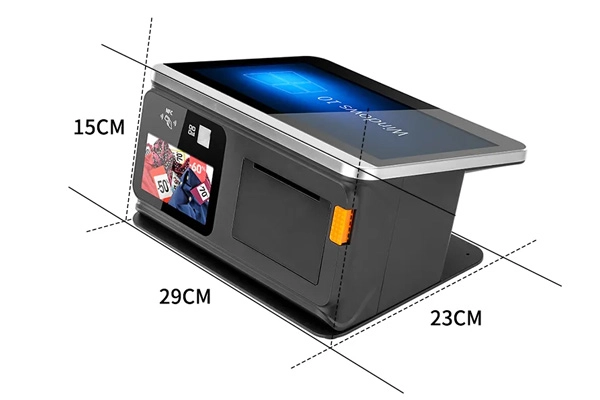
POS Hardware for Grocery Stores & Supermarkets

Explore POS hardware options for neighborhood grocery stores, supermarkets and specialty food retailers. Review checkout terminals, handheld devices, scanners, receipt printers and peripherals for your intended store workflow. Confirm model-specific interfaces, software compatibility, payment requirements and service terms with FAVORPOS before placing an order.
POS Solutions for Grocery and Supermarkets

Grocery & Supermarket POS Hardware Considerations

Fast checkout processing

Checkout Hardware and Payment Compatibility

Review POS terminals, scanners, printers and cash drawers for staffed checkout. Supported payment methods depend on the selected device, payment module, software and service provider. Confirm cash, card, mobile payment and peripheral requirements for your proposed configuration.
Weight and price integration

Weighing and Price Lookup

For produce and bulk-food sales, confirm whether your selected POS hardware and software support the required electronic scales, barcode labels and price-lookup workflow. Scale integration, price calculation and synchronized updates depend on compatible devices and software.
Real-time Inventory Synchronization

Inventory Software and Replenishment

Inventory tracking, low-stock alerts and replenishment planning are software-dependent functions. Share your inventory workflow and ask FAVORPOS to confirm the hardware interfaces, operating system and compatible peripherals needed for your chosen inventory solution.
Membership management and promotions

Loyalty and Promotions Compatibility

Membership cards, loyalty points, coupons and promotional pricing depend on compatible POS software and connected peripherals. Confirm the selected hardware configuration with your software or loyalty-service provider.
Barcode/QR code scanning and printing

Barcode Scanning and Receipt Printing

Discuss compatible barcode or QR-code scanners and receipt printers for the selected POS device. Built-in scanners, printer connections, invoice formatting and coupon processing vary by model and software configuration.
Multi-device connection and system integration

Multi-Terminal Store Workflows

Multiple checkout stations and handheld devices may be considered for larger stores. Real-time synchronization among checkout, inventory and back-office systems requires suitable network infrastructure and compatible software; verify the complete system design with relevant providers.
Integrated Payment Solutions

Payment and Data Security Requirements

Payment security depends on the complete hardware, software, network and payment-service environment. Ask FAVORPOS for available model-specific specifications and documentation; verify PCI DSS and other applicable requirements with the responsible payment and compliance providers. Do not assume that every configuration has the same certification scope.
Compliance and Reporting

Sales Reporting Software

Sales dashboards, category reporting and analytics are features of the chosen POS or back-office software. Discuss the device specifications and connectivity required for your reporting workflow, and confirm software functions with the relevant solution provider.
Customer self-service checkout terminal

Self-Service Checkout Requirements

For self-service checkout projects, assess the intended terminal, scanner, printer, payment interface and user experience. Self-service workflows and multilingual interfaces depend on compatible hardware and software and require project-specific confirmation.
Networking and cloud management

Networking and Remote Management

Discuss available wired or wireless connections for your selected hardware. Cloud synchronization, remote access and multi-store management depend on the operating system, network and management software; confirm compatibility and security requirements for the complete solution.

POS Hardware Requirements by Grocery Store Type

Neighborhood Grocery Stores

Neighborhood Grocery Stores

For smaller stores, review counter space, checkout volume, barcode scanning and receipt-printing requirements. Confirm the hardware configuration and any inventory or loyalty software separately.
Get a quote
Supermarkets

Supermarkets

For stores with multiple checkout lanes, discuss terminals, scanners, printers, price checkers and related peripherals. Centralized pricing, self-service checkout and supply-chain integration require compatible software and project-specific system planning.
Get a quote
Organic and Specialty Food Stores

Organic and Specialty Food Stores

Review barcode, scale and label-printing needs for packaged, weighed or specialty products. Product records, supplier management and certification tracking depend on the chosen business software and should not be assumed to be hardware features.
Get a quote
Supermarket Chains

Supermarket Chains

For multi-location projects, share the intended number of checkout points, device types and connectivity requirements. Unified pricing, promotions and inventory visibility depend on a compatible centralized software platform and network design.
Get a quote

What to Confirm When Selecting Grocery POS Hardware

Checkout Configuration

Compare the selected terminal, scanner and printer configuration against expected transaction volume, counter space and operating conditions. Actual performance depends on the complete device and software environment.

Inventory Software Compatibility

If your project requires stock tracking, perishables management or replenishment alerts, verify the hardware and operating-system requirements with the software provider.

Loyalty and Promotion Requirements

Confirm whether the selected POS software and peripherals can support the membership, coupon or promotional functions required for your store.

Reporting Requirements

Ask your software provider about available sales and inventory reports, then confirm appropriate POS device performance, storage and connectivity for that application.

Integration with Existing Systems

Share your existing ERP, accounting, inventory or payment system requirements. Software integration and data exchange must be verified for the complete proposed solution.

Multi-Store Expansion Planning

Review device quantities, network conditions, peripherals and software licensing when planning additional stores or checkout lanes. Confirm hardware availability and project arrangements before expansion.

Payment Security and Compliance

Request applicable specifications and documents for the chosen POS hardware. Payment encryption, fraud prevention and PCI DSS obligations depend on the complete payment environment and must be verified with responsible providers.

Discuss Your Grocery POS Hardware Project

Step 01

Share Store Requirements

Tell FAVORPOS your store type, checkout workflow, expected device quantity, preferred peripherals and destination market to begin a hardware discussion.
Demand Analysis

Step 02

Review Hardware Options

Discuss available POS models, interfaces and configurations. Any product customization or new development must be evaluated against technical feasibility and the agreed project scope.
Solution Design

Step 03

Confirm Samples and Specifications

Ask about product specifications and whether a sample or prototype is appropriate and available for the selected project. Confirm cost, timing and evaluation requirements before proceeding.
Sample Confirmation

Step 04

Coordinate Deployment Requirements

Confirm hardware setup, software integration and staff-training responsibilities with FAVORPOS and the relevant solution provider. The available scope depends on agreed project and service terms.
Implementation and Training

Step 05

Confirm Applicable After-Sales Support
Discuss available documentation, troubleshooting, warranty, repair or firmware resources for the selected product. Coverage and service arrangements depend on applicable order and support terms.
Quality Inspection

After-Sales Support: Confirm the Applicable Scope

always

Technical Assistance

Contact FAVORPOS with the product model and issue details to discuss available technical assistance and troubleshooting options.
Hardware maintenance and replacement service

Warranty and Repair Options

Confirm warranty coverage, repair or replacement options and related conditions for the selected product and agreed order terms.
Firmware upgrade

Firmware Resources

Ask whether relevant firmware resources or update guidance are available for your selected model and configuration.
Troubleshooting and remote diagnosis

Troubleshooting

Provide the model, symptoms and operating environment to discuss available troubleshooting steps and any applicable remote-assistance options.
Spare parts supply

Spare Parts Inquiry

Contact FAVORPOS to confirm spare-part compatibility, availability, ordering terms and estimated supply arrangements for your device.
Training and documentation support

Documentation and Training

Request available product manuals and discuss any applicable setup guidance or training arrangements for the selected project.
Product-Specific Service Information
Contact FAVORPOS with your product model, order information and issue details to discuss available assistance. Warranty, repair, replacement and other service arrangements are subject to the applicable product and agreed terms.
Quality Assurance and Commitment
Project and Market Requirements
Share your destination market, language, power, interface and documentation requirements for review. Available localization or customization options must be confirmed for the selected device and project.

Grocery & Supermarket POS Hardware FAQs

Review common questions about device configurations, peripherals, software compatibility and support. Ask FAVORPOS to confirm the requirements for your selected model and application.
For Grocery and Supermarkets
Can I manage multiple stores with your POS system?

Yes, our POS solution provides multi-store management capabilities, allowing you to control pricing, inventory, and promotions for all stores from a single platform.

Can your POS system handle the high volume of transactions in a supermarket?

Yes, our POS system is designed for high-volume environments like supermarkets, ensuring transactions are processed quickly and efficiently even during peak hours.

How does your system help manage perishable goods?

Our POS system tracks the shelf life of goods and provides reminders for perishable goods, helping you reduce waste and ensure product freshness.

What types of reports can I generate?

You can generate detailed reports on sales, inventory, employee performance, and customer behavior, providing valuable insights to optimize store operations.

Can your POS system be integrated with weighing equipment?

Yes, our POS system can be integrated with weighing equipment to facilitate the management of goods sold by weight, such as fresh produce or bulk goods.

How secure is your POS system?

Our POS system is PCI-DSS compliant and uses advanced encryption technology to protect the security of all transactions and customer data.

Discuss Your Grocery POS Hardware Requirements

Tell FAVORPOS your store type, preferred POS hardware, required peripherals, software environment, destination market and estimated quantity. Contact the team to discuss model-specific specifications, available documents, project feasibility and next steps.
Name must not exceed 100 characters.
Invalid email format or length exceeds 100 characters. Please re-enter.
Please enter a valid phone number!
Company Name must not exceed 150 characters.
Content must not exceed 3000 characters.
Contact customer service

How can we help?

Hi,

If you are interested in our products / engineered customized solutions or have any doubts, please be sure to let us know so that we can help you better.

×
Name must not exceed 100 characters.
Invalid email format or length exceeds 100 characters. Please re-enter.
Please enter a valid phone number!
Company Name must not exceed 150 characters.
Content must not exceed 3000 characters.