
25 Best Desktop Based POS Systems for 2026: The Ultimate Comparison Guide [Updated]
- What is a Desktop Based POS System?
- Key Takeaways: 2026 POS Landscape Quick Summary
- Why Choose Desktop POS Over Mobile or Pure Cloud?
- The 25 Best Desktop Based POS Systems for 2026
- 1-5: The Enterprise Powerhouses
- 6-10: Best for Small to Mid-Sized Retailers
- 11-15: Top Hospitality & Restaurant Solutions
- 16-20: Best Free and Budget-Friendly Options
- 21-25: Niche & Specialized Industry Leaders
- Expert Tips: How to Choose the Right POS Hardware and Software
- Common Mistakes to Avoid When Upgrading Your POS
- Conclusion
- What is the best desktop based POS system for small businesses?
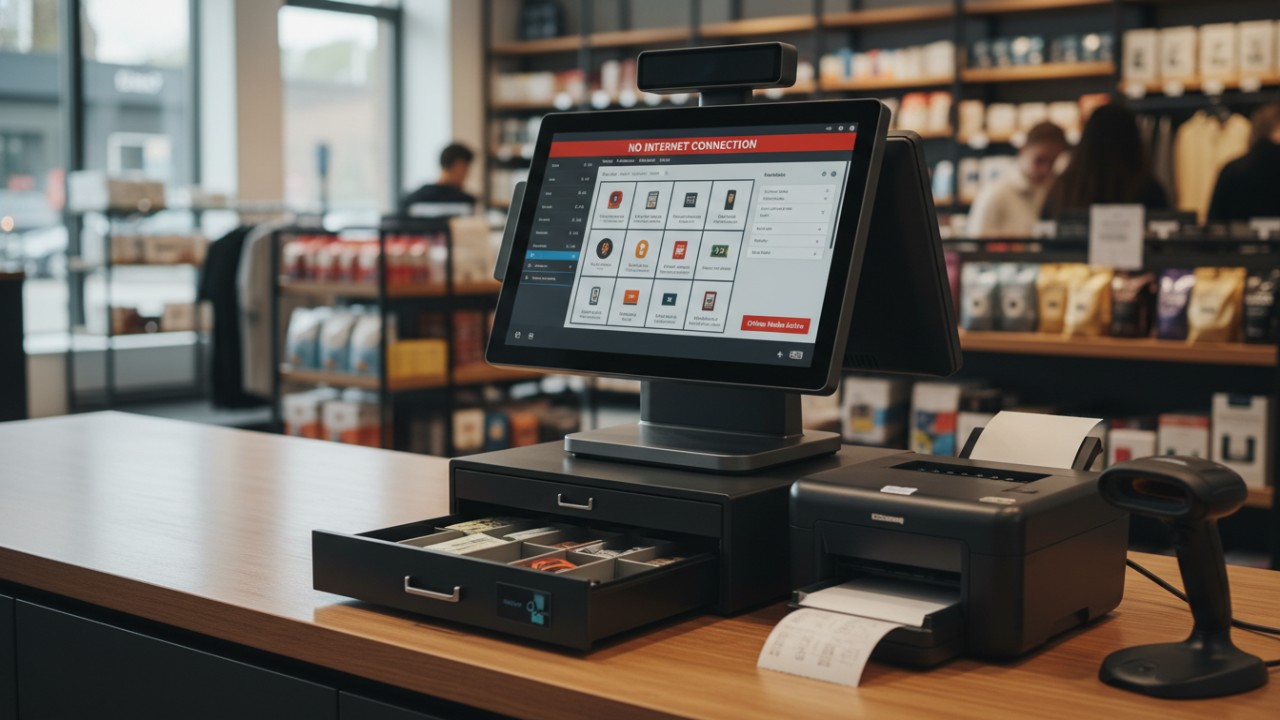
- Can a desktop POS system work without the internet?
- How much does a locally-installed POS system cost in 2026?
- What is the difference between cloud POS and desktop POS?
- Can I use a standard Windows PC as a cash register?
- How do I migrate my inventory to a new desktop POS software?
- Do desktop point of sale systems integrate with QuickBooks?
- What hardware is required for a desktop billing software setup?
What is a Desktop Based POS System?
A desktop based POS system is a locally installed software application that processes sales, manages inventory, and handles customer data directly from a computer. Unlike web-only platforms, these systems excel in offline environments, ensuring continuous business operations even when the internet is down.
Desktop platforms represent the reliable backbone of both traditional and modern retail environments. In 2026, Windows point of sale software has evolved to offer robust, enterprise-grade functionalities that cater to businesses of all sizes. As detailed by Wikipedia, the point of sale is the exact time and place where a retail transaction is completed, acting as a central component where sales, inventory, and customer management merge. Modern desktop terminals take this definition a step further by processing vast amounts of data locally, eliminating the lag associated with pure cloud tools, and syncing everything securely to remote servers once a connection is re-established.
Key Takeaways: 2026 POS Landscape Quick Summary
The 2026 POS landscape demands extreme reliability, blending traditional offline functionality with advanced cloud synchronization. The best desktop platforms prioritize hardware flexibility, zero downtime, and industry-specific customizations to meet diverse business needs.
- Offline-First Capability: The most reliable 2026 systems ensure zero downtime by utilizing advanced local database caching, meaning transactions never halt.
- Hybrid Cloud Sync: Enjoy the unshakeable security of local, hard-drive-based software coupled with the convenience of remote cloud reporting and analytics.
- Hardware Versatility: Modern systems support vast hardware ecosystems, from basic Windows PCs to rugged, dual-screen touch terminals and complex scanner arrays.
- Industry-Specific Solutions: Businesses are no longer settling for generic tools; they are leveraging platforms built specifically for niche markets like retail apparel, large-scale catering, or gas stations.
Why Choose Desktop POS Over Mobile or Pure Cloud?
Choosing a Locally installed cash register system guarantees internet independence and eliminates the risk of downtime during ISP outages. These systems offer superior stability for hardware connections and provide enhanced on-premise data security for your most sensitive financial information.
At Guangzhou licon electronic tec. co., ltd. (operating under our trusted brand name FAVORPOS), we specialize in manufacturing high-tech POS hardware, including advanced cash registers, thermal printers, and price checkers. Through our extensive OEM and ODM services, our experience has consistently shown that high-volume retail and catering environments require the physical stability and robust processing power that only a desktop system can provide. While mobile setups are excellent for floor staff, the primary checkout counter thrives on traditional desktop architecture.
- Internet Independence: Uninterrupted checkouts and local data storage guard against disruptive ISP outages, keeping lines moving quickly and preserving revenue.
- Cost Effectiveness: Many locally-installed options offer favorable one-time licensing models, helping businesses avoid the hefty, recurring monthly SaaS fees associated with pure cloud tools.
- Peripheral Integration: Desktop systems allow for easier, more stable, and direct connections via USB and serial ports to essential hardware like thermal printers, RFID scanners, and heavy-duty cash drawers.
- Enhanced Data Security: Sensitive financial and customer information can be stored securely on-premise, minimizing the business's exposure to broad, web-based data breaches.
The 25 Best Desktop Based POS Systems for 2026
The 25 best desktop based POS systems for 2026 offer everything from enterprise-grade inventory management to budget-friendly solutions for startups. Finding the right Cloud-integrated desktop billing software depends heavily on your specific industry, transaction volume, and necessary hardware integrations.
As highlighted by insights from SumUp, modern POS trends emphasize AI-powered insights, omnichannel integrations, and hybrid cloud functionality that keeps physical stores intimately connected to the digital world. Let's explore the top 25 contenders shaping the market this year.
1-5: The Enterprise Powerhouses
- 1. Lightspeed Retail: An enterprise powerhouse offering deep multi-location inventory tracking, tailored specifically for complex retail environments that require granular reporting.
- 2. Oracle MICROS: The definitive gold standard for massive hospitality chains, offering unparalleled scalability and integration with global ERP systems.
- 3. Odoo POS: A highly customizable, open-source desktop application that seamlessly connects physical sales to Odoo's massive suite of business management apps.
- 4. Square for Desktop: Brings Square's famously intuitive interface to a robust PC application, making it ideal for permanent, fixed-counter setups.
- 5. Shopify POS (PC Integration): The ultimate omnichannel bridge for massive e-commerce brands needing a stable, locally managed physical checkout presence.
6-10: Best for Small to Mid-Sized Retailers
- 6. Aronium: A brilliant, user-friendly Windows application that provides incredible value, rich analytics, and zero-cost entry for growing shops.
- 7. Nexchar POS: Highly rated for its straightforward interface and rapid deployment, making it a breeze for mid-sized merchants to adopt instantly.
- 8. Vend by Lightspeed: Focuses heavily on driving customer loyalty programs and precise, real-time inventory tracking for boutique retailers.
- 9. Daftra: A powerful desktop system tailored for seamless invoice generation and comprehensive B2B sales management.
- 10. Hike POS: Renowned for its flawless offline capabilities and rich retail management features that keep fast-paced checkout lines moving smoothly.
11-15: Top Hospitality & Restaurant Solutions
- 11. Toast (Desktop Setups): While known for mobile capabilities, Toast's fixed desktop terminals provide unbeatable stability for high-volume restaurant kitchens.
- 12. TouchBistro: Brilliantly combines the flexibility of modern tablet interfaces with the robust, unshakeable back-end processing of a fixed desktop server.
- 13. CAKE: Purpose-built for the fast-paced diner and quick-service restaurant industry, focusing heavily on rapid order entry and turnaround.
- 14. Aloha POS: A legendary name in the restaurant sector, offering unparalleled reliability and deep customizations for complex kitchen routing.
- 15. POSbistro: A cutting-edge application designed specifically to streamline modern food delivery pipelines and physical table management simultaneously.
16-20: Best Free and Budget-Friendly Options
- 16. Loyverse (PC Web-App): Perfect for ultra-budget setups, delivering essential inventory and sales features without high enterprise price tags.
- 17. SumUp Smart POS: An excellent hybrid approach, pairing low-cost desktop hardware with intuitive, low-fee payment processing to maximize margins.
- 18. Zakya: A streamlined billing and inventory tool built specifically to help budget-conscious independent retailers scale efficiently.
- 19. Odoo Free Version: Allows ambitious startups to leverage enterprise-grade underlying code at zero initial software licensing cost.
- 20. Square Free: The ubiquitous, trusted choice for new sellers who need immediate, reliable desktop billing without upfront software fees.
21-25: Niche & Specialized Industry Leaders
- 21. SuperSonic POS: The definitive industry leader for gas stations and convenience stores, offering seamless fuel pump integrations.
- 22. Erply: Built from the ground up to support highly complex franchise models and massive multi-outlet retail chains.
- 23. Clover (Custom Desktop Setups): Offers highly modular, customizable systems that adapt perfectly to niche service industries like salons and spas.
- 24. QuickBooks Desktop POS Alternatives: Specialized tools designed purely for native, flawless integration with Intuit's financial ecosystem to simplify taxes.
- 25. Algo Soft Tech: A rising star focusing on hyper-customized POS software deployments tailored specifically for localized regional markets.
Expert Tips: How to Choose the Right POS Hardware and Software
Choosing the optimal hardware and software requires evaluating system requirements, ensuring wide peripheral compatibility, and prioritizing hybrid data models. Your physical counter setup must directly reflect your daily transaction volume and operational complexity.
At FAVORPOS, our vision is to become the world's best manufacturer of POS systems and solutions. We know from hands-on development that locking yourself into proprietary hardware is a recipe for disaster. You need the flexibility to pair robust desktop software with standardized, high-quality peripherals. Furthermore, if your retail space is expanding, integrating mobile pos solutions alongside your desktop registers ensures staff can bust lines during peak hours.
- Check System Requirements: Ensure your desktop has at least a Core i5 processor and 8GB RAM to handle smooth, 2026-era multitasking without lag.
- Evaluate Peripheral Compatibility: Do not get locked into proprietary hardware. Ensure the software supports standard plug-and-play barcode scanners and receipt printers.
- Prioritize Hybrid Models: Look for desktop clients that offer robust offline modes but automatically sync inventory to a cloud dashboard for remote management.
- Consider Touch Screen vs. Keyboard: High-volume fast food needs rapid, resistive touch screens, while complex retail inventory management might benefit from traditional keyboard setups.
Common Mistakes to Avoid When Upgrading Your POS
Upgrading to a Multi-location inventory management POS often fails when businesses ignore offline capabilities, overlook hidden payment processing fees, and skimp on hardware durability. Avoiding these critical errors ensures a high return on your technology investment.
The lure of sleek, modern software often blinds buyers to practical physical realities. A beautiful interface means nothing if the commercial-grade PC shatters after one spill, or if a minor internet hiccup brings your entire checkout line to a grinding halt.
- Ignoring Offline Capabilities: Assuming the internet will never go down is a costly retail mistake; always demand local database functionality.
- Overlooking Hidden Payment Fees: Failing to check if the software locks you into their proprietary, high-rate payment processor can destroy your profit margins.
- Skimping on Hardware Durability: Using fragile, consumer-grade PCs instead of industrial, spill-proof POS terminals in high-traffic areas inevitably leads to hardware failure.
- Forgetting Accounting Integration: Not ensuring the system exports cleanly to QuickBooks, Xero, or your preferred financial software creates massive back-office headaches.
Conclusion
To summarize, upgrading to a robust desktop based POS system in 2026 is critical for maintaining high-speed checkouts, securing offline data, and scaling your retail or restaurant business. Whether you need a free application like Aronium or an enterprise-grade solution like Odoo, the right choice depends heavily on your hardware ecosystem and transaction volume. By combining state-of-the-art desktop software with durable, purpose-built peripherals, you can create a frictionless environment for both your staff and your customers. Contact us today to schedule a personalized consultation and see how our industry-leading solutions can transform your sales process.
What is the best desktop based POS system for small businesses?
For small businesses, tools like Aronium, Square, and Nexchar are highly rated. They offer intuitive interfaces, essential inventory management, and low barriers to entry with free or low-cost tiers.
Can a desktop POS system work without the internet?
Yes, one of the main advantages of an Offline retail POS application is offline functionality. Systems like Daftra and Nexchar allow you to process sales and print receipts locally, syncing the data to the cloud once the internet connection is restored.
How much does a locally-installed POS system cost in 2026?
Costs vary widely. Free software like Aronium costs nothing to start. Paid one-time software licenses can range from $300 to $1,000+, while hybrid systems typically charge $60 to $150 per month, not including the physical PC hardware.
What is the difference between cloud POS and desktop POS?
Cloud POS runs entirely through a web browser or app and relies on a continuous internet connection. Desktop POS is installed directly on your PC's hard drive, processing data locally for faster speeds and offline reliability.
Can I use a standard Windows PC as a cash register?
Absolutely. Many desktop POS applications are designed specifically for Windows. By connecting a USB receipt printer, a barcode scanner, and a cash drawer, any standard Windows PC can be converted into a fully functional cash register.
How do I migrate my inventory to a new desktop POS software?
Most modern POS systems allow bulk inventory imports via CSV or Excel files. You simply export your existing product list from your old software, format the columns to match the new system's template, and upload the file.
Do desktop point of sale systems integrate with QuickBooks?
Yes, many top-tier POS systems offer direct integrations or easy export options to QuickBooks Desktop and QuickBooks Online, ensuring your daily sales, taxes, and inventory values automatically sync with your accounting.
What hardware is required for a desktop billing software setup?
A basic setup requires a desktop PC or Mac, a monitor (touch screen is optional but recommended), a thermal receipt printer, a secure cash drawer, a barcode scanner, and a credit card terminal/reader.
What are the application scenarios of touch screen pos pc?
Where to Buy android handheld pos in Germany
Wholesale cash register pos systems manufacturer and supplier
How to Choose a Restaurant POS: 7 Must-Have Features
For OEM
Do you provide technical support and training services?
Yes, we provide comprehensive online technical support and training services to help your team become familiar with the operation and maintenance of POS machines.
For Beauty and Wellness
How does your POS system integrate with online booking platforms?
Our POS system integrates seamlessly with online booking platforms, allowing customers to book appointments online and synchronize them with in-store appointments.
For company
How much does customization cost?
The cost varies according to customization requirements. We will provide a detailed quotation after understanding your specific needs.
For Distributor
What are the benefits of joining your reseller network?
Benefits include access to innovative POS products, attractive margins, comprehensive training and support, and the opportunity to work with a globally recognized brand.
For Healthcare
How long does it take to implement the POS system?
Implementation time varies depending on customization requirements and usually ranges from a few weeks to a few months, including installation and employee training.

Aluminum Dual Screen Pos Terminal Pos Systems 15.6 inch Touchscreen Pos
FAVORPOS Aluminum Dual Screen POS Terminal features a 15.6-inch touchscreen, ideal for seamless transactions. As a trusted OEM Windows POS manufacturer, we deliver durable, high-performance solutions tailored for retail and hospitality businesses.

Android Handheld Pos Device Touch Screen Pos Terminal Manufacturer

All in One POS Terminal Metal 11.6'' Touchscreen Android Windows with Printer
The All-in-One POS Terminal features an 11.6'' touchscreen display, compatible with both Android and Windows. This metal-constructed terminal combines durability with style, making it a perfect fit for any retail or hospitality environment. Equipped with a built-in printer, it streamlines transactions by allowing for instant receipt printing.

8 inch Touchscreen Price Checker Barcode Scanner Wifi Optional Android Win 10
FAVORPOS Touchscreen Price Checker offers a user-friendly interface, perfect for retail environments. With optional Wi-Fi connectivity, this device runs on Android or Windows, providing flexibility and ease of use. The integrated barcode scanner allows for quick price verification, enhancing the shopping experience for customers. Compact and efficient, it's designed to streamline operations and improve checkout speed.


Copyright © 2025 Favorpos All Rights Reserved.
