
The Complete Handbook to All-in-One Restaurant POS Systems in 2026: Save 20+ Hours Weekly
- What Is an All-in-One Restaurant POS System?
- Quick Summary: Key Takeaways
- The Evolution of Restaurant Tech: Why Fragmented Systems are Failing
- How an All-in-One Ecosystem Saves You 20+ Hours Weekly
- Must-Have Features of a 2026 'Restaurant-Grade' POS
- Expert Tips: Common Mistakes When Upgrading Your POS
- ROI and Cost Analysis: Is Consolidating Worth It?
- Step-by-Step Transition Plan for 2026
- Conclusion
- How much does an all-in-one restaurant POS system cost in 2026?
- Can a new POS system really save my restaurant 20 hours a week?
- What is the difference between cloud-based and legacy POS systems?
- Do all-in-one POS systems work if the internet goes down?
- How long does it take to train staff on a new POS system?
- What is a Kitchen Display System (KDS) and do I need one?
- Can an all-in-one POS handle multi-location reporting?
- Will a new POS system integrate with my existing accounting software?
What Is an All-in-One Restaurant POS System?
An all-in-one restaurant POS system is a centralized, cloud-based platform that unifies all front-of-house, back-of-house, and administrative operations into a single application. It seamlessly combines payment processing, staff scheduling, inventory tracking, and kitchen display systems to replace fragmented tech stacks.
Historically, the point of sale was primarily defined as the physical location where a transaction took place, typically managed by standalone cash registers, as outlined by Wikipedia. However, modern dining demands have radically transformed this concept. Today, instead of relying on a fragmented web of separate software solutions, a unified cloud-based POS ecosystem serves as the central nervous system for your entire business. This fully integrated approach combines every essential tool into one seamless, intuitive interface.
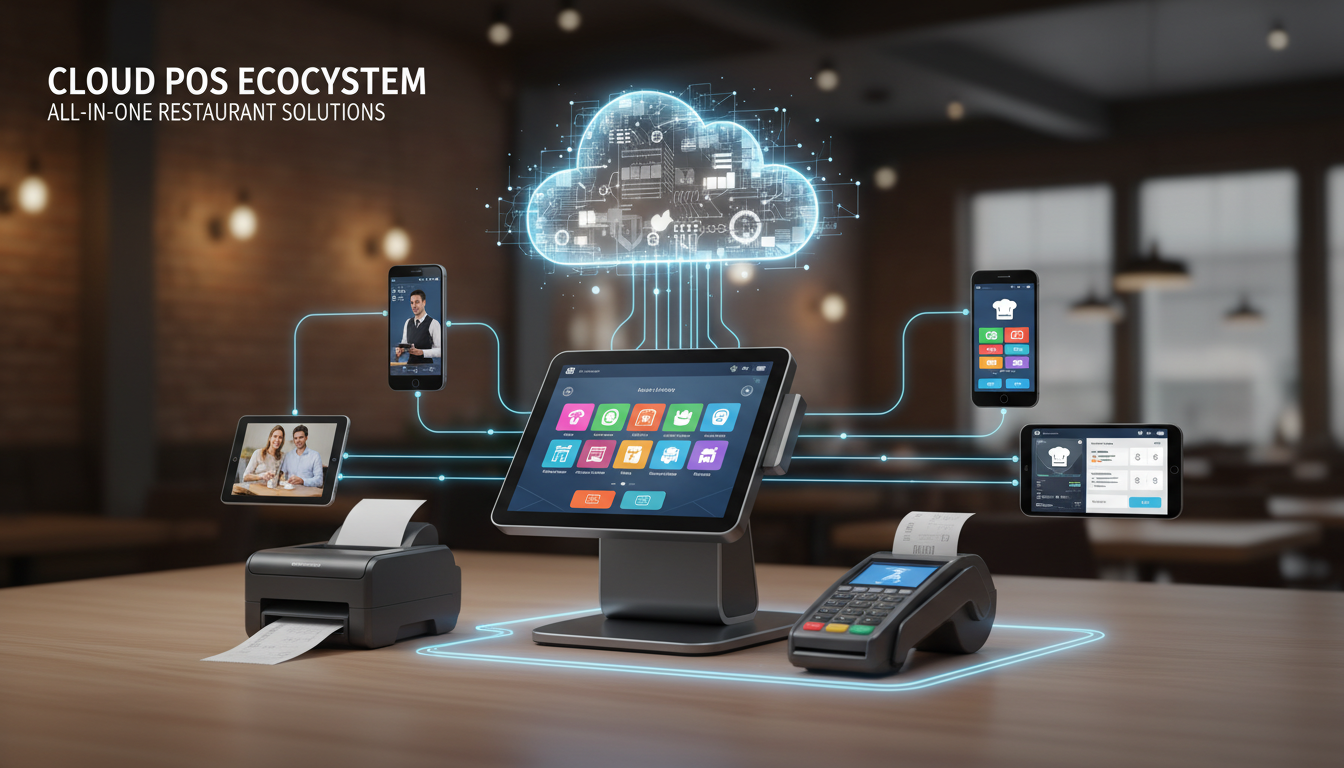
The primary advantage of this unified architecture is the total elimination of data silos. When your front-of-house terminals communicate instantly and flawlessly with your back-office reporting software, you dramatically reduce costly third-party app integration fees. More importantly, it automates tedious manual data entry, empowering operators to save substantial administrative time while minimizing human error across the board.
- Unified Interface: A single dashboard to monitor all operational metrics.
- Seamless Integration: Native connections between ordering, prep, and accounting.
- Eliminated Silos: Real-time data sharing across all restaurant departments.
Quick Summary: Key Takeaways
Implementing an all-in-one POS system delivers immediate, measurable benefits for modern hospitality operations. Upgrading directly saves an average of 20 hours weekly on administrative tasks, eliminates bloated third-party software costs, provides real-time multi-location reporting, and boosts revenue through faster service.
Modernizing your operations with a comprehensive restaurant management software platform is no longer optional in 2026. Before diving into the technical specifications and operational transition plans, here is a quick overview of why top-performing restaurants are upgrading their ecosystems.
- Reclaim Administrative Time: Replacing a chaotic, patchwork tech stack with a unified ecosystem saves operators an average of 20+ hours weekly on tedious administrative tasks like scheduling and inventory reconciliation.
- Eliminate Bloated Costs: Consolidated systems immediately eliminate expensive third-party integration charges and overlapping software licensing fees, freeing up crucial cash flow.
- Gain Real-Time Visibility: Modern cloud-based POS platforms provide real-time, multi-location reporting natively, allowing owners to make rapid, data-driven decisions from any device, anywhere in the world.
- Boost Revenue and Efficiency: Seamless data flow from the guest's table directly to the kitchen display screen and back-office accounting software increases table turn times and raises average check sizes by 10-15%.
The Evolution of Restaurant Tech: Why Fragmented Systems are Failing
Fragmented restaurant technology fails because it relies on fragile third-party integrations that cannot handle high-volume operations efficiently. When these separate systems break down during peak hours, data stops flowing, causing major service disruptions, severe revenue loss, and compromised data security.
The hospitality industry has undergone a massive digital transformation over the last decade. The historical transition from basic digital cash registers to complex, multi-vendor integrations initially seemed like the perfect solution. According to the National Restaurant Association, the vast majority of operators now rely on a blend of technology to navigate persistent labor shortages and rising food costs. However, stitching together a half-dozen different specialized apps creates a precarious IT environment.
- The "Friday Night" Failure: What happens when third-party API connections break during a massive dinner rush? Orders get lost in the digital void, kitchen tickets fail to print, and front-of-house staff are left scrambling to manually write down orders while guests grow impatient.
- Hidden Costs and Security Risks: Juggling separate applications for online ordering, inventory management, and payroll is a financial drain. Every new app introduces hidden subscription fees, distinct customer support hurdles, and severe security vulnerabilities.
- Disjointed Customer Experiences: When your loyalty program doesn't communicate properly with your payment terminal, guests are unable to redeem their hard-earned rewards, heavily damaging your brand reputation.
How an All-in-One Ecosystem Saves You 20+ Hours Weekly
An all-in-one ecosystem saves 20+ hours weekly by completely automating tedious back-office administrative tasks, eliminating the need for manual data entry, and centralizing reporting. This allows management teams to focus exclusively on guest experience, team training, and strategic business growth.
Achieving complete restaurant tech stack consolidation fundamentally transforms the daily workflow of your management team. When a restaurant operates on a unified platform, data is only entered once and automatically syncs across all necessary modules. This ends the era of managers sitting in the back office past midnight, manually cross-referencing spreadsheets and fixing payroll discrepancies.
- Automating Inventory Tracking (Saves ~5 hours/week): Instead of manually counting stock with a clipboard, an all-in-one system tracks ingredient-level inventory in real-time as each dish is sold. It generates automated vendor reordering alerts, ensuring you never run out of crucial items.
- Streamlining Labor Management (Saves ~6 hours/week): Unified systems simplify staff scheduling, shift-swapping, and complex tip management distributions. Employees can request shift changes via a dedicated mobile app, which managers can approve with a single tap.
- Unifying Financial Reporting (Saves ~9 hours/week): A unified setup automates multi-location reporting, daily ledger syncing, and tax compliance, ensuring your accounting software is always up to date without manual exporting and importing.
- Reducing Staff Training Time: With a single, highly intuitive interface across all terminals and handheld devices, the learning curve for new hires is drastically reduced.
Must-Have Features of a 2026 'Restaurant-Grade' POS
A true 2026 restaurant-grade POS must feature seamlessly integrated kitchen display systems, robust offline operational capabilities, AI-driven predictive analytics, and built-in digital food safety compliance logs. These advanced functions ensure uninterrupted, high-speed service during the most demanding dining rushes.
Relying on generic retail point-of-sale software is a massive operational risk for a modern food and beverage business. True restaurant-grade POS infrastructure is engineered specifically to handle the unique chaos, speed, and complexities of the hospitality environment.
- Kitchen Display System (KDS) integration: Essential for dynamic, high-volume order routing. It automatically organizes tickets by prep time, instantly routing hot items to the grill and cold items to the salad station, ensuring food hits the pass simultaneously.
- Robust Offline Mode Reliability: A premium system offers offline mode reliability with secure local data encryption. This allows your staff to continue taking orders, firing tickets to the kitchen, and processing credit card payments seamlessly during internet outages.
- Built-In Digital Food Safety: Modern platforms now include digital food safety modules, allowing staff to log temperature tracking and compliance checklists directly into the POS, keeping the health department happy.
- AI-Driven Predictive Analytics: Leveraging artificial intelligence, top-tier POS systems analyze historical sales data, weather patterns, and local events to provide highly accurate demand forecasting for smarter scheduling.
Expert Tips: Common Mistakes When Upgrading Your POS
The most common mistakes when upgrading a POS include ignoring local network infrastructure, choosing generic retail-first platforms over hospitality systems, underestimating required staff training time, and failing to comprehensively map out existing operational workflows before signing a software vendor contract.
Transitioning to a new technology ecosystem is a significant operational endeavor. Even the best software in the world will fail if the implementation strategy is flawed. Avoiding these critical pitfalls ensures a seamless deployment and a much faster realization of your return on investment.
- Mistake 1: Ignoring Network Infrastructure and Failover Systems: Upgrading your software without also investing in commercial-grade routers and robust cellular failover systems is a recipe for disaster during a busy service.
- Mistake 2: Choosing a Retail-First POS Platform: Selecting a generic retail platform instead of a hospitality-specific ecosystem leads to missing critical features like complex menu modifiers, seat-level order tracking, and coursing.
- Mistake 3: Underestimating Staff Training Time: Rushing a POS launch without dedicating ample time for hands-on staff training creates front-of-house confusion, delayed ticket times, and frustrated guests.
- Mistake 4: Failing to Map Out Existing Workflows: Not auditing and mapping out your existing operational workflows before selecting a vendor often results in purchasing the wrong software entirely.
ROI and Cost Analysis: Is Consolidating Worth It?
Consolidating your tech stack is absolutely worth it because the total cost of ownership for a unified system is drastically lower than maintaining multiple specialized tools. It actively protects profit margins by optimizing labor efficiency and severely reducing food waste.
Business owners are naturally hesitant to invest capital in a full system replacement. However, when you conduct a thorough financial analysis, the long-term cost benefits of an all-in-one ecosystem become undeniable.
- Lower Total Cost of Ownership (TCO): Calculating the true TCO of your current vendor ecosystem often reveals massive overspending on overlapping features from separate reservation platforms, inventory software, and scheduling apps.
- Subscription Efficiency: Comparing all-in-one subscription models versus "best-in-class" specialized tools highlights how consolidation drastically cuts monthly software fees while streamlining technical support.
- Margin Protection: Unified systems optimize labor costs and reduce food waste through accurate forecasting and precise ingredient tracking, directly boosting your overall bottom line.
Step-by-Step Transition Plan for 2026
A successful POS transition requires a meticulous four-phase approach: auditing your operational pain points, setting up reliable hardware and secure networks, conducting comprehensive mock-service staff training, and executing a tightly controlled launch day followed by ongoing workflow and reporting optimization.
Replacing the technological heart of your restaurant does not have to be a chaotic experience. By adhering to a structured, highly organized transition roadmap, you can ensure zero operational downtime.
- Phase 1: Auditing Your Operations: Begin by auditing your current operational pain points and fully documenting your existing tech stack to establish clear goals for the new system.
- Phase 2: Setup and Migration: Focus on the physical and digital foundation, including hardware setup, secure commercial network preparation, and accurate menu and pricing migration.
- Phase 3: Training and Testing: Conduct comprehensive, hands-on staff training sessions and run full mock-service tests to identify potential bottlenecks before they affect real customers.
- Phase 4: Launch and Optimize: Execute a controlled "Go-Live" day during a slower shift, followed by continuous post-launch optimization and workflow refinement based on staff feedback.
Conclusion
Upgrading to an all-in-one restaurant POS system is the most effective way to reclaim 20+ hours of your week and protect your profit margins in a highly competitive market. By moving away from fragmented, unreliable tools to a powerful, unified ecosystem, you drastically improve operational efficiency and future-proof your restaurant for 2026 and beyond. Consolidating your tech stack eliminates the headache of manual data entry, cuts down on hidden software fees, and empowers your staff to focus on delivering exceptional guest experiences rather than fighting with buggy software.
Contact us today to optimize your restaurant management software strategy.
How much does an all-in-one restaurant POS system cost in 2026?
Costs typically range from $79 to $299 per month for software licensing, depending on the number of terminals and locations. Hardware costs are usually upfront, ranging from $500 to $2,000 per station. Many vendors offset upfront hardware costs with slightly higher payment processing fees.
Can a new POS system really save my restaurant 20 hours a week?
Yes, by automating repetitive administrative tasks such as manual tip calculation, ledger syncing, and inventory counting. Centralized scheduling and automated purchase orders drastically reduce the time managers spend in the back office. Unified systems eliminate the need to manually reconcile data between different third-party apps.
What is the difference between cloud-based and legacy POS systems?
Legacy systems store data on a physical, on-site server, making remote access difficult and updates costly. Cloud-based systems securely host data on remote servers, allowing managers to view real-time reports from any device. Cloud POS systems also integrate more easily with modern digital tools like online ordering and loyalty apps.
Do all-in-one POS systems work if the internet goes down?
Top-tier 'restaurant-grade' POS systems feature an 'offline mode' that allows you to continue taking orders and printing tickets. Payments are securely encrypted and stored locally, then processed in batches once the internet connection is restored. However, some cloud-only features like multi-location real-time syncing may pause during an outage.
How long does it take to train staff on a new POS system?
Modern systems are designed with intuitive, mobile-first interfaces similar to smartphones, drastically reducing training time. Basic order entry can typically be learned in under an hour. Complex back-office functions for managers may require a few days of hands-on training and vendor support.
What is a Kitchen Display System (KDS) and do I need one?
A KDS is a digital screen that replaces traditional paper tickets in the kitchen, organizing orders by prep time and station. It improves communication between the front and back of house, reducing ticket times and missing items. While not mandatory for small cafes, it is highly recommended for full-service dining and high-volume quick-service restaurants.
Can an all-in-one POS handle multi-location reporting?
Yes, all-in-one systems excel at enterprise-level scaling and multi-unit management. Operators can view aggregate sales data or drill down into individual location performance from a single dashboard. Menu updates and pricing changes can be pushed globally to all locations instantly.
Will a new POS system integrate with my existing accounting software?
Most major all-in-one POS systems feature native integrations or direct API connections to popular accounting tools like QuickBooks, Xero, and Sage. This ensures daily sales, labor costs, and vendor payouts sync automatically. It is crucial to verify API compatibility with your specific vendor before transitioning.
How to start the portable pos device business in France ?
Wholesale pos machine with touch screen manufacturer and supplier
OEM/ODM android pos machine factory Manufacturers and Suppliers
Wholesale android based pos machine manufacturer and supplier
For Government and Public
Does your POS system support ticketing and permit issuance?
Of course, our system includes the ability to manage ticketing and permit issuance, with automatic processing and real-time update capabilities.
For company
How long the warranty do you offer?
We provide a 12-month warranty. The warranty period starts from the invoice date.
For OEM
What kind of OEM service do you provide?
OEM (Original Equipment Manufacturer) service means that we provide services such as printing logos and custom packaging to customers according to their needs.
For ODM
What is the lead time for ODM production?
The lead time depends on multiple factors, including product complexity, production volume and material availability. Generally speaking, the time from design confirmation to delivery may range from a few weeks to a few months. We will provide a detailed schedule at the start of the project and try our best to deliver on time.
For Beauty and Wellness
What payment methods does the system support?
Our system supports a variety of payment methods, including credit cards, digital wallets and contactless payments, providing customers with a convenient payment experience.

Aluminum Dual Screen Pos Terminal Pos Systems 15.6 inch Touchscreen Pos
FAVORPOS Aluminum Dual Screen POS Terminal features a 15.6-inch touchscreen, ideal for seamless transactions. As a trusted OEM Windows POS manufacturer, we deliver durable, high-performance solutions tailored for retail and hospitality businesses.

Android Handheld Pos Device Touch Screen Pos Terminal Manufacturer

All in One POS Terminal Metal 11.6'' Touchscreen Android Windows with Printer
The All-in-One POS Terminal features an 11.6'' touchscreen display, compatible with both Android and Windows. This metal-constructed terminal combines durability with style, making it a perfect fit for any retail or hospitality environment. Equipped with a built-in printer, it streamlines transactions by allowing for instant receipt printing.

8 inch Touchscreen Price Checker Barcode Scanner Wifi Optional Android Win 10
FAVORPOS Touchscreen Price Checker offers a user-friendly interface, perfect for retail environments. With optional Wi-Fi connectivity, this device runs on Android or Windows, providing flexibility and ease of use. The integrated barcode scanner allows for quick price verification, enhancing the shopping experience for customers. Compact and efficient, it's designed to streamline operations and improve checkout speed.


Copyright © 2025 Favorpos All Rights Reserved.
