Small Business POS System: Hardware, Cost & Buying Guide
- Quick Answer: How Should a Small Business Choose a POS System?
- Key Takeaways for Small Business POS Buyers
- Why Small Businesses Need a Practical POS Buying Guide
- Core Components of a Small Business POS System
- Match the POS System to the Small Business Type
- Software Compatibility and Integration
- Total Cost of Ownership for Small Businesses
- Small Business POS Buying Checklist
- How This Page Fits the POS Content Cluster
- Supplier Evaluation and OEM/ODM Requirements
- Recommended Next Step
- Frequently Asked Questions
Quick Answer: How Should a Small Business Choose a POS System?
A small business POS system should match the business type, checkout workflow, payment method, inventory needs, hardware budget, staff training capacity and future growth plan. The right setup is not only software. It usually includes a POS terminal, printer, cash drawer, scanner, customer display, payment device and support process.
Small business buyers should compare hardware configuration, software compatibility, payment workflow, total cost of ownership, supplier support and RFQ requirements before selecting a POS solution.
Key Takeaways for Small Business POS Buyers
- Start with the business model: a retail store, cafe, bar, salon, food truck and small supermarket may need different POS hardware.
- Check the full hardware setup: terminal, printer, cash drawer, scanner and customer display affect daily checkout efficiency.
- Compare total cost: include hardware, software fees, payment processing, installation, training, support and replacement devices.
- Validate software compatibility: inventory, loyalty, accounting, payment and reporting functions should fit the daily workflow.
- Prepare a practical RFQ: clear store format, device quantity, software environment and customization needs help suppliers quote accurately.
Why Small Businesses Need a Practical POS Buying Guide
Many small business owners search for a quick recommendation, but a generic POS list may not match their checkout environment. A small retail store may need barcode scanning and a cash drawer. A cafe may need menu modifiers and receipt printing. A mobile business may need handheld POS hardware. A small supermarket may need price lookup and product database support.
The safer approach is to define the workflow first, then compare the hardware and software needed to support that workflow.
Core Components of a Small Business POS System
A small business POS setup can be simple or modular. Buyers should confirm which components are required before approving a supplier quotation.
| Component | Role | Buyer Check |
|---|---|---|
| POS terminal | Runs the POS application and processes sales, orders and staff actions. | Check screen size, operating system, ports, mounting, software support and service access. |
| Thermal printer | Prints customer receipts, kitchen tickets, service records or shift documents. | Confirm print speed, paper width, cutter, interface and installation location. |
| Cash drawer | Secures cash and supports cash/card hybrid checkout. | Check drawer layout, lock type, interface, counter space and durability. |
| Barcode scanner | Supports product lookup, checkout and inventory tasks. | Confirm barcode type, connection method, software database and mounting style. |
| Handheld POS | Supports mobile ordering, line busting, table service or stock checks. | Check battery, Wi-Fi, scanner option, payment workflow and device handling. |
| Customer display | Shows item details, totals, promotions or payment prompts. | Check display size, mounting, dual-screen requirement and software support. |
Match the POS System to the Small Business Type
Small businesses should avoid choosing a POS system only by price or general popularity. Each business type has a different workflow.
| Business Type | Common Needs | Hardware Focus |
|---|---|---|
| Retail store | Barcode scanning, receipts, inventory, customer display and cash/card payments. | Counter terminal, scanner, printer and cash drawer. |
| Cafe or bakery | Menu modifiers, fast checkout, receipt printing, loyalty and queue management. | Compact terminal, handheld POS, printer and customer display. |
| Bar or small restaurant | Open tabs, tips, split bills, staff permissions and receipt printing. | POS terminal, handheld POS, cash drawer and printer. |
| Mobile business | Portable checkout, wireless connection, battery planning and mobile payment. | Mobile POS hardware, handheld device and charging accessories. |
Software Compatibility and Integration
Software compatibility should be confirmed before buying hardware. A small business POS system may need inventory, loyalty, payment processing, accounting, e-commerce, reporting and staff permission features. The selected POS terminal and peripherals must support the software environment.
Buyers should confirm the operating system, printer compatibility, scanner support, payment device requirements, offline behavior and data export options before approving a configuration.
Total Cost of Ownership for Small Businesses
Small businesses often compare only the first purchase price. A more useful calculation includes the full cost of ownership: hardware, software subscription, payment processing, installation, staff training, accessories, maintenance, support and replacement devices.
For small businesses with limited staff, ease of operation and service support can be as important as purchase cost. A low initial price may not be the lowest long-term option if it creates downtime, integration problems or replacement costs.
Small Business POS Buying Checklist
Use this checklist before requesting a quotation:
- Business model: retail, cafe, bar, restaurant, salon, kiosk, food truck or service business.
- Checkout workflow: counter checkout, mobile order taking, table service, pickup, delivery or self-service.
- Hardware needs: POS terminal, handheld POS, thermal printer, scanner, cash drawer, customer display and payment device.
- Software environment: operating system, POS application, inventory, loyalty, accounting, e-commerce and reporting.
- Payment method: card, mobile wallet, cash, tips, split bills and local payment requirements.
- Deployment plan: one store, multiple counters, future branch expansion or seasonal temporary locations.
- Support requirements: manuals, sample testing, warranty, replacement parts and after-sales workflow.
How This Page Fits the POS Content Cluster
This small business POS system guide is a subtopic for buyers with limited teams, focused budgets and practical checkout needs. For broader POS architecture, review the POS system selection guide. For retail-specific planning, see the POS systems for retail stores selection and TCO guide.
For mobile checkout or queue reduction, compare the handheld POS systems buying guide. For cash handling, see the register cash drawer guide for POS systems.
Supplier Evaluation and OEM/ODM Requirements
Small businesses may need a standard POS setup, while distributors and growing brands may need hardware customization, branding, packaging or repeat-order stability. Buyers should define whether they need standard devices or an OEM/ODM hardware project before asking for a quotation.
FAVORPOS provides POS systems and peripherals, cash registers, handheld terminals and scanners, price checkers, thermal printers, cash drawers and accessories for market segments such as retail, catering and supermarkets. FAVORPOS also provides OEM and ODM services. Buyers should confirm project-specific requirements, including software compatibility, certification documents, warranty terms, lead time and after-sales responsibilities before ordering.
Recommended Next Step
If you are planning a small business POS project, prepare your business type, checkout workflow, device quantity, software environment, payment method, printer, cash drawer and scanner requirements. FAVORPOS can review POS terminal, handheld POS, thermal printer, cash drawer and OEM/ODM hardware requirements for small business projects.
Frequently Asked Questions
What is a small business POS system?
A small business POS system is the hardware and software used to process sales, payments, receipts, inventory, customer data, staff permissions and reports for a small store, cafe, restaurant or service business.
What hardware does a small business POS setup need?
A typical setup may include a POS terminal, receipt printer, cash drawer, scanner, customer display, payment device and optional handheld POS terminal, depending on the workflow.
How should a small business compare POS system cost?
Compare total cost of ownership, including hardware, software, payment processing, installation, staff training, accessories, support, maintenance and replacement devices.
Do small businesses need handheld POS devices?
Not always. Handheld POS devices are useful for mobile ordering, queue reduction, table service or stock checks, but the need depends on the business workflow and software compatibility.
What should be included in a small business POS RFQ?
Include business type, checkout workflow, device quantity, hardware needs, software environment, payment methods, deployment plan, customization scope and support expectations.
Can small business POS hardware be customized?
Yes, when the supplier supports OEM or ODM services. Customization may include branding, packaging, hardware configuration, operating system selection, interface requirements and compatibility testing.
How a 15.6 + 11.6-Inch Dual-Screen POS Improves Retail Checkout
Windows POS Systems: Why Flexible 15-Inch Terminals Still Matter in Modern Retail
Retail Price Checker: How 8-Inch Touchscreen Devices Improve Modern Retail
Two Screens, One Smarter Checkout: Why a Dual-Screen POS Makes Sense for Modern Retail
How Can a 10.1-Inch Price Checker Transform Retail Shopping and Self-Service Experiences?
For Government and Public
Does your POS system support ticketing and permit issuance?
Of course, our system includes the ability to manage ticketing and permit issuance, with automatic processing and real-time update capabilities.
Can your POS system handle various types of public sector payments?
Yes, our system is designed to handle a wide range of public sector payments, including fines, utility bills and service charges, ensuring secure and efficient processing.
For Restaurants & Cafes
How is the installation and training of the POS system carried out?
We provide comprehensive installation and training services. Our technical team will assist you in completing the installation of the POS machine and provide detailed operation training for your staff. In addition, we also provide online training resources and operation manuals to help your team get started quickly.
For E-commerce
Does the POS system support global payments?
Yes, we support multi-currency and cross-border transactions, enabling you to accept payments from customers around the world.
For company
What kind of certifications do you have?
CE, ROHS, and FCC as standards.
Dual Screen Thin Screen POS Systems Point of Sales Systems Manufacturer
FAVORPOS dual screen POS terminals deliver fast, reliable checkout performance for retail and hospitality businesses. Built by our commercial pos terminal manufacturer, these thin-profile systems streamline transactions while maximizing counter space—trusted by checkout pos systems factory operations worldwide.
Dual Screen POS With Barcode Scanner Desktop POS Manufacturer POS Factory 15.6 11.6 Client Screen Optional
FAVORPOS: Your leading dual screen POS factory and manufacturer. Our desktop POS with barcode scanner offers 15.6/11.6 client screen options and OS flexibility. Get reliable, efficient dual screen POS with barcode scanner solutions directly from us.
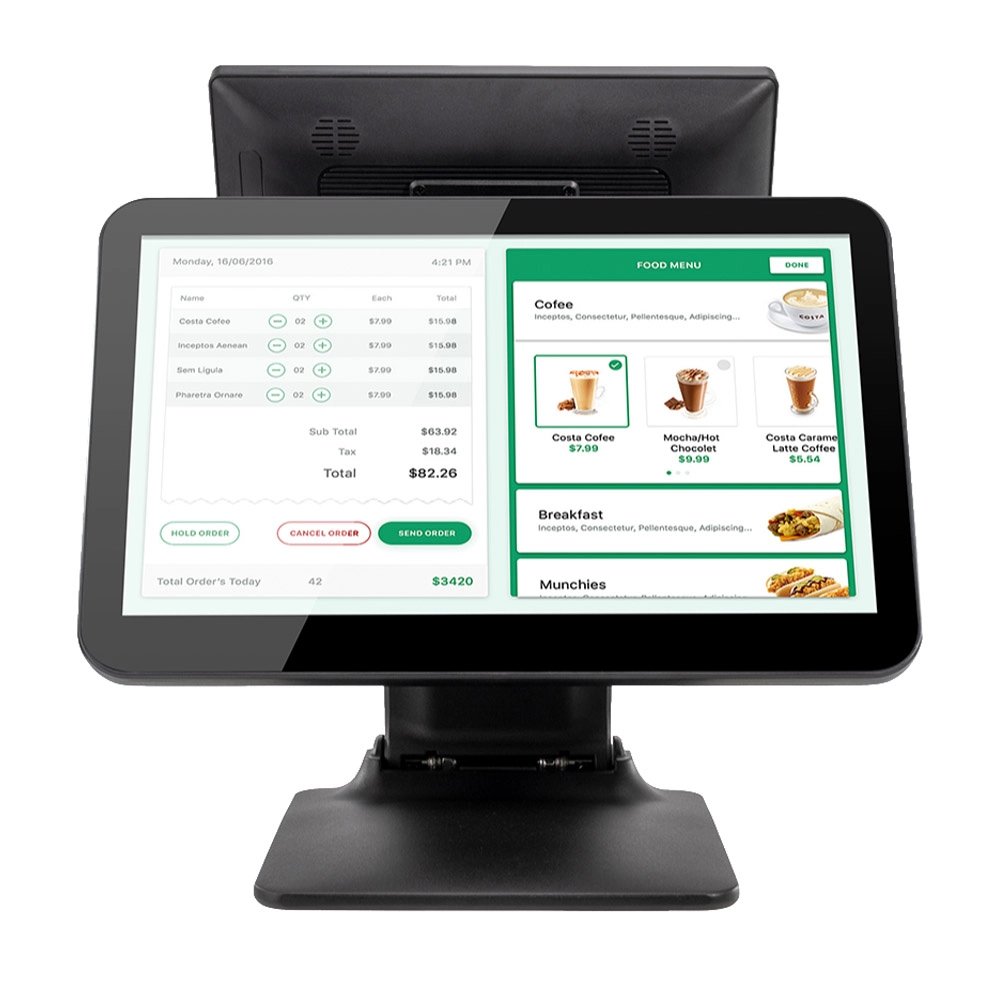
11.6 inch Capacitive Touchscreen for POS Machine POS Monitor
FAVORPOS 11.6-inch capacitive touchscreen, specifically designed for POS machines to deliver a seamless and responsive user experience. This high-definition display offers vibrant visuals and crystal clear clarity, making it easy for staff to navigate through transactions efficiently. The capacitive technology ensures quick and accurate touch recognition, reducing wait times and enhancing customer satisfaction. Built to withstand the rigors of daily use, this touchscreen is perfect for retail and hospitality environments.
Android Handheld Pos Device Touch Screen Pos Terminal Manufacturer
Get in touch
Interested in becoming a POS system dealer? Contact us for more information and start the process of joining our dealer network.
We look forward to working with you to expand the market together.
Copyright © 2025 Favorpos All Rights Reserved.