
How to choose the best desktop based POS system for retail?
- 1) How can I guarantee offline-first sales integrity and later cloud synchronization without duplicates or lost transactions?
- 2) What hardware and operating system lifecycle planning should I follow to keep a desktop POS secure and PCI-compliant for 3–5 years?
- 3) How do I migrate a complex catalog (25,000 SKUs with variants, batches, and serialized items) into a desktop POS while preserving cost layers and sales history?
- 4) How to integrate EMV/contactless payment terminals with a desktop POS while minimizing PCI scope and ensuring certification?
- 5) How can a desktop POS accurately handle complex promotions, multi-tier pricing, and multi-jurisdiction taxes without manual overrides?
- 6) What is the real total cost of ownership (TCO) difference between perpetual-license desktop POS and subscription desktop POS for a 3-year multi-store rollout?
- Conclusion: Advantages of a well-chosen desktop based POS system
How to Choose the Best Desktop Based POS System for Retail: 6 Advanced Questions Answered
When evaluating a desktop based pos system for retail, buyers need more than marketing blurbs. Below are six specific, pain-point-focused questions beginners often search for but rarely find deeply answered. Each section gives step-by-step checks, implementation notes, and practical recommendations that align with PCI DSS and EMV realities, local database architectures, and real-world retail workflows.
1) How can I guarantee offline-first sales integrity and later cloud synchronization without duplicates or lost transactions?
Pain point: Stores that rely on a desktop POS fear that network outages will cause lost sales, mismatched inventory or duplicate transactions when syncing to head-office systems.
Checklist and approach:
- Choose a POS architecture that explicitly supports an offline-first client-server model (local database as source of truth). Typical stack: desktop client + local SQL database (SQLite/MySQL/SQL Server Express) + synchronization service.
- Use immutable transaction IDs and vector clocks. Each sale should create a unique sale ID (UUID) with a local timestamp and a store ID. When syncing, server identifies and rejects duplicates by ID and reconciles by timestamp + sequence number.
- Implement an append-only journal. Instead of in-place edits, write operations are journaled. Journals are replayed on the central server to preserve order and enable deterministic reconciliation.
- Design conflict resolution rules in advance. For example: stock adjustments from central catalog are authoritative, local sales decrement stock, and manual edits require user-level audit trails. Avoid blind overwrite strategies.
- Build resumable uploads and incremental sync. Sync should transmit only deltas using change vectors, not full DB dumps. This reduces bandwidth and risk of partial sync failures creating inconsistencies.
- Keep a local rollback point and daily backups. Create scheduled local backups (encrypted) that are stored off-site or pushed to the cloud when connectivity is available.
- Test with simulated outages. Run acceptance tests: create 200 random sales offline at different POS terminals, then reconnect and verify inventory, receipts, and accounting entries match.
Operational tips: Train staff to mark refunds or voids with clear reasons and require manager approval to avoid ambiguous post-sync edits. Log every sync attempt and maintain a reconciliation dashboard that highlights failed or partial uploads.
2) What hardware and operating system lifecycle planning should I follow to keep a desktop POS secure and PCI-compliant for 3–5 years?
Pain point: Retailers buy cheap POS terminals and later face security holes, unsupported OS, or incompatible peripherals that create PCI scope issues.
Minimum lifecycle plan:
- Select hardware with enterprise-grade components: SSD (not HDD), 8+ GB RAM for Windows systems, gigabit Ethernet, and at least two USB-A/USB-C ports for peripherals. Choose vendors that offer 3–5 year warranty and spare parts availability.
- Pick an OS with active support. For Windows, ensure use of Windows 10/11 IoT Enterprise or later with vendor-provided security updates. For Linux, choose an LTS distribution (e.g., Ubuntu LTS or CentOS Stream alternatives) with vendor OS maintenance contracts when possible.
- Plan for patch windows and scheduled maintenance. Create a quarterly patching cadence that includes OS, antivirus, and POS application updates. Test patches in a staging store before wide deployment.
- Isolate cardholder data environment (CDE). Use P2PE-capable terminals and tokenization so the desktop POS never stores PANs. This significantly reduces PCI DSS scope. Ensure hardware integrations are vendor certified for P2PE or point-to-point encryption.
- Document end-of-life (EOL) timelines. Maintain an inventory of devices, OS versions, and expected EOL dates. Budget for 20–30% device turnover across 3 years in medium-sized retail—replace oldest units first.
- Use centralized monitoring and MDM. Mobile Device Management or endpoint management solutions push security policies, enforce disk encryption, and report anomalies centrally.
Security practices: Enforce TLS 1.2+ for all server communications, use disk encryption (BitLocker or LUKS), enforce multi-factor admin access on management consoles, and require signed software updates for the POS app.
3) How do I migrate a complex catalog (25,000 SKUs with variants, batches, and serialized items) into a desktop POS while preserving cost layers and sales history?
Pain point: Large catalogs with variants and serialized items risk losing costing history or breaking SKU hierarchies during migration.
Migration plan (staged and auditable):
- Discovery audit: Export the legacy POS database and run automated profiling to identify SKU duplicates, inconsistent barcodes, missing unit measures, and mixed costing methods (FIFO/LIFO/Average).
- Define canonical SKU model: Decide how to represent variants (parent-child SKUs vs. single SKU with option matrix). Document attributes needed by the new desktop POS: barcode, cost, retail price, tax class, supplier code, expiry/batch fields, serial number policy.
- Preserve costing layers: If the legacy system used FIFO, migrate receipt-level purchase cost lines, not just current average cost. The new POS must support one of: per-receipt costing, perpetual inventory with historic receipts, or an inventory valuation layer. Export purchase invoices and map each inbound receipt to a cost lot in the new system.
- Serialized and batch-managed items: Migrate serial numbers and batch numbers linked to each sales and purchase transaction. Maintain lots with date and quantity. For serialized returns or warranty claims, linking historical sale IDs to serials is essential.
- Sales history: Export historical sales in a normalized format (sale ID, date/time, SKU, qty, unit price, discounts, tax, register ID). Import historic sales into reporting schemas, not always into the transactional register—this prevents accidental duplication of on-hand quantities. Alternatively, import sales up to a cut-off date and then initialize on-hand snapshot after that date.
- Test migration in stages: pilot with a subset (1,000 SKUs) and validate stock counts, costing reports, and sales reports. Run physical counts to confirm accuracy.
- Cutover strategy: Use a single-day cutover where all registers are taken offline, final stock is frozen, and the new system is initialized with the validated on-hand snapshot. Keep legacy system accessible in read-only for audit reconciliation for at least 90 days.
Tools and integrations: Use ETL scripts (Python, SQL) and ensure encoding and unit conversions are correct. Retain raw exports and checksums for auditability. Engage vendors who offer professional services for large migrations and insist on a rollback plan.
4) How to integrate EMV/contactless payment terminals with a desktop POS while minimizing PCI scope and ensuring certification?
Pain point: Retailers struggle to connect EMV/contactless terminals to desktop POS without exposing card data or invalidating certifications.
Practical integration options and controls:
- Prefer PCI P2PE-certified solutions. P2PE terminals encrypt card data at the terminal and deliver tokens to the POS, so the desktop POS never handles PANs. Ask payment providers for their P2PE certificate ID and integration documentation.
- Terminal connectivity models:
- Direct SDK/API: POS calls terminal SDK (USB/COM/Network) to initiate transaction; terminal performs cryptography and returns token/authorization. Requires terminal SDK and often local driver installation.
- Gateway tokenization: POS sends transaction amount and receives a payment URL or token; the terminal or cloud gateway handles card entry and tokenizes card data.
- Cloud terminal (WebSocket/REST): Modern terminals support WebSocket or REST-based flows; ensure TLS and certificate pinning.
- Use certified payment processors and terminal manufacturers. EMVCo and major acquirers require end-to-end certification—confirm with your payment partner which certification path (P2PE, PCI PA-DSS or application testing) is required for your integration.
- Scope reduction practices: Do not log raw card data, enforce access control on POS logs, and use tokenization for refunds (allow refunds by token rather than card PAN).
- Test EMV, contactless, fallback and partial approvals. Validate chip, magstripe fallback, contactless, and partial auth flows across multiple card brands.
Operational note: Work with your acquirer/payment gateway early. Integration and certification can add weeks; early coordination avoids surprises during deployment.
5) How can a desktop POS accurately handle complex promotions, multi-tier pricing, and multi-jurisdiction taxes without manual overrides?
Pain point: Promotions and taxes that rely on manual cashier overrides cause shrinkage and reporting confusion.
Design principles and configuration steps:
- Promotion engine features to require: stacking rules, conditional triggers (buy X get Y), time-bound promotions, loyalty-tier discounts, and per-item price lists. The engine must evaluate rules deterministically in the same order at checkout and in batch-pricing jobs.
- Use price lists and price matrices rather than per-transaction manual discounts. Maintain price lists by store, channel, or customer group and permit scheduled effective dates.
- Tax engine requirements: support compound taxes, jurisdictional tax rates, tax-exempt items, tax-included pricing, and rounding rules per region. For multi-jurisdiction retail (e.g., state and local taxes), allow mapping items to tax classes and ensure tax calc order matches local tax authority rules.
- Testing: Author and run test cases that model real promotions and edge cases—e.g., overlapping promotions, coupons applied during BOGO, and returns on promotional items. Ensure the POS posts both gross and net values for auditing.
- Audit trails and manager overrides: Require manager PIN for price overrides, log reason codes, and show pre- and post-discount amounts on receipts and in back-office reports to prevent abuse.
- Back-office rule simulation: The back-office should include a promotion simulator that can run historical receipts through proposed rules to project financial impact before go-live.
Implementation tip: Start with a small set of canonical promotion patterns used by your business and ensure the POS supports them natively. Avoid excessive one-off exceptions that complicate reporting and operations.
6) What is the real total cost of ownership (TCO) difference between perpetual-license desktop POS and subscription desktop POS for a 3-year multi-store rollout?
Pain point: Buyers often compare only license fees and ignore support, hardware refresh, payment integration, training, and downtime costs.
Key cost categories to include in a 3-year TCO model:
- Software acquisition: perpetual license upfront vs. annual subscription fees. Perpetual often has a lower long-term software cost if no major upgrades are required, but subscription typically bundles updates and support.
- Maintenance & support: Perpetual-license vendors usually charge annual maintenance (20–25% of license) for updates and support. Subscription includes support but costs recur.
- Implementation & migration: professional services, data migration, testing. Large catalogs and complex integrations increase one-time professional fees.
- Hardware & peripherals: initial hardware purchase and expected replacement cycles. Budget for OS upgrades and hardware spares to avoid downtime.
- Payment processing & certification fees: PCI scope reduction via P2PE reduces compliance costs, but certification and gateway fees persist. Integration costs for EMV/contactless terminals are often one-time but can include ongoing gateway fees.
- Training & change management: initial training and recurring refreshers when features change.
- Downtime & business impact: estimate lost sales per hour of downtime and frequency of incidents; on-premises desktop POS can reduce SaaS network-dependency downtime but accepts local hardware risk.
- Upgrade & feature velocity: subscription models generally deliver faster feature updates; perpetual-license systems may require paid upgrades for new features, which affects long-term value.
How to compute decision drivers:
- Build a 3-year cashflow model that includes initial capital expenses (CapEx) and recurring operating expenses (OpEx). Compare Net Present Value (NPV) or simple cumulative cost.
- Factor non-financial items: regulatory compliance risk, vendor roadmap alignment, and speed to market for new retail features (e.g., omnichannel inventory). For retailers requiring continuous feature updates, subscription often gives better ROI despite higher OpEx.
- Consider hybrid procurement: perpetual core POS with optional SaaS modules (cloud reporting, loyalty) to balance CapEx and OpEx.
Decision checklist: quantify expected transaction volumes, number of SKUs, number of stores, needed integrations, and acceptable downtime cost. Use these inputs to stress-test the TCO model under optimistic and pessimistic scenarios.
Conclusion: Advantages of a well-chosen desktop based POS system
A desktop based POS system offers robust offline capabilities, local performance for high-volume retail, deterministic inventories, and tighter control over hardware and integration with peripherals (receipt printers, barcode scanners, cash drawers). When selected and configured properly—paying attention to secure EMV/contactless integrations (P2PE/tokenization), lifecycle planning for OS and hardware, and rigorous migration and promotion engines—desktop POS delivers high reliability, reduced PCI scope, and predictable TCO. For multi-store retailers requiring complex inventory, serialized items, or heavy local processing, a mature desktop-based point of sale solution often outperforms lightweight cloud-only alternatives.
If you need a custom quote, contact us for a personalized evaluation and implementation plan: visit www.favorpos.com or email sales2@wllpos.com.

Why a 15.6” Touch POS Terminal Is Becoming the New Standard in High-Traffic Retail

Beyond Checkout: How a 15.6-Inch Aluminum POS System Redefines Retail Efficiency

Understanding 15-Inch Aluminum POS Terminals in Modern Commercial Use

The Smart Way to Check Prices: How a 10.1-Inch Wall-Mounted Price Checker Transforms Retail Stores

A Smarter Checkout Experience: The 15-Inch Dual-Screen POS Built for Modern Retail
For Restaurants & Cafes
If there is a problem with the device, how can I get technical support?
You can contact our technical support team by phone, email or online customer service. We provide 24/7 support to ensure that your issues are resolved promptly and the system is up and running.
For Healthcare
Do you provide training for our employees?
Yes, we provide comprehensive training materials to ensure that your employees are proficient in using the new machine.
For company
Can I visit your factory?
Certainly, welcome to visit our factory at any time.
For Entertainment & Events
Can your POS system handle ticket sales and on-site catering at the same time?
Yes, our system can seamlessly manage ticket sales, catering services and merchandise, ensuring efficient and smooth online and on-site sales operations.
For Hotels
Can mobile POS be used for poolside or outdoor services?
Yes, our mobile POS solution allows staff to place orders and process payments in any area of the hotel (such as poolside or outdoors), improving guest convenience.

Factory 11.6'' Touch Screen POS Terminal Android Windows
The Factory 11.6'' Touch Screen POS Terminal is a versatile solution that supports both Android and Windows operating systems. Designed for durability and efficiency, this terminal is perfect for various retail environments. Its compact size and responsive touch screen enhance customer interactions, making transactions quick and seamless.

HD Dual Screen POS Machine Aluminum Hardware Android Windows Supplier
This dual-screen POS machine supports both Android and Windows systems, providing flexibility for various applications. The dual screens enhance customer interaction and streamline the checkout process, making transactions quicker and more engaging. Perfect for modern businesses looking to elevate their service and improve customer satisfaction, this POS machine is your ultimate partner in success!
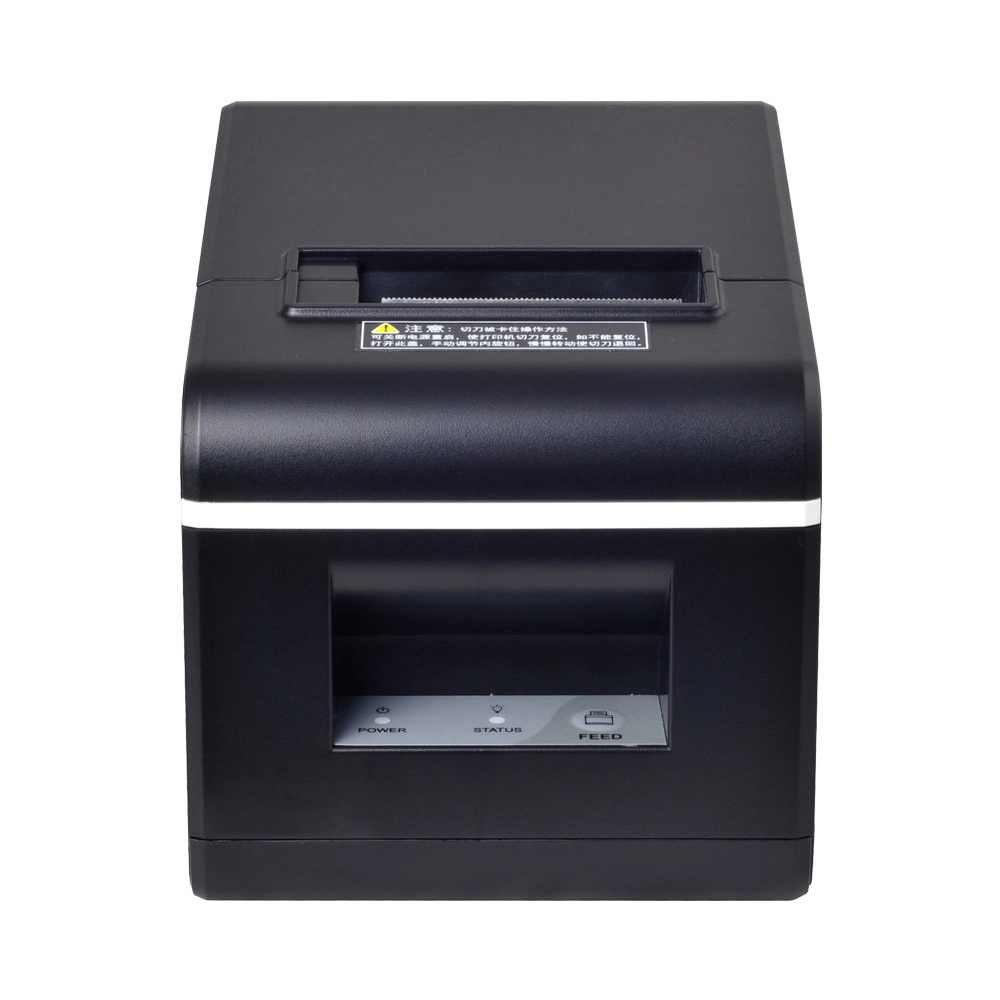
New Model Thermal Printer Bill Printer Manufacturer Portable Printer for Receipt
New Model Thermal Printer, a state-of-the-art bill printer designed for modern retail and hospitality environments. This printer combines advanced technology with user-friendly features, ensuring fast and efficient printing of high-quality receipts. Its sleek design complements any workspace, while multiple connectivity options make it easy to integrate into your existing POS systems.

Desktop Touch Screen POS Systems 12.1'' Android Windows Manufacturer
Our Desktop Touch Screen POS Systems feature a 12.1'' display, supporting both Android and Windows platforms. Engineered for high performance. The intuitive touch interface simplifies transactions and enhances customer engagement. With a sleek design and robust construction, our POS systems are perfect for businesses looking to improve efficiency and elevate the shopping experience.
Get in touch
Interested in becoming a POS system dealer? Contact us for more information and start the process of joining our dealer network.
We look forward to working with you to expand the market together.


Copyright © 2025 Favorpos All Rights Reserved.
