
How secure is a desktop based POS system for payment data?
- 1. How can a desktop based POS system securely store cardholder data on local servers while meeting PCI DSS requirements?
- 2. What encryption and tokenization methods should I require when integrating a desktop POS with a payment gateway?
- 3. Can a desktop POS operate offline without exposing payment data—and what are best practices for secure transaction queuing and reconciliation?
- 4. How should vendors and merchants handle firmware updates and secure boot on desktop POS terminals to prevent supply-chain and firmware attacks?
- 5. What network architecture and segmentation should I implement for a desktop based POS system to isolate payment traffic from corporate and guest networks?
- 6. How do robust audit logging, role-based access control and endpoint monitoring reduce insider risk in desktop POS environments?
1. How can a desktop based POS system securely store cardholder data on local servers while meeting PCI DSS requirements?
Answer:A desktop based POS system that stores or caches cardholder data on-premises must follow PCI DSS controls just like any other payment environment. Key, measurable steps:
- Minimize storage. Never store full Primary Account Numbers (PAN), expiration or CVV unless strictly necessary. Where storage is required for business, store only what's scoped by PCI and truncate/PAN-hash where possible.
- Strong cryptography for data-at-rest. Use validated cryptographic modules (e.g., FIPS 140-2/3 approved) and strong algorithms (AES-256 is an industry standard for high-assurance protection per NIST guidance). Protect encryption keys in Hardware Security Modules (HSMs) or equivalent key management solutions; never store keys alongside encrypted PAN.
- Access control and unique IDs. Implement role-based access control (RBAC) and unique user IDs for administrators and operators; follow PCI requirement for multi-factor authentication for administrative/remote access.
- Segmentation and scope reduction. Physically or logically isolate the payment environment (local database, transaction servers, card readers) from guest Wi‑Fi and general business networks to limit PCI scope; this reduces systems that require full PCI controls.
- Logging and retention. Enable immutable, tamper-evident logs (SIEM/EDR) with proper time synchronization; retain per PCI guidance and your assessor’s direction for forensic capability.
- Documented procedures and evidence. Maintain an Attestation of Compliance (AOC) or documentation from a Qualified Security Assessor (QSA) proving controls, plus routine internal/external vulnerability scans and penetration tests.
Practical note: Many merchants avoid on-site PAN storage by using validated Point-to-Point Encryption (P2PE) or tokenization offered by gateways—this drastically reduces PCI scope for desktop POS deployments.
2. What encryption and tokenization methods should I require when integrating a desktop POS with a payment gateway?
Answer:When selecting an integration, require cryptographic and tokenization technologies that are validated and provable:
- PCI-validated P2PE. Prefer gateways or solutions that provide PCI-validated P2PE (Point-to-Point Encryption) so card data is encrypted at the PIN entry device or terminal and only decrypted in a secure gateway/HSM outside your environment.
- Tokenization. Use gateway tokenization so PANs are replaced with irreversible tokens for storage and reconciliation. Ensure tokens are vault-based (gateway holds the mapping) rather than reversible algorithms stored locally.
- TLS 1.2+/1.3 for transit. All network communication between desktop POS and gateway must use strong TLS (prefer TLS 1.3; minimum 1.2 with secure cipher suites). Disable older protocols (SSL, TLS 1.0/1.1).
- Key management. Keys should be managed by an HSM or validated key-management service with clear key rotation policies and secure backup. Never hardcode keys in POS binaries or configuration files.
- Validate algorithms. Check third-party attestations: PCI P2PE listing on PCI SSC, gateway’s tokenization model, and independent penetration test/SOC 2/ISO27001 evidence.
Why this matters: Proper P2PE + tokenization ensures that even if a desktop POS or its local database is compromised, usable PANs are not accessible—greatly lowering breach risk and PCI scope.
3. Can a desktop POS operate offline without exposing payment data—and what are best practices for secure transaction queuing and reconciliation?
Answer:Offline capability is a common desktop POS requirement for reliability, but it introduces risks if not implemented securely. Best practices:
- Encrypted local vault. Queue transactions in an encrypted local store (using authenticated encryption, e.g., AES-GCM) and protect keys in an HSM or keystore tied to the device’s TPM/secure element.
- Limit cached PANs. Cache only the minimum required data and avoid storing CVV or unmasked PANs. Prefer tokenization so queued items store tokens not PANs.
- Integrity and replay protection. Use cryptographic MACs, sequence numbers and timestamps to detect tampering/replay of queued transactions.
- Secure upload policy. On reconnection, transmit queued transactions over TLS to the gateway/POS back-end; use mutual TLS or gateway authentication to prevent MitM.
- Automatic purge after settlement. Once transactions are confirmed settled by the acquirer, securely erase local copies using secure deletion routines.
- Time and retry controls. Implement back-off and alerting for failed uploads and reconcile counts/amounts daily; require supervisor sign-off for discrepancies.
Operational caution: Offline mode increases fraud exposure (card not validated online) and may require higher risk tolerance or additional business rules (e.g., transaction limits, manager approval for high-ticket offline sales).
4. How should vendors and merchants handle firmware updates and secure boot on desktop POS terminals to prevent supply-chain and firmware attacks?
Answer:Firmware and supply-chain security are critical—most serious POS compromises begin with insecure firmware or remote update mechanisms. Controls to require/verify:
- Secure boot and code signing. POS devices should implement secure boot measures that verify vendor-signed firmware signatures before execution. Bootloaders must check cryptographic signatures tied to vendor keys.
- Signed over-the-air (OTA) updates. Updates must be cryptographically signed and distributed over authenticated channels (mutual TLS). The device must verify signatures prior to applying updates.
- Update provenance and vendor attestations. Demand proof of secure development lifecycle (SSDLC), signed firmware hashes, and a change-control register from the vendor. Vendors should provide CVE disclosures and patch timelines.
- Supply-chain validation. Prefer vendors that utilize hardware root of trust (TPM), component provenance, and that maintain firmware rollback protections (prevent downgrades to vulnerable versions).
- Restrict local interfaces. Disable or tightly control USB/serial access in production devices; require physical security controls and tamper-evident seals.
- Patch management policy. Define SLA for security patches (e.g., critical vulnerabilities patched within 30/15 days depending on severity) and documented verification steps to confirm deployment.
Ask vendors to provide SOC 2 Type II or ISO 27001 evidence and to allow independent firmware verification in procurement contracts.
5. What network architecture and segmentation should I implement for a desktop based POS system to isolate payment traffic from corporate and guest networks?
Answer:Network segmentation is one of the highest-leverage controls to reduce PCI scope and limit lateral movement:
- Dedicated VLANs/subnets. Put POS devices, local payment servers and printers on a dedicated VLAN with strict ACLs. Avoid shared physical switches with guest networks.
- Firewall rules and egress filtering. Only allow the minimum required outbound connections (to specific IPs/ports for your payment gateway, acquirer and DNS). Deny all other traffic by default; log and monitor exceptions.
- Layering and isolation. Use internal firewalls between POS VLANs and back-office networks. Management workstations should not be on the same segment as POS devices.
- Use of VPNs or private circuits. For remote branch connections, prefer private circuits or site-to-site VPNs with strong encryption and mutual authentication instead of exposing POS traffic over public internet without protection.
- Monitoring and IDS/IPS. Put IDS/IPS sensors and network flow logging on the POS segment to detect anomalous traffic (large data exfiltration, unusual destinations).
- PCI segmentation testing. Validate segmentation with internal and external penetration tests and document compensating controls for your QSA.
Implementation tip: Document precisely which hosts and ports are needed (e.g., gateway IPs and TLS ports), and lock those into firewall policies to reduce unexpected egress paths.
6. How do robust audit logging, role-based access control and endpoint monitoring reduce insider risk in desktop POS environments?
Answer:Insider threats—malicious or negligent—are a major vector for payment-data exposure. Controls that demonstrably reduce risk:
- Least privilege and RBAC. Assign permissions by role and enforce separation of duties (cash handling vs. system admin). Administrative access should be time-bound and require approval workflows.
- Multi-factor authentication (MFA). Require MFA for admin consoles, configuration changes, and remote access. PCI requires unique IDs and strong authentication for privileged users.
- Tamper-evident logs and centralized SIEM. Forward endpoint and transaction logs to a centralized SIEM/EDR with immutable storage. Monitor for anomalous behavior (off-hours admin actions, bulk export of transaction files).
- File integrity monitoring and application whitelisting. Detect unauthorized binary changes and block unknown processes from executing on POS desktops.
- Regular audits and access reviews. Perform periodic access recertification, review logs for privileged activity, and document investigations and remediation trails.
- Endpoint detection and response (EDR). Use EDR agents on POS desktops to detect lateral movement, suspicious processes, credential theft, and to provide rapid containment.
Together these measures create defense-in-depth: even if credentials are stolen, MFAs, logging, and EDR speed detection and containment to keep breaches small and observable.
Concluding summary of advantages
Desktop based POS systems offer robust advantages for merchants: greater control over data residency and customization, lower latency and better integration with local hardware (scales, printers), and predictable offline behavior. When paired with validated P2PE/tokenization, strong segmentation, signed firmware, and centralized logging/MFA, a desktop POS can be as secure—or more secure—than cloud-only alternatives for payment data. The critical factor is implementation: insist on PCI-validated components, vendor security attestations (PCI P2PE, SOC 2/ISO27001), documented patch SLAs, and enforce RBAC, TLS, and HSM-backed key management.
For a secure quotation and technical review of your desktop based POS system deployment, contact us for a quote at www.favorpos.com or email sales2@wllpos.com.

Why a 15.6” Touch POS Terminal Is Becoming the New Standard in High-Traffic Retail

Beyond Checkout: How a 15.6-Inch Aluminum POS System Redefines Retail Efficiency

Understanding 15-Inch Aluminum POS Terminals in Modern Commercial Use

The Smart Way to Check Prices: How a 10.1-Inch Wall-Mounted Price Checker Transforms Retail Stores

A Smarter Checkout Experience: The 15-Inch Dual-Screen POS Built for Modern Retail
For ODM
What is the process of ODM service?
Our ODM service process includes the following steps:
1. Preliminary consultation: Discuss project goals, needs and vision with customers.
2. Design and development: Develop and confirm product design.
3. Prototyping & Testing: Prototypes are made, tested and designs are optimized.
4. Production: Carry out mass production, following quality standards and production schedules.
5. Logistics & Delivery: Manage logistics to ensure that products are delivered on time.
6. Post-production Support: Provide technical support and maintenance services.
For company
How much does customization cost?
The cost varies according to customization requirements. We will provide a detailed quotation after understanding your specific needs.
How many days will I get the sample?
Generally, 3-5 days for production and 3-7 days for transportation, so you will get goods in 6-12 days.
For Healthcare
What payment methods does the POS system support?
Our POS system supports a variety of payment methods, including credit/debit cards, mobile payments, contactless payments, and integration with insurance bills.
For E-commerce
What kind of support do you provide after the system is implemented?
We provide 24/7 technical support, regular firmware updates, and ongoing maintenance to ensure that the system always maintains optimal performance.

Foldable Touch Screen POS Cash Register 15.6'' Windows Supplier Aluminum
This innovative cash register combines portability with advanced functionality, making it ideal for retail environments. Its aluminum construction ensures durability while maintaining a lightweight design for easy transport and setup. The foldable feature allows for convenient storage and flexibility in various business settings.

Factory 11.6'' Touch Screen POS Terminal Android Windows
The Factory 11.6'' Touch Screen POS Terminal is a versatile solution that supports both Android and Windows operating systems. Designed for durability and efficiency, this terminal is perfect for various retail environments. Its compact size and responsive touch screen enhance customer interactions, making transactions quick and seamless.

HD Dual Screen POS Machine Aluminum Hardware Android Windows Supplier
This dual-screen POS machine supports both Android and Windows systems, providing flexibility for various applications. The dual screens enhance customer interaction and streamline the checkout process, making transactions quicker and more engaging. Perfect for modern businesses looking to elevate their service and improve customer satisfaction, this POS machine is your ultimate partner in success!
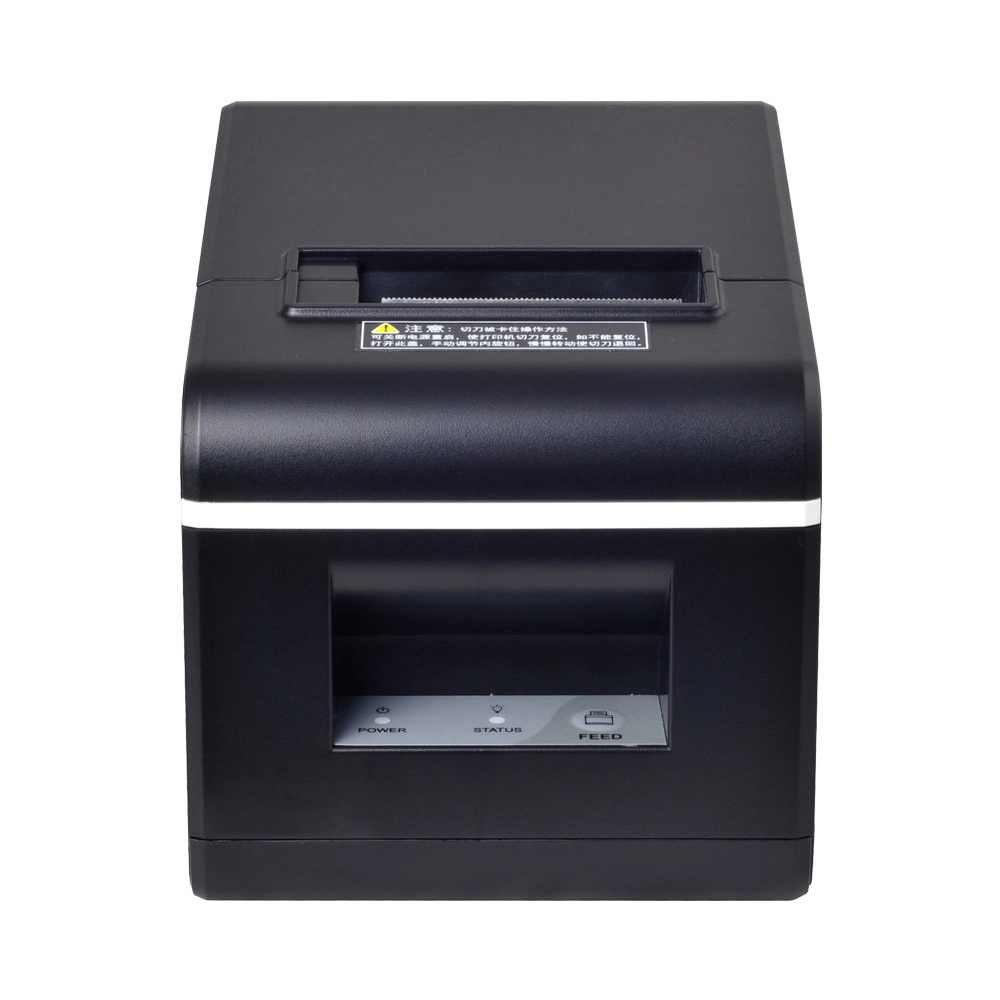
New Model Thermal Printer Bill Printer Manufacturer Portable Printer for Receipt
New Model Thermal Printer, a state-of-the-art bill printer designed for modern retail and hospitality environments. This printer combines advanced technology with user-friendly features, ensuring fast and efficient printing of high-quality receipts. Its sleek design complements any workspace, while multiple connectivity options make it easy to integrate into your existing POS systems.
Get in touch
Interested in becoming a POS system dealer? Contact us for more information and start the process of joining our dealer network.
We look forward to working with you to expand the market together.


Copyright © 2025 Favorpos All Rights Reserved.
