
Which POS features increase liquor store profits fastest?
- 1. How do I configure POS age verification and ID scanning so I stay compliant without creating checkout bottlenecks?
- 2. Which POS features reduce inventory shrink fastest for liquor stores, and how do I measure ROI within 90 days?
- 3. How do I set up purchase-order automation in a liquor-store POS so I stop overstocking seasonal and high-ABV slow movers?
- 4. Can a POS create audit-ready compliance reports for state excise taxes, case-level tracking and inspection demands?
- 5. What loyalty and promotion features in a liquor POS drive the fastest increase in basket size for craft beer and High Quality spirits?
- 6. How should I structure POS user permissions and shift audits to expose employee theft without hurting checkout speed?
Liquor Store POS Systems: 6 Deep Questions Beginners Ask
Buying a liquor store POS system is more than picking a register: you need integrated age verification, inventory management for high-ABV SKUs, compliance-ready audit trails, shrink prevention, loyalty that upsells High Quality spirits and payment security (EMV & contactless). Below are six long-tail beginner questions that often have thin or outdated answers online, plus practical, up-to-date, actionable answers built for independent and multi-store operators.
1. How do I configure POS age verification and ID scanning so I stay compliant without creating checkout bottlenecks?
Problem: Manual ID checks slow lanes and lead cashiers to cut corners; overly strict scanning adds friction and abandoned sales.
Solution (step-by-step):- Choose a POS with integrated ID scanning hardware and database validation (magstripe + 2D barcode OCR for driver licenses). Modern ID scanners extract birthdate, document type and issuing state and flag out-of-state or obviously invalid IDs.- Configure an automated age-check rule: for example, require scanning for all alcohol sales or for purchasers who look under 40. This balances compliance and speed.- Enable smart prompts: if the scanner verifies age, allow the sale to proceed with a single tap; if it flags, route to manager override with a short, logged reason.- Keep an abbreviated manual entry fallback for temporary hardware failure (scan not available), but require manager override and note the reason to preserve auditability.- Train staff on fast scan technique and a 5-second exception workflow so lanes maintain throughput.Key metrics to monitor: scan success rate (>98%), average checkout time when a scan is required (target <30 seconds added), number of manager overrides per 1,000 sales (<5 recommended), and compliance incidents (zero tolerable).Why it works: Automated ID scanning reduces human error and creates an auditable, time-stamped trail for inspections by state alcohol control boards and local enforcement while minimizing friction through verification rules.
2. Which POS features reduce inventory shrink fastest for liquor stores, and how do I measure ROI within 90 days?
Problem: Shrink from theft, miscounts, and receiving errors disproportionately hurts narrow-margin, high-value liquor SKUs.
High-impact features:- Real-time inventory counts with integrated barcode scanning at POS and on receiving.- Receiving workflows that require scanned confirmation of cases/SKUs against purchase orders (POs) to eliminate blind receiving.- FIFO/LIFO costing options and lot-control for special release bottles or limited editions.- Case-break tracking: log when a case is opened and how many individual bottles are created in inventory.- Employee-level sales logging and shift close audits with variance reports.- Cycle-count scheduling and variance alerts for high-value SKUs.Quick ROI measurement (90-day plan):- Baseline: capture current monthly shrink dollars (use existing POS or manual inventory difference). If unknown, start with a targeted cycle count for top 200 SKUs.- Implement: enable barcode receiving, require scanned POs, and schedule weekly cycle counts on top 50% of sales-value SKUs.- Track: shrink dollars, inventory accuracy %, and average days-of-supply pre- and post-implementation. A realistic target is improving inventory accuracy by 5–10% and reducing shrink for liquor SKUs by 20–40% in 90 days when controls are strictly applied.Why measurable: Scanning on receipt and POS removes human-typed SKUs, the biggest cause of phantom inventory, and provides transaction-level evidence for loss prevention follow-up.
3. How do I set up purchase-order automation in a liquor-store POS so I stop overstocking seasonal and high-ABV slow movers?
Problem: Liquor stores often over-order rare/slow SKUs (High Quality spirits, specialty liqueurs) and under-order fast movers (popular domestic beers), hurting cash flow and shelf ROI.
Configuration steps:- Turn on sales-velocity and demand-forecast modules in your POS that calculate daily/weekly sell-through per SKU and vendor lead times.- Set tiered reorder points by SKU class: fast movers (days of supply target 7–14), steady movers (14–30), slow/seasonal (30–90). Prioritize fill rates for high-velocity SKUs.- Use vendor-specific lead times and minimum order quantities (some wholesalers have case minimums). The POS should suggest PO quantities that round to case sizes automatically.- Enable suggested substitutions and cross-sell bundles for out-of-stock High Quality bottles to preserve margin.- Run a monthly dead-stock report and set automated reduce-price or promotional triggers for slow SKUs after a configurable aging threshold.KPIs to watch: stockouts for top 100 SKUs (<2% target), inventory turnover (increase over baseline), gross margin return on inventory (GMROI) improvement, and cash conversion cycle.Why it works: PO automation ties sales patterns to vendor behavior and prevents manual over-ordering emotion-driven decisions on collectible or trendy bottles.
4. Can a POS create audit-ready compliance reports for state excise taxes, case-level tracking and inspection demands?
Problem: Regulators may ask for transaction-level histories, excise tax summaries, and case tracking; manual extraction is time-consuming and error-prone.
Capabilities to require:- Transaction-level exports with timestamps, product codes, unit sizes (ml), ABV, and purchaser age verification flags.- Excise tax module that calculates tax liabilities by jurisdiction and exports tax-period summaries and remittance files.- Case/lot tracking for limited releases (serial numbers or lot IDs), including chain-of-custody (received → sold → return) logs.- Audit-ready PDF reports with filters for date ranges, POS terminals, cashier IDs and SKU batches.- API access or standard CSV/Excel formats so data can be delivered to accountants or regulators quickly.Best practices: schedule monthly auto-exports of excise tax summaries, and retain raw transaction export for the state-mandated retention period (often 3–7 years, check local law). Test a mock audit export quarterly to ensure completeness.Why it matters: Having immediate access to audit-ready reports can prevent fines and expedite license renewals. Many state liquor authorities expect electronic records in standardized formats; choose a POS that supports those exports.
5. What loyalty and promotion features in a liquor POS drive the fastest increase in basket size for craft beer and High Quality spirits?
Problem: Loyalty programs that issue only generic points rarely increase spend on high-margin categories like craft beer or small-batch spirits.
Fast-impact features:- Basket-based coupons (e.g., 15% off a second craft six-pack when buying one) to encourage multi-unit purchases.- Product-level targeted offers using purchase history: automated email/SMS targeting customers who bought a craft IPA last month with a 10% offer on a complementary spirit.- Tiered loyalty that unlocks members-only tastings or early access to limited releases, increasing perceived value and repeat visits.- Mix-and-match promos for mixed packs (beer + mixer + spirit) to increase average order value.- Integrated promotions manager that enforces vendor-funded discounts, ensuring margin protection.Measurement: track attach rate (accessory/mixer/secondary SKU per transaction), average transaction value (ATV), and repeat-purchase rate among loyalty members. A well-executed targeted promo can lift ATV by 8–15% in the promo week.Why this works: Data-driven offers that respect customer preferences convert better than blanket discounts; the POS stores and activates segmentation at checkout for instant redemption.
6. How should I structure POS user permissions and shift audits to expose employee theft without hurting checkout speed?
Problem: Overly permissive employee permissions and lax shift audits let theft go undetected, but excessive checks slow daily operations and hurt staff morale.
Recommended approach:- Principle of least privilege: give cashiers only tender and return capabilities; voids, price overrides, discounts and cancelations should require a supervisor PIN or higher role.- Split duties: receiving, purchasing, and accounts payable should be separated among employees when possible; the person who receives stock should not be the one reconciling invoices.- Configure automated exception reports: daily alerts for unusual voids, refunds, discounts, or high-value comp transactions and for negative inventory adjustments.- Implement shift-close procedures that require two-person verification for cash drops and register counts. Log discrepancies with timestamped notes and require manager sign-off.- Use transaction video integration where possible (link POS transactions to time-stamped surveillance clips) to reduce false accusations and speed investigations.Key metrics: number of suspicious exception reports per 1000 transactions (review and trend), average dollar value per void/refund, and resolution time for anomalies. Quick remediation and transparent feedback loops deter repeat theft.Why effective: Combining policy (permissions) with automated monitoring (exception reports) creates a low-friction deterrent: the system surfaces anomalies so managers intervene only when needed.
Concluding summary of advantages of modern liquor store POS systems
Modern liquor store POS systems combine age verification, barcode-driven inventory management, purchase-order automation, compliance reporting, loyalty engines and secure EMV/contactless payments to reduce shrink, speed checkout, improve cash flow and increase average order value. Together these features deliver measurable ROI via reduced loss, optimized inventory turns, higher basket sizes and faster, audit-ready reporting—critical for both single stores and multi-location chains.
For a tailored quote and to evaluate how these features map to your store’s needs, contact us at www.favorpos.com or email sales2@wllpos.com.

The Smart Way to Check Prices: How a 10.1-Inch Wall-Mounted Price Checker Transforms Retail Stores

A Smarter Checkout Experience: The 15-Inch Dual-Screen POS Built for Modern Retail

8-Inch Smart Price Checker: A Small Device Powering Smarter Retail Spaces

Built for Retail Precision: Manufacturing Excellence Behind the 11.6” Smart Price Checker

Building Stability in an Unstable Market: A 15.6-Inch All-in-One POS Designed for the Long Term
For Restaurants & Cafes
How to update the menu or add new items?
After being equipped with the corresponding software, our POS machine allows you to easily update the menu through the backend management interface. You can add new items, modify prices or adjust the menu layout, and all changes will be reflected in the system in real time, ensuring that employees always have the latest menu information.
What is the warranty period for the POS system?
We provide a standard warranty period of at least one year. During the warranty period, if the device fails, we will provide free repair or replacement services. The specific warranty period and terms can be negotiated according to the contract.
For Healthcare
How much does it cost to develop a POS solution?
The cost depends on the level of customization, required functionality, and scale of deployment. We offer competitive pricing and work with you to develop a solution that fits your budget.
For Beauty and Wellness
Does your POS system support loyalty programs?
Of course, our POS solution includes the function of implementing and managing loyalty programs to reward returning customers and promote customer retention.
For ODM
What are the main advantages of ODM service?
You can enjoy the following advantages by choosing our ODM service:
1. Innovative design: Our team provides cutting-edge design solutions to ensure that products meet the latest market trends.
2. Full process management: Full process management from design to production to reduce your operational complexity.
3. Customization: We provide personalized hardware customization services according to your needs.
4. Quality assurance: Strict quality control procedures ensure high standards for each POS machine.
5. Cost-effectiveness: Efficient production processes help reduce costs while maintaining high quality.
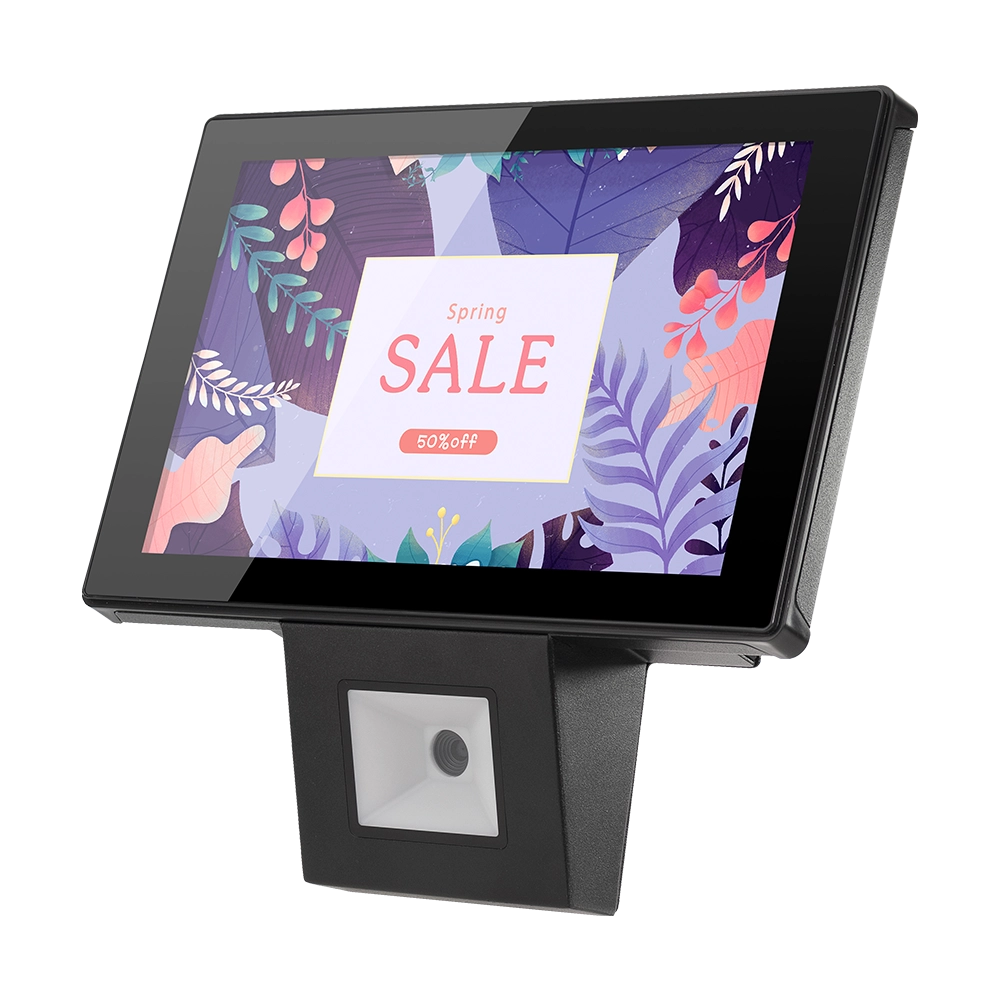
10 inch Price Checker Device Supplier Barcode Scanner for Sale Price Check for Supermarket
FAVORPOS offers 10 inch Price Checker Device, perfect for supermarkets. This wall mounted 10 inch touch screen barcode scanner ensures fast, accurate price checks, enhancing customer experience and operational efficiency. Durable, user-friendly, and perfect for high-traffic retail environments.

Aluminum Dual Screen Pos Terminal Pos Systems 15.6 inch Touchscreen Pos
FAVORPOS Aluminum Dual Screen POS Terminal features a 15.6-inch touchscreen, ideal for seamless transactions. As a trusted OEM Windows POS manufacturer, we deliver durable, high-performance solutions tailored for retail and hospitality businesses.

Android Handheld Pos Device Touch Screen Pos Terminal Manufacturer

All in One POS Terminal Metal 11.6'' Touchscreen Android Windows with Printer
The All-in-One POS Terminal features an 11.6'' touchscreen display, compatible with both Android and Windows. This metal-constructed terminal combines durability with style, making it a perfect fit for any retail or hospitality environment. Equipped with a built-in printer, it streamlines transactions by allowing for instant receipt printing.
Get in touch
Interested in becoming a POS system dealer? Contact us for more information and start the process of joining our dealer network.
We look forward to working with you to expand the market together.


Copyright © 2025 Favorpos All Rights Reserved.
