
How do liquor store POS systems reduce shrink and theft?
- 1. How can a liquor store POS system integrate ID scanning to prevent underage sales and create an audit trail that holds up in compliance checks?
- 2. What POS signals reliably flag employee theft patterns in liquor stores, and how do you automate detection?
- 3. How should a liquor store configure cycle counts and ABC classification in the POS to detect shrink earlier than annual inventories?
- 4. Can POS systems prevent supplier-side fraud (short-shipped or over-invoiced deliveries) and how should you configure the receiving workflow?
- 5. How do integrated POS and CCTV/video systems reduce internal theft, and what setup provides the most actionable evidence?
- 6. What real-time reports and KPIs should a liquor store POS expose to reduce shrink proactively, and what are reasonable thresholds to trigger investigations?
How Do Liquor Store POS Systems Reduce Shrink and Theft? 6 Deep Answers
Liquor stores face higher-risk shrink drivers: high-value SKUs, underage-sale risk, vendor mis-shipments, and internal collusion. Below are six specific, implementation-focused questions beginners ask but rarely find thorough answers to—each answered with practical steps, KPIs, and configuration guidance for modern liquor store POS systems with integrated inventory management, age verification, barcode scanning, loss-prevention tools, and real-time reporting.
1. How can a liquor store POS system integrate ID scanning to prevent underage sales and create an audit trail that holds up in compliance checks?
Problem: Manual ID checks are easy to bypass, offer no searchable audit trail, and expose stores to liability if challenged. Solution: Deploy a POS-integrated ID scanner with parsed data capture, exception workflows, and automated alerts.
- How it works: A barcode/2D ID scanner reads driver's license or state ID, the POS parses DOB and ID number, then compares the age against the configured minimum (e.g., 21). The scanner stores an encrypted image/transaction link (subject to local privacy laws) and creates a transaction-level audit record.
- Configuration: Set forced ID scan for all alcohol SKUs or for random percent of transactions (recommended: mandatory for all alcohol SKUs). Log the scanning event with user ID, terminal ID, timestamp, and the specific SKU(s) sold.
- Compliance & retention: Follow local data privacy laws—many jurisdictions allow storing only a hashed ID number or transaction reference rather than full images. Configure retention (e.g., 30–90 days) in consultation with legal counsel.
- KPI & monitoring: Track “failed ID scans per shift,” “override rate” (employee bypasses/manager approvals), and “attempted underage sale incidents.” Industry practice: investigate any employee override rate above 0.5–1%.
- Audit tip: When regulators or police request records, provide the POS transaction IDs, timestamped scan logs, and associated terminal footage (see Q5 below on CCTV integration).
2. What POS signals reliably flag employee theft patterns in liquor stores, and how do you automate detection?
Problem: Employee theft often manifests as patterns (excessive voids, refunds, discounts, or mismatched cash drops) rather than single obvious events. Solution: Use POS analytics, role-based permissions, and automated exception reports to detect patterns early.
- Key signals to monitor: voids per employee per shift, refund frequency, discount/override rates, items sold at price different from SKU price, cash drawer variance, and high-value item splits (e.g., bottle removed without sale).
- Automation rules: Configure the POS to generate real-time alerts for combinations such as: more than X voids in Y hours, refunds above $Z without manager approval, or an employee with consecutive cash over/shorts > threshold. Typical starting thresholds: void rate >0.5–1% of transactions, refunds >$100/day without multi-manager sign-off.
- Access control: Enforce role-based permissions—only managers can process large refunds or price overrides, require manager PIN plus reason code for sensitive actions, and rotate cashier PINs periodically. Consider biometric or 2FA logins to prevent PIN sharing.
- Data retention & audit logs: Keep immutable audit logs (who, what, when, where) tied to each transaction. Logs should be exportable to CSV/PDF for investigators and auditors.
- Investigation workflow: When an alert triggers, pull the POS exception report, match to adjacent CCTV clips, interview staff with prepared evidence (transaction IDs, timestamps), and, if needed, perform an ad-hoc cycle count of relevant SKUs.
3. How should a liquor store configure cycle counts and ABC classification in the POS to detect shrink earlier than annual inventories?
Problem: Annual physical inventories detect shrink too late. Solution: Apply ABC (Pareto) classification and scheduled cycle counts within the POS inventory module so discrepancies surface continuously.
- ABC classification: Tag SKUs as A (top 20% revenue or margin), B (next 30%), C (remaining 50%). Configure the POS to require weekly counts for A, bi-weekly/monthly for B, and quarterly for C.
- Counting workflows: Use handheld scanners tied to the POS for blinded counts (employees see SKU but not expected quantity) or full-count mode depending on trust level. Blind counts reduce intentional misreporting during receiving or counting.
- Exception handling: POS should auto-generate variance reports when counted quantity differs by configured tolerances (e.g., A-items variance >1% absolute or >2 units). Route exceptions to store manager and to central loss-prevention dashboard if variance persists for multiple cycles.
- KPIs and cadence: Measure “count variance rate” by SKU class, “time-to-investigate” for exceptions, and “variance repeat rate.” Aim to investigate A-item variances within 24–48 hours; unresolved variances over two consecutive cycles indicate potential theft or receiving issues.
- Result expectation: Continuous cycle counting typically reduces time-to-detection from months to days, enabling quicker corrective actions that materially lower shrink.
4. Can POS systems prevent supplier-side fraud (short-shipped or over-invoiced deliveries) and how should you configure the receiving workflow?
Problem: Vendor fraud—short shipments, over-invoiced goods, or incorrect item substitutions—contributes to shrink but is often overlooked. Solution: Implement PO-based receiving, three-way matching (PO, receiving, invoice), and blind receiving in the POS.
- PO-centric receiving: Create POs in the POS for every inbound order. On delivery, receive into the POS by scanning cartons/UPC/barcodes and confirm quantities against the PO.
- Three-way match: Reconcile PO, receiving record, and supplier invoice. Configure the POS/accounting integration to automatically flag discrepancies above tolerance (e.g., quantity or price variance >2–5%).
- Blind receiving: Periodically use blind receiving (warehouse or receiving staff do not see expected quantities) to detect collusion. For high-value SKUs, require two-person verification and signed delivery receipts.
- Vendor performance metrics: Track “short shipments,” “invoice variances,” and “return rate” per vendor in the POS. Use these metrics during vendor reviews and negotiate penalties or corrective action plans for repeated issues.
- Operational tip: For chain operations, centralize high-risk vendor reconciliation at the corporate level to spot network-wide patterns that single stores miss.
5. How do integrated POS and CCTV/video systems reduce internal theft, and what setup provides the most actionable evidence?
Problem: Video footage alone is time-consuming to search; POS data alone lacks visual proof. Solution: Link transaction metadata to camera timestamps so investigators can instantly jump to the exact clip for a specific barcode/transaction.
- Transaction-linked video: Configure POS to write transaction IDs and terminal timestamps to a central server. Integrate with video management software so each transaction link opens the video clip around that timestamp and associated POS terminal/camera angle.
- Camera placement & coverage: Place cameras to capture the register area, receiving dock, high-value shelf displays, and blind spots. Use high-resolution cameras to read labels when needed. Forensic-quality evidence requires cameras with at least 1080p and proper lighting.
- Search & redaction: Use POS-driven search to pull video by SKU, transaction ID, employee ID, or time window. Ensure the video system supports redaction and lawful retention policies that comply with privacy laws.
- Alerts & proactive monitoring: Integrate motion analytics and POS exception alerts so security teams get clips automatically when suspicious events occur (e.g., void + camera shows no customer at register).
- Evidence best practice: For any internal-theft investigation, export the POS exception report, matched video clip, and employee login history together; these three pieces strengthen legal and HR actions.
6. What real-time reports and KPIs should a liquor store POS expose to reduce shrink proactively, and what are reasonable thresholds to trigger investigations?
Problem: Generic daily sales reports don’t reveal shrink drivers quickly. Solution: Configure a tailored loss-prevention dashboard in the POS that surfaces high-value, high-risk signals automatically.
- Core KPIs to display in real time: overall shrink % (calculated from expected inventory vs actual), voids/refunds per cashier, discount/override frequency and dollar value, high-value SKU variance, inventory days on hand, and vendor variance rate.
- Drill-down capabilities: From a KPI tile, be able to drill to SKU-level activity, associated transactions, employee login history, and linked CCTV clip. Example: click on “High-value SKU variance” → see SKU, last 10 transactions, last three cycle counts, and responsible employee IDs.
- Thresholds & alerting guidance (industry starting points):
- Voids per cashier: investigate if >0.5–1% of transactions per shift.
- Refunds/overrides: investigate if refunds exceed $100–200 per day per employee without documented manager approval.
- Inventory variance for A-items: any variance >1–2 units or >1–2% should trigger immediate review.
- Frequent price overrides by same employee: investigate if >3 overrides per shift or >X dollars total (store-specific).
- Reporting cadence: configure daily exception emails to store managers and weekly consolidated reports to regional managers/Loss Prevention. Maintain 90-day historical trend charts to spot slow-moving theft strategies.
- Business impact example: A store with $1M annual sales at a 3% shrink rate loses $30,000. A 25% reduction in shrink (to 2.25%) saves $7,500—often covering POS loss-prevention feature costs within a year.
Conclusion: Combining barcode-driven inventory management, POS-integrated ID scanning, vendor three-way matching, cycle counting by ABC class, employee permissioning, and transaction-linked CCTV yields a layered defense that reduces both external (shoplifting, underage sales) and internal (employee or vendor) theft. Modern liquor store POS systems that offer real-time reporting and automated alerts turn reactive investigations into proactive prevention—recovering margin, protecting compliance, and preserving reputation.
For a tailored assessment and quote on implementing liquor store POS systems with robust loss prevention, contact us at www.favorpos.com or email sales2@wllpos.com.

Understanding 15-Inch Aluminum POS Terminals in Modern Commercial Use

The Smart Way to Check Prices: How a 10.1-Inch Wall-Mounted Price Checker Transforms Retail Stores

A Smarter Checkout Experience: The 15-Inch Dual-Screen POS Built for Modern Retail

8-Inch Smart Price Checker: A Small Device Powering Smarter Retail Spaces

Built for Retail Precision: Manufacturing Excellence Behind the 11.6” Smart Price Checker
For Bakeries
Does the system provide real-time sales reports?
Yes, our system provides real-time reporting and analytics to help you monitor performance, track inventory, and optimize sales strategies.
For Healthcare
How much does it cost to develop a POS solution?
The cost depends on the level of customization, required functionality, and scale of deployment. We offer competitive pricing and work with you to develop a solution that fits your budget.
For E-commerce
Does the POS system support global payments?
Yes, we support multi-currency and cross-border transactions, enabling you to accept payments from customers around the world.
For OEM
Do you provide technical support and training services?
Yes, we provide comprehensive online technical support and training services to help your team become familiar with the operation and maintenance of POS machines.
For Restaurants & Cafes
Is your POS system suitable for different types of catering businesses?
Yes, our POS system is suitable for a variety of catering businesses, including fast food restaurants, high-end restaurants, cafes, as well as food trucks and pop-up restaurants. The system functions can be customized according to different business types to meet specific needs.
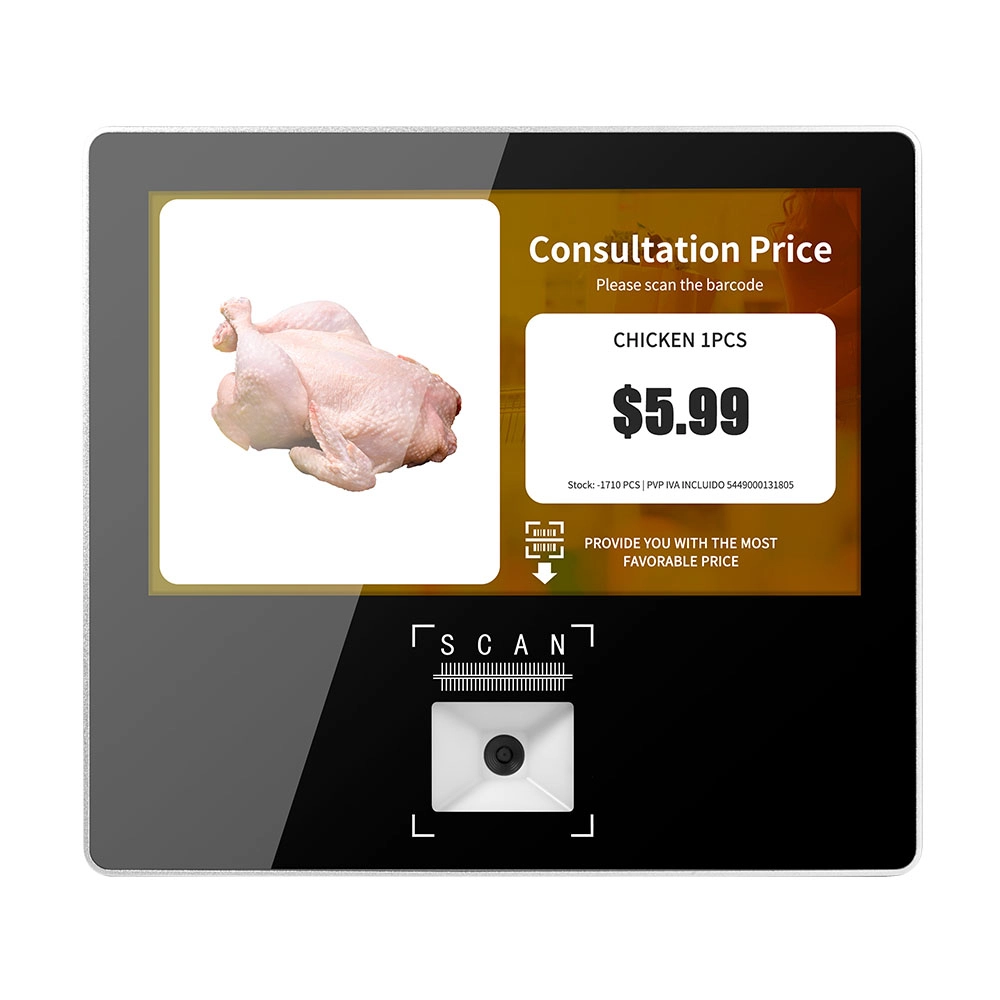
Metal 11.6 inch Price Scanner Machine Android Windows with Wifi Supplier
FAVORPOS Metal 11.6-inch Price Scanner Machine, designed for durability and efficiency in retail environments. This versatile device operates on both Android and Windows, providing seamless functionality for various applications. With built-in Wi-Fi connectivity, it allows for quick access to pricing data and updates. The 11.6'' display ensures clear visibility for easy operation, making it perfect for price checking and inventory management. Enhance your retail experience with this reliable and robust price scanner from a trusted supplier!

10 inch Price Checker Device Supplier Barcode Scanner for Sale Price Check for Supermarket
FAVORPOS offers 10 inch Price Checker Device, perfect for supermarkets. This wall mounted 10 inch touch screen barcode scanner ensures fast, accurate price checks, enhancing customer experience and operational efficiency. Durable, user-friendly, and perfect for high-traffic retail environments.

Aluminum Dual Screen Pos Terminal Pos Systems 15.6 inch Touchscreen Pos
FAVORPOS Aluminum Dual Screen POS Terminal features a 15.6-inch touchscreen, ideal for seamless transactions. As a trusted OEM Windows POS manufacturer, we deliver durable, high-performance solutions tailored for retail and hospitality businesses.

Android Handheld Pos Device Touch Screen Pos Terminal Manufacturer
Get in touch
Interested in becoming a POS system dealer? Contact us for more information and start the process of joining our dealer network.
We look forward to working with you to expand the market together.


Copyright © 2025 Favorpos All Rights Reserved.
