
POS desktop system vs tablet POS: which is better for stores?
- 1. How do I size RAM, CPU, and storage for a POS desktop system in a high-volume grocery store to avoid lag during peak hours?
- 2. What are the realistic total cost of ownership (TCO) components for an on-premise POS desktop system over 5 years compared to a tablet POS?
- 3. How can I ensure my POS desktop system maintains PCI DSS compliance and EMV standards across integrated peripherals and offline modes?
- 4. In mixed environments (desktop back counter + mobile tablets), how do I architect network, sync, and inventory reconciliation to prevent double-sell and latency?
- 5. Which peripherals are most likely to cause compatibility issues with a POS desktop system and how to mitigate them?
- 6. For small multi-location stores, when is a POS desktop system more cost-effective than tablet POS, considering inventory complexity, promotions, and reporting?
1. How do I size RAM, CPU, and storage for a POS desktop system in a high-volume grocery store to avoid lag during peak hours?
For high-volume retail (groceries, convenience, pharmacy) the bottlenecks are I/O (database disk access), network contention, and POS software concurrency, not just CPU. Use these practical guidelines when specifying a fixed retail POS terminal or on-premise till:
- CPU: A modern quad-core Intel i5 or equivalent (e.g., Intel Core i5 10th gen or newer / AMD Ryzen 3/5) is a reliable baseline for a local POS desktop system running a Windows POS client or a local server process. For multi-checkout servers handling many terminals, choose a 6-core/8-thread CPU or a small server-class Xeon.
- RAM: 8 GB minimum for a single checkout terminal; 16 GB recommended if the machine hosts the local database, reporting, or runs background sync tasks. For a headless local server of multiple registers, provision 32 GB depending on concurrent connections.
- Storage: Enterprise or consumer NVMe/SSD for the OS and the POS database dramatically reduces transaction latency vs HDDs. Plan 256–512 GB SSD per desktop terminal; for on-premise POS servers, use RAID-1/RAID-10 with NVMe or SATA SSDs sized to store POS database histories and local cache (1 TB+ depending on retention).
- Network I/O: Use gigabit LAN for wired POS terminals. Avoid Wi-Fi for primary fixed registers in high-volume lanes. A dedicated VLAN for POS traffic and PoE switches for peripherals reduces contention.
- Peripherals & USB bandwidth: If you connect multiple USB accessories (scales, signature pads, scanners), verify hub bandwidth or use separate USB controllers. USB-C and USB 3.1 reduce device congestion.
- Resilience: Add a small UPS for each workstation and for any on-site server; corrupt DBs after power loss are a leading downtime cause.
Sizing checklist: expected transactions per hour, average ticket size (affects receipt printing), concurrent back-office operations (end-of-day reports), number of integrated peripherals, and retention period for local data. Use these to estimate database size and IOPS and then choose SSD capacity and server CPU/RAM accordingly.
2. What are the realistic total cost of ownership (TCO) components for an on-premise POS desktop system over 5 years compared to a tablet POS?
Don’t just compare purchase price. TCO should include hardware amortization, software licensing or subscription, payment processing hardware, peripherals, installation, maintenance, security/compliance costs, and expected replacement cycles:
- Hardware amortization: Desktop workstations and receipt printers typically last 4–7 years. Tablets often need replacement or battery servicing every 2–4 years when used full-time. So amortize desktops over 5 years and tablets over 3.
- Software: Many POS vendors price desktop (Windows/Linux) licenses differently from cloud or tablet-native versions. Include local-server licensing, database licensing (if any), and support contracts.
- Payment terminals: EMV PIN pads and integrated payment modules may be required regardless of form factor; however, tablets sometimes need additional hardware bridges or secure payment modules which add cost.
- Peripherals: Cash drawers, scales, receipt printers, barcode scanners, and pole displays often cost the same; compatibility is usually better with desktop POS towers which support legacy interfaces (serial, parallel, USB, Ethernet).
- Installation & configuration: On-premise setups have higher initial integration and network configuration costs but lower ongoing connectivity costs if offline mode is used.
- Maintenance & downtime: Desktop systems with enterprise-class hardware typically have lower failure rates and easier on-site repair. Factor in mean time to repair (MTTR), spare parts, and technical support fees.
- Security & compliance: PCI assessments, patching, and potential hardware encryption modules for card handling must be budgeted.
To compare: build a 5-year model summing CAPEX (hardware+installation) and OPEX (support, subscriptions, payment fees, security, replacement). For multi-lane, high-volume stores, desktops often show lower TCO per terminal due to longevity, peripheral flexibility, and reduced replacement cycles. For small pop-ups, tablets can have lower upfront CAPEX despite higher replacement frequency.
3. How can I ensure my POS desktop system maintains PCI DSS compliance and EMV standards across integrated peripherals and offline modes?
Compliance is both software and hardware-driven. For desktop POS systems used in retail, follow these practical controls:
- Use approved payment solutions: Always use an EMV-certified payment terminal or a validated P2PE (point-to-point encryption) solution. Do not route plaintext card data through your POS desktop system; use payment terminals that tokenize or encrypt at the PIN pad.
- Network segmentation: Place POS terminals and payment processors on a segmented VLAN with firewall rules to limit inbound/outbound access. Separate guest Wi-Fi from POS networks.
- Patch and harden OS: Keep Windows/Linux OS images up-to-date and locked down. Disable unnecessary services. Enforce strong local admin controls and endpoint protection.
- Secure peripherals: Buy peripherals (scales, cash drawers, printers) from vendors that support secure firmware updates. Avoid generic or unknown-brand devices that lack update paths.
- Offline mode controls: If you allow offline transaction capture, configure secure local storage (encrypted databases) and strict reconciliation procedures to clear queued transactions promptly once connectivity restores. Limit the number of offline-authorized transactions and maintain audit trails.
- Logging and monitoring: Enable logs for payment events, authorization attempts, and admin changes. Centralize logs if possible for retention required by auditors.
- Regular assessments: Conduct quarterly vulnerability scans and annual PCI assessments if your processor requires it. Keep SAQ documentation (Self-Assessment Questionnaire) updated.
Working with payment processors and vendors who publish EMV/P2PE compliance documentation simplifies audits. Ask vendors for their AOC (Attestation of Compliance) and ensure your integration method (API, SDK, or terminal integration) is validated.
4. In mixed environments (desktop back counter + mobile tablets), how do I architect network, sync, and inventory reconciliation to prevent double-sell and latency?
Mixed deployments require an architecture that guarantees data consistency while enabling mobility:
- Choose the right synchronization topology: For stores that require instant, accurate inventory across devices, prefer a local authoritative database (on-premise server or one of the desktops as a local master) that replicates with cloud when bandwidth is available. For smaller shops, a cloud-first architecture with strong offline caching and conflict resolution may suffice.
- Real-time vs eventual consistency: For high-risk SKUs (limited quantity items), implement a real-time reservation model: when a transaction begins or an item is put on hold, decrement an available-quantity field and lock the item until the sale completes. For low-risk items, eventual consistency with background reconciliation may be acceptable.
- Concurrency control: Use transaction-level locking in the POS database rather than file-based sync. Many modern POS platforms provide atomic inventory APIs to avoid race conditions.
- Network design: Ensure wired gigabit connections for fixed registers and robust Wi-Fi (802.11ac/ax) with adequate AP density for mobile devices. Use QoS to prioritize POS and payment traffic.
- Reconciliation tools: Implement automated end-of-day reports that compare POS transactions to inventory movements and payment batches. Configure alerts for negative inventory or high variance.
- Testing & incident playbooks: Simulate peak loads and failovers. Have manual override procedures if sync fails (e.g., suspend online sales for particular SKUs rather than risk oversell).
A hybrid approach (local authoritative DB + periodic cloud sync) is commonly used in grocery and multi-lane retail because it balances speed, reliability, and centralized reporting.
5. Which peripherals are most likely to cause compatibility issues with a POS desktop system and how to mitigate them?
Common troublemakers and mitigation strategies:
- Receipt printers (legacy serial/paralell models): Older models may require specific drivers. Mitigate by standardizing on Ethernet or USB printers supported by your POS vendor and using vendor-recommended driver packages.
- Weighing scales and price-computation scales: Scales can use proprietary protocols. Use certified scales listed on the POS vendor’s peripheral compatibility list or request middleware that translates scale protocols to your POS.
- Payment terminals and PIN pads: Integration type matters (keyboard wedge, serial, USB HID, or integrated via API). Use EMV-approved, PCI-validated terminals with vendor-provided SDKs. Avoid DIY serial integrations unless vendor-certified.
- Barcode scanners with keyboard emulation: These are usually reliable, but scan formatting and prefixes/suffixes must be configured to match the POS’s UPC parsing rules.
- Cash drawers: These are relatively straightforward, but ensure your receipt printer or PC supports the kick command expected by the drawer (kick via serial or via printer GPIO).
- Touchscreens & drivers: Touch drivers, especially on Windows, can cause stability issues if not signed and updated. Buy commercial-grade touchscreen monitors with long driver support windows.
Mitigation checklist: maintain a peripheral compatibility matrix, standardize device procurement, use vendor-certified devices, keep firmware updated, and maintain spare devices and a rapid-replacement SLA with suppliers.
6. For small multi-location stores, when is a POS desktop system more cost-effective than tablet POS, considering inventory complexity, promotions, and reporting?
A POS desktop system becomes more cost-effective when your operational complexity grows in these areas:
- Advanced inventory management: If you require multi-location transfers, serialized inventory, per-location reorder points, or integrated scales/barcode label printing, desktops (or on-premise servers) often provide stronger local reporting and peripheral integration.
- Complex promotions and pricing rules: Desktop POS software commonly supports advanced promotion engines (mix-and-match, tiered discounts, buy X get Y) and complex tax rules. Handling these centrally with robust processing reduces reconciliation work.
- High transaction volumes: Desktops offer lower latency and more peripheral ports, reducing queuing times and maintenance frequency.
- Compliance and offline resiliency needs: If stores must operate reliably during internet outages or meet strict PCI requirements with local logging, an on-premise desktop server + terminals usually yields lower disruption risk.
- Centralized reporting and fast batch processing: Larger stores that need fast nightly processing, data aggregation, and integration with ERP/warehouse systems benefit from fixed POS stations and local compute.
If each location is very small (single checkout, low SKUs, simple promotions), tablet POS might be cheaper initially. But when SKU counts exceed a few thousand, promotion complexity increases, or multi-location stock moves become frequent, desktop systems typically offer a lower TCO and less administrative overhead across the estate.
Conclusion — Advantages of POS desktop systems
POS desktop systems (fixed retail POS terminals and on-premise POS servers) deliver stronger peripheral compatibility, longer hardware lifecycles, superior offline resilience, and better support for complex inventory, promotions, and reconciliation workflows. For multi-lane, high-volume, or multi-location retailers needing robust reporting, on-premise or hybrid desktop architectures reduce latency, lower replacement frequency, and simplify integration with enterprise peripherals and back-office systems.
For a tailored quote or to evaluate which architecture fits your store(s), contact us for a free consultation: visit www.favorpos.com or email sales2@wllpos.com.

Beyond Checkout: How a 15.6-Inch Aluminum POS System Redefines Retail Efficiency

Understanding 15-Inch Aluminum POS Terminals in Modern Commercial Use

The Smart Way to Check Prices: How a 10.1-Inch Wall-Mounted Price Checker Transforms Retail Stores

A Smarter Checkout Experience: The 15-Inch Dual-Screen POS Built for Modern Retail

8-Inch Smart Price Checker: A Small Device Powering Smarter Retail Spaces
For company
What kind of certifications do you have?
CE, ROHS, and FCC as standards.
For Bakeries
Does the system provide real-time sales reports?
Yes, our system provides real-time reporting and analytics to help you monitor performance, track inventory, and optimize sales strategies.
For Restaurants & Cafes
What is the warranty period for the POS system?
We provide a standard warranty period of at least one year. During the warranty period, if the device fails, we will provide free repair or replacement services. The specific warranty period and terms can be negotiated according to the contract.
For Distributor
What kind of support will I receive as a reseller?
As a reseller, you will receive comprehensive support, including product training, technical assistance, and support from a dedicated account management team.
For ODM
Does ODM service provide product warranty and after-sales support?
Yes, we provide product warranty and after-sales support. Our technical support team can assist with any problems that arise after production and provide maintenance and repair services to ensure the long-term use of the product.
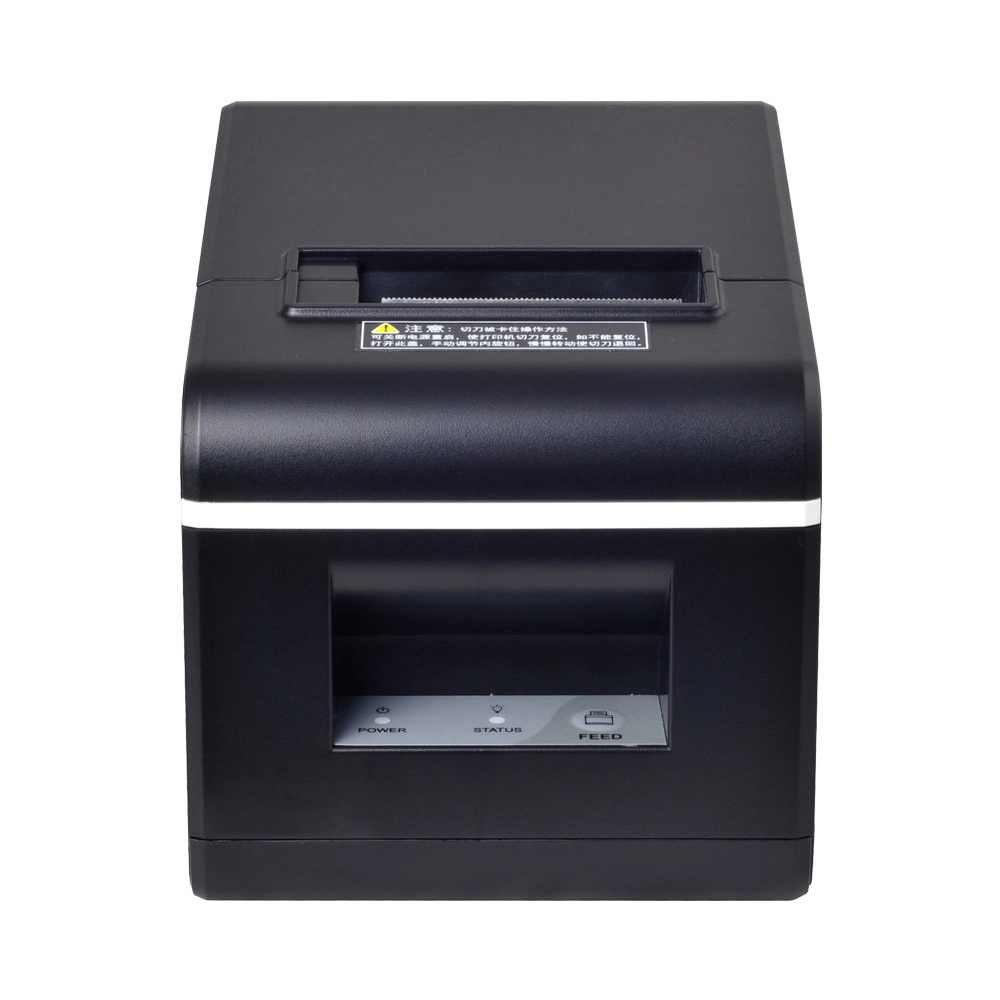
New Model Thermal Printer Bill Printer Manufacturer Portable Printer for Receipt
New Model Thermal Printer, a state-of-the-art bill printer designed for modern retail and hospitality environments. This printer combines advanced technology with user-friendly features, ensuring fast and efficient printing of high-quality receipts. Its sleek design complements any workspace, while multiple connectivity options make it easy to integrate into your existing POS systems.

Desktop Touch Screen POS Systems 12.1'' Android Windows Manufacturer
Our Desktop Touch Screen POS Systems feature a 12.1'' display, supporting both Android and Windows platforms. Engineered for high performance. The intuitive touch interface simplifies transactions and enhances customer engagement. With a sleek design and robust construction, our POS systems are perfect for businesses looking to improve efficiency and elevate the shopping experience.

15.6 Inch Windows POS Terminal with VFD Display, Foldable Aluminum Stand Touch Screen POS for Retail & Hospitality
This 15.6-inch POS terminal is built to meet the needs of modern retail and hospitality environments. Powered by a stable Windows operating system, it ensures smooth performance for various point-of-sale applications. The device features a crisp, responsive touch screen and a built-in VFD customer display, allowing customers to view transaction details clearly. Its aluminum alloy stand offers a sleek, professional appearance while providing enhanced durability and stability for busy checkout counters. Ideal for retail stores, restaurants, and service-based businesses, this POS machine delivers a reliable and customer-friendly checkout experience.

Point of Sale System with Thermal Printer All in One Pos Dual Touchscreen Pos with Barcode Scanner Supplier
FAVORPOS presents the all-in-one Point of Sale System with Thermal Printer, featuring dual touchscreens and an integrated barcode scanner. As a leading POS with NFC factory and barcode scanner supplier, we deliver reliable, efficient solutions tailored for your business needs.
Get in touch
Interested in becoming a POS system dealer? Contact us for more information and start the process of joining our dealer network.
We look forward to working with you to expand the market together.


Copyright © 2025 Favorpos All Rights Reserved.
