
How to choose the best POS desktop system for small businesses?
- 1) How can I verify a POS desktop system will reliably handle 50,000+ SKUs and real-time inventory sync across 3–5 stores?
- 2) What hidden recurring costs should I budget for when buying a POS desktop system for a small restaurant with intermittent offline days?
- 3) How do I validate a POS desktop system’s PCI and EMV credentials before purchase?
- 4) What desktop hardware specs and redundancy measures will deliver 99.9% uptime on Black Friday-style peak traffic?
- 5) How can I ensure the POS desktop system integrates with my accounting ERP and e-commerce platform without creating duplicate records?
- 6) What backup and disaster recovery plan should I implement for a POS desktop system that stores transactions locally?
1) How can I verify a POS desktop system will reliably handle 50,000+ SKUs and real-time inventory sync across 3–5 stores?
A retail POS desktop system’s ability to handle large SKU counts and multi-store sync depends on three measurable components: database design and engine, synchronization architecture, and network/topology.
Checklist and validation steps:
Database engine and indexing: Ask which database the POS uses (PostgreSQL, MySQL/MariaDB, SQLite, Microsoft SQL Server). For 50k+ SKUs you should avoid single-file local DBs (e.g., plain SQLite) as primary store; prefer server-grade engines (PostgreSQL, MS SQL) with proper indexing and normalized tables. Request query plans or sample index strategies for product lookups.
Benchmark numbers: Request transaction-per-second benchmarks and inventory query latency with a dataset representative of 50k SKUs (include images/attributes). Acceptable targets: <200 ms latency for SKU lookup and <500 ms for complex SKU searches under load.
Sync architecture: Determine whether the system uses real-time replication (push/streaming), eventual sync (batch every X minutes), or hybrid. For real-time inventory accuracy across 3–5 stores, require a pub/sub or change-data-capture architecture with conflict-resolution rules. Look for technologies like logical replication or message queues (Kafka/RabbitMQ) on the vendor side.
Conflict handling & master record: Clarify which site is authoritative for inventory adjustments, how negative stocks are handled, and rules for concurrent updates (reservations, backorders).
Network resilience and offline mode: Verify the desktop point of sale supports local caching and queueing of transactions; after reconnect it should reconcile with central servers using idempotent operations to avoid duplicate sales.
Load testing and proof: Ask the vendor for a proof-of-concept (PoC) using your SKUs and sample traffic, or insist on an on-site pilot. Vendors should provide logs and monitoring metrics (CPU, DB locks, replication lag) from their reference deployments.
Scalability plan: Confirm horizontal scaling (read replicas, sharding for catalogs if needed) and whether the architecture supports adding a central server (cloud-hosted or on-premise) to handle multi-store aggregation.
Embedded terms: retail POS desktop, inventory management, multi-store sync, local database replication.
2) What hidden recurring costs should I budget for when buying a POS desktop system for a small restaurant with intermittent offline days?
Beyond upfront hardware and initial software fees, anticipate the following ongoing costs that often get overlooked:
Payment processing & gateway fees: Card processing typically includes interchange + processor markup (ranges vary by region). If using a hosted gateway or tokenization service, expect monthly gateway fees ($10–$50) plus per-transaction fees. For EMV terminal rental/lease, factor monthly charges ($5–$30) or purchase price.
PCI compliance & security maintenance: Small restaurants often fall under PCI DSS SAQ B-IP or SAQ P2PE depending on architecture. Achieving and maintaining compliance requires annual self-assessments, possible quarterly scans (ASV scans ~$100–$400/scan), and patching—budget for security updates, anti-malware and periodic penetration testing if required.
Software subscriptions & updates: SaaS POS plans commonly range $29–$199+/month per terminal; advanced modules (kitchen display, recipe costing, loyalty) can be add-ons. If a perpetual license is used, include annual support & maintenance ~15–22% of license cost.
Integrations and middleware costs: Connecting accounting (QuickBooks/Xero), payroll, or e‑commerce (Shopify/BigCommerce) may require middleware platforms or paid connectors with monthly fees.
Backup, cloud storage & disaster recovery: Automated backups to cloud storage (daily incremental + weekly full) incur storage and egress costs. Budget for at least $10–$50/month depending on retention.
Hardware replacement & consumables: Printers, cash drawers, and terminals wear out; plan for replacement cycles: receipt printers every 3–5 years, terminals every 4–6 years. Consumables (thermal paper) are continuous costs.
Support SLAs and on-site service: Guaranteed response SLAs cost more. Remote support may be included; on-site repair or emergency visits should be line-item priced.
Training and onboarding: Initial staff training and periodic retraining as software updates arrive. Professional services for setup or migration are often charged by the hour.
Embedded terms: restaurant POS desktop, offline transaction mode, POS hardware compatibility, thermal receipt printer.
3) How do I validate a POS desktop system’s PCI and EMV credentials before purchase?
Validation steps (practical checklist):
Ask for documented attestations: Ask the vendor for their PCI DSS status and which SAQ applies (A, A-EP, B-IP, D, etc.). Confirm if they process cardholder data on-premise or use a P2PE/hosted route. For EMV, request the payment terminal model and whether it is EMVCo certified and PCI PTS certified.
Confirm payment flow: If the desktop POS handles card-present entry, confirm whether card data ever touches the POS application. If they use integrated payment terminals (semi-integrated), verify they implement point-to-point encryption or tokenization.
Terminal certification: For EMV acceptance, terminals must be certified by EMVCo and often by processors/acquirers. Request the terminal’s exact model (e.g., Ingenico, Verifone) and certification documents (EMV Level 1/2, PCI PTS SRED/P2PE status).
Request SAQ/ROC evidence: For cloud-hosted or hybrid vendors, they should provide SOC 2 (Type II) or similar audit reports. While SOC is not PCI, it demonstrates controls. For PCI-specific assurance, request any available ROC or merchant-level AOC (attestation of compliance).
Test with acquirer: Before roll-out, perform a certification test with your acquirer/gateway using the vendor’s integration. Ensure authorization, capture, void, refund, and offline EMV flows all function and are properly reconciled.
Third-party security scans: If the vendor requires quarterly ASV scans, request the most recent report (redacted as needed) and remediation timelines for discovered vulnerabilities.
Keep documentation in procurement: Save all compliance docs (AOCs, PTS certificates) in your vendor file; banks/acquirers will ask during onboarding.
Embedded terms: EMV payment terminal, PCI compliance, payment gateway, tokenization.
4) What desktop hardware specs and redundancy measures will deliver 99.9% uptime on Black Friday-style peak traffic?
High-transaction reliability requires both capable local hardware and infrastructure redundancy. Recommended specifications and measures:
Base workstation: Modern Intel Core i5/i7 or equivalent AMD Ryzen CPU, 8–16 GB RAM (16 GB preferred for heavier operations), 256–512 GB NVMe SSD for OS and local DB cache, Gigabit Ethernet port. For high-performance setups, choose Intel vPro/AMD PRO class for manageability.
Database host (if on-premise central server): Dual-core Xeon or modern equivalent, 16–32 GB RAM, enterprise SSDs in RAID1 (OS) + RAID10 (data) or software RAID depending on budget, regular snapshots. For critical stores, consider a small rack server or cloud-hosted DB with read replicas.
Peripherals: Industrial-grade receipt printers (Epson TM-T88 series), heavy-duty cash drawers, USB/Ethernet barcode scanners, kitchen display screens with commercial-grade touch panels.
Power and UPS: Use an uninterruptible power supply (UPS) for each critical desktop and server; aim for runtime >10 minutes at full load for safe shutdown and continued operation during short outages.
Network redundancy: Dual internet links (primary business broadband + LTE/4G failover) with automatic failover; use VLAN separation for POS traffic and QoS to protect transaction packets.
High-availability architecture: For multi-terminal stores, implement a master-local sync with a central server (cloud or on-premise) and local failover mode. For central services, use cloud providers with SLA-backed uptime and auto-scaling; consider read replicas and automatic failover for DBs.
Monitoring & alerting: Implement 24/7 monitoring (CPU, disk I/O, replication lag) with automated alerts and runbooks for on-call staff. Pretest peak loads and run simulation drills before promotional days.
Targets: 99.9% uptime equals ~8.8 hours annual downtime. With redundancy above and tested failover, most small-business architectures can approach this SLA.
Embedded terms: POS hardware compatibility, desktop point of sale, UPS, local database.
5) How can I ensure the POS desktop system integrates with my accounting ERP and e-commerce platform without creating duplicate records?
Integration is a common pain point. To avoid duplication and reconciliation headaches, use an integration-first approach and insist on these technical controls and mapping strategies:
Canonical data model: Define a canonical mapping for customers, SKUs, taxes, sales, refunds, and store locations. Ensure all systems reference a single SKU/master product ID to prevent duplicate product creation.
API-based real-time sync with idempotency: Prefer integrations that use RESTful APIs/webhooks with idempotent endpoints (use unique transaction IDs) so retries do not create duplicates.
Directionality and ownership: Decide which system owns which data (e.g., POS owns daily sales and local payments; ERP owns chart of accounts and product costing). Document ownership for every entity.
Reconciliation layer or middleware: Use middleware or an iPaaS (e.g., MuleSoft, Zapier for simple cases, or a lightweight ETL) to transform and dedupe data. The middleware should support field mapping, scheduled transforms, and duplicate detection rules.
Tax and currency handling: Confirm tax mapping logic (tax categories, rates per jurisdiction) and rounding rules. For multi-currency sales, ensure conversion rates and accounting entries match ERP expectations.
Batch vs real-time: For high-volume stores, schedule aggregated batch syncs for sales receipts to ERP (end-of-day totals) and real-time sync for inventory and critical events. Ensure the ERP can accept aggregated entries.
Test & audit trail: Execute multi-day integration tests and verify counts: total transactions, total sales amount, refunds. Keep immutable logs and transaction IDs to trace back any discrepancies.
Embedded terms: API integration, e‑commerce platform, accounting ERP, webhooks.
6) What backup and disaster recovery plan should I implement for a POS desktop system that stores transactions locally?
A pragmatic DR plan should meet realistic RTO (recovery time objective) and RPO (recovery point objective) targets based on business needs. For small businesses, aim for RTO ≤ 4 hours for store operations and RPO ≤ 1 hour (or less if feasible).
Recommended components:
Automated local backups: Configure automated hourly transaction file backups to a local NAS or separate disk with a daily full image. Use encrypted backups and verify integrity with checksums.
Offsite/cloud replication: Replicate backups to a secure cloud repository (object storage) daily with at least 30-day retention. Ensure backups are encrypted at rest and in transit.
Continuous transaction queueing: If using offline mode, the desktop POS should store an immutable transaction queue that can be re-played to the central server. Validate replays produce idempotent results.
Image-based server backups: Create periodic system images for the POS workstation and database host for fast recovery. Keep a copy offsite.
Restore exercises: Run quarterly restore drills that simulate a failed workstation and a full site loss. Measure time-to-recover and refine procedures.
Documentation and runbook: Maintain step-by-step runbooks for restore sequences: which backups to use, order of service start, DNS or IP changes, and contact list for support.
Redundancy for critical components: Consider warm spare terminals or cloud-hosted POS fallback where staff can use tablets/alternate hardware logged into the cloud POS to continue sales.
Embedded terms: disaster recovery, local database replication, cloud backups, RTO/RPO.
Conclusion:
Choosing the right POS desktop system involves validating real-world performance (SKU capacity and multi-store sync), budgeting for hidden recurring costs (processing, compliance, backups), verifying PCI/EMV credentials, selecting high-availability hardware and networking, designing robust API integrations with ERP/e‑commerce platforms, and implementing tested backup and disaster-recovery procedures. A properly procured retail POS desktop or restaurant POS desktop system reduces downtime, protects payments, and keeps inventory accurate across stores while controlling total cost of ownership.
For a customized quote and technical audit tailored to your store size and workflow, contact us at www.favorpos.com or email sales2@wllpos.com. Our team can supply PoC testing, hardware recommendations, and compliance documentation to accelerate deployment.

Beyond Checkout: How a 15.6-Inch Aluminum POS System Redefines Retail Efficiency

Understanding 15-Inch Aluminum POS Terminals in Modern Commercial Use

The Smart Way to Check Prices: How a 10.1-Inch Wall-Mounted Price Checker Transforms Retail Stores

A Smarter Checkout Experience: The 15-Inch Dual-Screen POS Built for Modern Retail

8-Inch Smart Price Checker: A Small Device Powering Smarter Retail Spaces
For OEM
Do you provide technical support and training services?
Yes, we provide comprehensive online technical support and training services to help your team become familiar with the operation and maintenance of POS machines.
For E-commerce
How long does it take to implement a POS system?
Implementation time depends on the complexity of the customization, but it can usually be completed within a few weeks, including testing and training.
For Restaurants & Cafes
How long does it take to deliver the equipment?
The delivery time for standard equipment is generally 3 to 4 weeks. For customized equipment, the delivery time may be 6 to 8 weeks. The specific time will be provided after the order is confirmed to ensure timely delivery to meet your needs.
For Healthcare
Can the POS system be integrated with our existing EHR/EMR system?
Absolutely. Our POS solution is able to integrate with multiple electronic health record (EHR) and electronic medical record (EMR) systems to streamline operational processes.
For company
What kind of certifications do you have?
CE, ROHS, and FCC as standards.
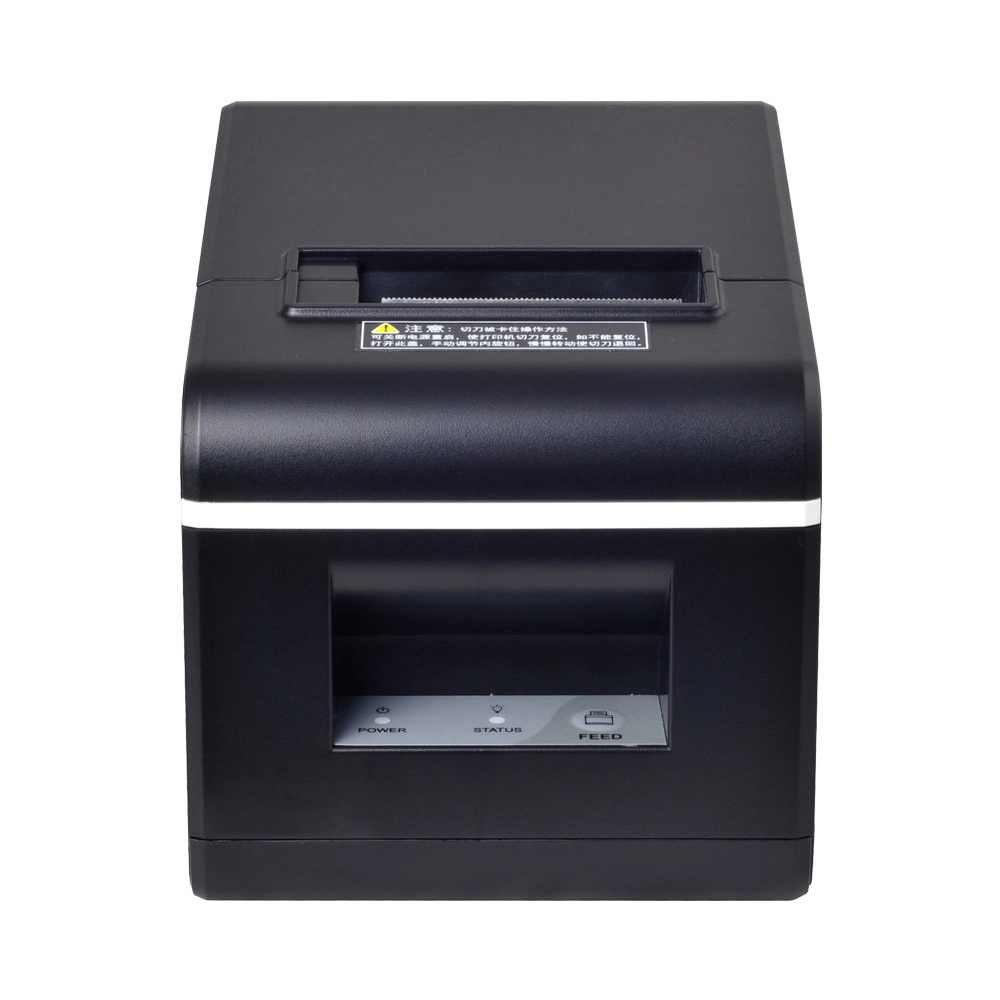
New Model Thermal Printer Bill Printer Manufacturer Portable Printer for Receipt
New Model Thermal Printer, a state-of-the-art bill printer designed for modern retail and hospitality environments. This printer combines advanced technology with user-friendly features, ensuring fast and efficient printing of high-quality receipts. Its sleek design complements any workspace, while multiple connectivity options make it easy to integrate into your existing POS systems.

Desktop Touch Screen POS Systems 12.1'' Android Windows Manufacturer
Our Desktop Touch Screen POS Systems feature a 12.1'' display, supporting both Android and Windows platforms. Engineered for high performance. The intuitive touch interface simplifies transactions and enhances customer engagement. With a sleek design and robust construction, our POS systems are perfect for businesses looking to improve efficiency and elevate the shopping experience.

15.6 Inch Windows POS Terminal with VFD Display, Foldable Aluminum Stand Touch Screen POS for Retail & Hospitality
This 15.6-inch POS terminal is built to meet the needs of modern retail and hospitality environments. Powered by a stable Windows operating system, it ensures smooth performance for various point-of-sale applications. The device features a crisp, responsive touch screen and a built-in VFD customer display, allowing customers to view transaction details clearly. Its aluminum alloy stand offers a sleek, professional appearance while providing enhanced durability and stability for busy checkout counters. Ideal for retail stores, restaurants, and service-based businesses, this POS machine delivers a reliable and customer-friendly checkout experience.

Point of Sale System with Thermal Printer All in One Pos Dual Touchscreen Pos with Barcode Scanner Supplier
FAVORPOS presents the all-in-one Point of Sale System with Thermal Printer, featuring dual touchscreens and an integrated barcode scanner. As a leading POS with NFC factory and barcode scanner supplier, we deliver reliable, efficient solutions tailored for your business needs.
Get in touch
Interested in becoming a POS system dealer? Contact us for more information and start the process of joining our dealer network.
We look forward to working with you to expand the market together.


Copyright © 2025 Favorpos All Rights Reserved.
