
Are mobile POS systems for supermarkets secure and PCI compliant?
- 1. How can I integrate weighted-produce scales and PLU management into a cloud POS without slowing checkout or expanding PCI scope?
- 2. What exact network segmentation and configuration steps reduce PCI scope when deploying mobile POS terminals on the sales floor?
- 3. How can I validate a mobile POS app or vendor for MPoC/PIN security before purchase (a buyer checklist)?
- 4. What inventory and perishable-item features must a supermarket POS include so I don't need separate inventory software?
- 5. For high-volume checkouts, what hardware and throughput criteria should I test (printers, scanners, EMV/contactless readers) before committing?
- 6. Are mobile POS systems for supermarkets secure and PCI compliant?
1. How can I integrate weighted-produce scales and PLU management into a cloud POS without slowing checkout or expanding PCI scope?
A common pain point for supermarkets is combining scale-integrated produce (PLU/weight capture) with cloud-based POS checkout while maintaining throughput and minimizing PCI scope. To do this correctly:
Architecture: Use a local, store-side POS application or edge gateway that handles scale interfacing (serial/USB/Ethernet) and PLU logic, then forwards only tokenized payment references and sales events to the cloud. This avoids sending raw PANs across local-to-cloud integrations and reduces the number of systems in PCI scope.
Scale certification and drivers: Choose scales certified for retail (check weights and OIML/NAWI compliance where applicable) and provide drivers or an SDK compatible with your POS vendor. Confirm the POS provider supports scale firmware updates and vendor-supplied drivers so weight capture is deterministic and fast.
PLU and price rules: Ensure the POS supports hierarchical PLU directories, quick PLU lookup, bulk PLU imports, and fast produce search. Implement local caching of PLU tables at the register or edge node so lookups remain sub-100ms during peak times.
Checkout flow optimization: Capture weight and calculate price locally before initiating the payment sequence. That prevents re-entries or manual price overrides that cause delays and reconciliation errors.
PCI scope considerations: Keep payment entry on a validated payment device, using P2PE or a mobile payment app validated under MPoC, so the scale/PLU systems do not process or store PANs. Document the data flows in a network/data-flow diagram and use segmentation to separate the POS/scale network from store back-office systems.
Failure modes and reconciliation: Implement an offline buffer that records signed, timestamped transactions locally if connectivity is lost; when connectivity returns, reconcile with cloud receipts and payment provider tokens. Keep audit logs for each weigh-and-price event for dispute resolution.
This approach preserves high throughput for produce lanes while limiting PCI scope through encryption/tokenization and clear network segmentation.
2. What exact network segmentation and configuration steps reduce PCI scope when deploying mobile POS terminals on the sales floor?
Mobile POS on the shop floor (tablets, smartphones, handheld terminals) often causes merchants to fear increased PCI scope. You can reduce scope with practical technical controls:
Validate the payment model: If the mobile POS app never receives PANs (it forwards to a validated P2PE device or uses a hosted payment SDK/MPoC flow), scope is reduced. Prefer models where cardholder data is encrypted on capture and never exposed to the app.
VLANs and ACLs: Put mobile POS endpoints on a dedicated VLAN that is isolated from back-office systems and inventory servers. Use strict ACLs at the switch/router to restrict traffic to only required payment gateway and backend IPs/ports.
Firewall rules and egress filtering: Block all outbound traffic except to the payment processor, update servers, and approved cloud APIs. Enforce TLS 1.2+/1.3 and certificate pinning where possible.
Use a validated P2PE or MPoC implementation: With P2PE, card data is encrypted at the point of interaction and decrypted only in a secure environment, which dramatically reduces the number of in-scope systems. MPoC provides validation paths for mobile payments on COTS devices.
MDM and device hardening: Enroll each mobile POS in an MDM/EMM solution to enforce OS updates, app whitelisting, remote wipe, screen-lock policies, and prevent sideloaded apps. Disable developer options, USB debugging, and unneeded wireless services.
Logging, monitoring, and ASV scans: Ensure the mobile POS environment and any internet-facing components are included in quarterly ASV scans and continuous monitoring. Maintain centralized logging (SIEM) for mobile endpoints and POS servers to detect anomalies.
Operational processes: Use unique service accounts for devices, rotate credentials, enforce 2FA for admin interfaces, and require merchants to obtain an Attestation of Compliance (AOC) or evidence that their payment solution is validated.
When implemented together, these steps reduce the number of systems that process or store cardholder data—simplifying PCI DSS compliance and lowering audit scope for supermarkets using mobile POS solutions.
3. How can I validate a mobile POS app or vendor for MPoC/PIN security before purchase (a buyer checklist)?
Buying a mobile POS requires vendor validation beyond marketing claims. Use this practical checklist to vet MPoC and PIN security:
Documentation: Ask for the vendor's Attestation of Compliance (AOC) or certification evidence. For mobile payments, request MPoC validation evidence from PCI SSC or documentation that the solution uses a validated P2PE or SPE (Software-based PIN Entry) approach.
Security programs and audits: Request recent third-party security assessments: QSA reports (if they claim PCI DSS compliance), SOC 2 Type II reports for cloud services, and results from third-party penetration tests with remediation notes.
P2PE and tokenization: Confirm whether card data is encrypted using a vendor or processor validated P2PE solution. If the vendor uses tokenization, ask who manages the token vault and where tokens are stored.
Software lifecycle and S-SDLC: Verify the vendor follows a secure software development lifecycle, signs their app binaries, and publishes a disclosure policy for vulnerabilities (and timelines for fixes).
Device and OS support: Check which device OS versions are supported and the vendor’s policy for OS updates and EOL behavior. Ask how the vendor prevents rooted/jailbroken devices from connecting.
Data flow diagrams: Require detailed data-flow diagrams that show where PANs are captured, encrypted, transmitted, and stored. Ensure that non-payment systems are out of scope.
Operational SLA and incident response: Get an SLA for security patching, incident response times, and a published breach-notification process.
References and pilots: Run an in-store pilot during peak hours to measure latency, throughput, and operational issues. Speak to other supermarket customers about settlement reconciliation and chargeback experiences.
If a vendor cannot provide clear, independently validated evidence for MPoC/P2PE or the relevant security audits, treat that as a red flag and escalate for alternative providers or additional compensating controls.
4. What inventory and perishable-item features must a supermarket POS include so I don't need separate inventory software?
Supermarket inventory has unique requirements (perishables, multiple units of measure, supplier lot tracking). When evaluating POS vendors, ensure they provide these capabilities:
Expiry and lot/batch tracking: Support per-item expiration dates, batch/lot numbers, and automatic FEFO/FIFO costing. The POS should allow scanning or manual entry at receiving and tie lot details to each sale for recalls.
Multi-UOM and scale integration: Handle multiple units of measure (kg, lb, each) and automatic conversion for PLUs and bulk items; integrate seamlessly with certified scales so inventory counts adjust by weight.
Real-time stock levels and hold/reservation: Offer real-time updates across tills, self-checkout, and mobile POS; implement reservation/hold for online orders or click-and-collect to avoid overselling perishable stock.
Automatic reorder and supplier EDI: Provide reorder-point triggers based on consumption patterns, lead times, and safety stock. Native EDI or API integrations with suppliers reduce manual PO work and speed replenishment.
Promotions, matrix pricing, and markdowns: Support complex promotions (BOGO, mix-and-match, weighted discounts), time-based markdowns, and scheduled price changes that respect expiry windows.
Shrinkage and cycle counts: Built-in cycle count workflows with variance reporting, integration with loss-prevention alerts, and support for scheduled blind counts.
Reporting and analytics: Inventory aging reports, velocity analysis, yield calculations for prepared foods, and supplier performance metrics. Real-time analytics help reduce spoilage and optimize ordering frequency.
If these features are missing from a prospective POS, expect additional integrations or middleware—and additional cost and complexity—so prioritize supermarket-specific inventory capabilities during selection.
5. For high-volume checkouts, what hardware and throughput criteria should I test (printers, scanners, EMV/contactless readers) before committing?
Supermarkets need hardware that survives peak loads and minimizes friction. Use these measurable criteria when testing:
Barcode scanners: Test sustained read rate and multi-scan throughput. In-lane hand scanners and fixed-mount scanners should consistently decode common retail barcodes (EAN/UPC, GS1-128) at distances expected in your lanes. Verify compatibility with damaged/dirty labels and printed scale labels (variable widths).
Receipt printers: Confirm thermal printers can handle your peak transactions per minute without buffering (test continuous receipts for 30 minutes). Check cutter reliability, paper roll capacity, and support for non-shift interruptions.
EMV/contactless readers: Validate chip transaction latency and contactless tap times. Perform tests for EMV chip + PIN, contactless (NFC), and mobile wallets to ensure authorizations and offline fallbacks complete within acceptable customer experience timeframes.
Integrated scales and ruggedness: Test scales for repeated weigh cycles and edge-case weights. Confirm environmental resilience (temperature/humidity) for fresh produce sections.
Network resiliency and failover: Test transactions under simulated network latency and packet loss. Verify offline-sale modes, local queuing, and automatic reconciliation when connectivity restores.
Lifecycle and maintenance: Request MTBF/MTTR figures where available and clarify service-level agreements for hardware replacement. Prefer devices with field-replaceable parts and quick-swap batteries for handhelds.
Security certifications: Ensure payment terminals are EMV Level 1/Level 2 certified and, if applicable, PTS-validated for PIN entry. For mobile devices, ensure vendors support secure card readers that are approved or validated for your payment flow.
Run a 2–4 week in-store pilot across multiple lanes and busiest times to gather real throughput metrics before full rollout.
6. Are mobile POS systems for supermarkets secure and PCI compliant?
Short answer: They can be—if built and deployed to current PCI requirements and industry best practices. Here’s what to check and how supermarkets achieve compliance:
Understand the standard: PCI DSS (the card industry standard) applies to environments that store, process, or transmit cardholder data. PCI SSC has programs relevant to mobile commerce, including Mobile Payments on COTS (MPoC) and Software-based PIN Entry (SPE). Point-to-point encryption (P2PE) and validated solutions reduce the number of systems in scope.
Choose validated components: Prefer payment flows that use validated P2PE solutions or MPoC-validated apps. P2PE encrypts cardholder data at the entry point, meaning fewer systems are in PCI scope. MPoC provides a validation framework for mobile apps on general-purpose devices.
Merchant level and assessments: Large supermarkets (Level 1 merchants: typically >6 million Visa transactions per year) require an annual Report on Compliance (ROC) by a QSA. Many supermarkets will also need quarterly ASV scans and ongoing internal/external vulnerability management as part of PCI DSS 3.x/4.x requirements.
Technical controls: Use strong encryption (tokens, TLS 1.2+/1.3), enforce device hardening and MDM, implement network segmentation, maintain logging/monitoring, perform regular penetration testing, and ensure remote wipe/lock capabilities for lost devices.
Operational controls: Maintain policies for device acceptance, secure update processes, change control, incident response, and employee training on cardholder data handling. Require vendor-supplied AOC documents and periodic security attestations.
Scope reduction options: Deploying validated P2PE, using a trusted payment processor that tokenizes PANs, and implementing hosted payment pages or redirect/SDK flows can significantly reduce PCI DSS scope for your supermarket’s systems.
Validation and evidence: Before purchase, request audit evidence (AOC, SOC reports, penetration-test summaries, and MPoC/P2PE certificates). During implementation, ensure your QSA or compliance partner reviews the deployment and documents any compensating controls.
When these controls are implemented, mobile POS can be both secure and PCI compliant. The choice of payment flow (P2PE vs MPoC vs hosted payment SDK), vendor transparency, and in-store operational discipline determine the final compliance posture.
For supermarkets, combining validated encryption/tokenization, strict segmentation, robust MDM, and supermarket-grade inventory/scale integration creates a secure, high-performance checkout ecosystem.
Advantages of a compliant supermarket POS include lower audit scope and liability, faster checkout experience, lower shrink due to better inventory controls, and improved customer trust from modern EMV and contactless acceptance.
Contact us for a quote: visit www.favorpos.com or email sales2@wllpos.com.

Why a 15.6” Touch POS Terminal Is Becoming the New Standard in High-Traffic Retail

Beyond Checkout: How a 15.6-Inch Aluminum POS System Redefines Retail Efficiency

Understanding 15-Inch Aluminum POS Terminals in Modern Commercial Use

The Smart Way to Check Prices: How a 10.1-Inch Wall-Mounted Price Checker Transforms Retail Stores

A Smarter Checkout Experience: The 15-Inch Dual-Screen POS Built for Modern Retail
For Restaurants & Cafes
If there is a problem with the device, how can I get technical support?
You can contact our technical support team by phone, email or online customer service. We provide 24/7 support to ensure that your issues are resolved promptly and the system is up and running.
For ODM
What is the lead time for ODM production?
The lead time depends on multiple factors, including product complexity, production volume and material availability. Generally speaking, the time from design confirmation to delivery may range from a few weeks to a few months. We will provide a detailed schedule at the start of the project and try our best to deliver on time.
Can we provide our own designs?
Of course. We welcome customers to provide their own design concepts and specifications. Our design team will work with you to ensure that your design is implemented in the manufacturing process and make necessary optimizations.
For Bakeries
Can you run a loyalty program through the system?
Yes, our POS system supports loyalty and rewards programs, and you can offer incentives such as discounts, free items, etc. to returning customers.
For E-commerce
How long does it take to implement a POS system?
Implementation time depends on the complexity of the customization, but it can usually be completed within a few weeks, including testing and training.

HD Dual Screen POS Machine Aluminum Hardware Android Windows Supplier
This dual-screen POS machine supports both Android and Windows systems, providing flexibility for various applications. The dual screens enhance customer interaction and streamline the checkout process, making transactions quicker and more engaging. Perfect for modern businesses looking to elevate their service and improve customer satisfaction, this POS machine is your ultimate partner in success!
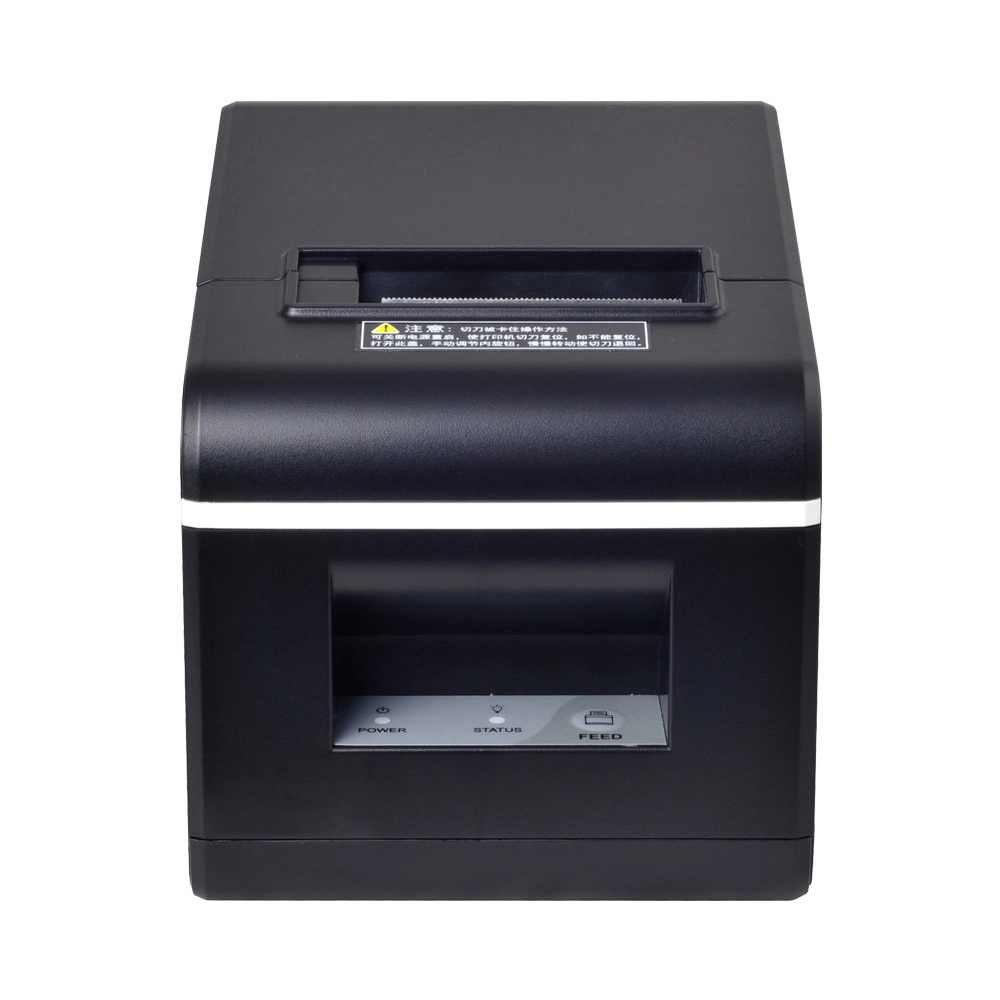
New Model Thermal Printer Bill Printer Manufacturer Portable Printer for Receipt
New Model Thermal Printer, a state-of-the-art bill printer designed for modern retail and hospitality environments. This printer combines advanced technology with user-friendly features, ensuring fast and efficient printing of high-quality receipts. Its sleek design complements any workspace, while multiple connectivity options make it easy to integrate into your existing POS systems.

Desktop Touch Screen POS Systems 12.1'' Android Windows Manufacturer
Our Desktop Touch Screen POS Systems feature a 12.1'' display, supporting both Android and Windows platforms. Engineered for high performance. The intuitive touch interface simplifies transactions and enhances customer engagement. With a sleek design and robust construction, our POS systems are perfect for businesses looking to improve efficiency and elevate the shopping experience.

15.6 Inch Windows POS Terminal with VFD Display, Foldable Aluminum Stand Touch Screen POS for Retail & Hospitality
This 15.6-inch POS terminal is built to meet the needs of modern retail and hospitality environments. Powered by a stable Windows operating system, it ensures smooth performance for various point-of-sale applications. The device features a crisp, responsive touch screen and a built-in VFD customer display, allowing customers to view transaction details clearly. Its aluminum alloy stand offers a sleek, professional appearance while providing enhanced durability and stability for busy checkout counters. Ideal for retail stores, restaurants, and service-based businesses, this POS machine delivers a reliable and customer-friendly checkout experience.
Get in touch
Interested in becoming a POS system dealer? Contact us for more information and start the process of joining our dealer network.
We look forward to working with you to expand the market together.


Copyright © 2025 Favorpos All Rights Reserved.
