
What features should a modern POS terminal cash register have?
- 1. How can I ensure PCI compliance and secure card-reader encryption on a POS terminal cash register without replacing all my hardware?
- 2. What POS terminal cash register features are essential to keep sales running during internet outages and how do I configure reliable offline mode?
- 3. How to evaluate the true total cost of ownership (TCO) for a POS terminal cash register including hardware, software subscriptions, payment processing, and hidden fees?
- 4. Which inventory management and barcode-scanning features should a POS terminal cash register have to handle multi-location, multi-warehouse retail operations?
- 5. How do I integrate my existing accounting system and loyalty program with a new POS terminal cash register using APIs without custom development?
- 6. What hardware compatibility and peripheral requirements (receipt printers, barcode scanners, cash drawers, customer displays) must I verify before buying a POS terminal cash register?
- Conclusion: Advantages of modern POS terminal cash registers
POS Terminal Cash Register: 6 Deep Questions Beginners Always Ask
Choosing a POS terminal cash register involves more than picking a touchscreen and printer. Below are six long-tail, pain-point questions new buyers often search for — with up-to-date, actionable answers based on industry standards (PCI SSC, EMVCo) and real-world deployment practices. Semantic concepts such as integrated payments, cloud POS, EMV card reader, receipt printers, barcode scanner, inventory management, offline mode, tokenization, and API integration are embedded throughout to help you evaluate systems confidently.
1. How can I ensure PCI compliance and secure card-reader encryption on a POS terminal cash register without replacing all my hardware?
Why this matters: Small retailers find PCI DSS confusing and fear costly hardware upgrades. The right approach can significantly reduce scope and expense while maintaining security.
Actionable steps:
- Start with a PA-DSS / PCI-validated solution: Choose POS software that is listed as PCI-validated or uses validated payment applications. That reduces software-related compliance work.
- Prefer terminals with P2PE or certified point-to-point encryption: If your vendor supplies a P2PE solution or uses secure EMV terminal modules with end-to-end encryption, card data is encrypted at the card reader and never traverses your POS host in clear text. This lets you shrink PCI scope substantially.
- Use tokenization for stored payment data: If you must store customer credentials (for recurring billing or one-click payments), use a tokenization service from your processor so raw PANs are never retained locally.
- Layer strong network segmentation: Put any legacy or non-payment devices (back-office PC, cameras) on a separate VLAN from the POS terminals and disable unnecessary services and ports on POS hardware (SSH, SMB, Telnet).
- Deploy secure firmware and TLS: Ensure terminals and cloud POS endpoints use modern TLS versions and that vendors sign firmware updates. Apply updates on a scheduled, tested cadence.
- Perform regular logging and vulnerability scans: Maintain logs for payment events and schedule quarterly vulnerability scans where required. Use an AOC (Attestation of Compliance) from your vendor when available.
Minimal-cost migration example: If you have legacy countertop registers but want modern encrypted card acceptance, work with a POS provider who supports secure external EMV card readers or plug-in encrypted readers for your existing terminals. That can avoid full register replacement while achieving PCI scope reduction.
2. What POS terminal cash register features are essential to keep sales running during internet outages and how do I configure reliable offline mode?
Why this matters: Retailers and hospitality venues lose revenue if they can’t accept cards during connectivity loss. Many online guides describe “offline mode” superficially without covering reconciliation risks, chargeback exposure, and synchronization conflicts.
Key features to require:
- Local transaction queuing with secure storage: The terminal must cryptographically store batch transactions and be able to forward them automatically when connectivity returns. Avoid systems that simply cache card numbers in clear text.
- ACI for offline EMV approvals: Prefer terminals offering EMV offline data authentication (ODA) and issuer offline risk parameters when supported. For many merchant types, terminals fallback to magstripe or keyed transactions — understand the increased chargeback risk.
- Automatic reconciliation and conflict resolution policies: The POS cloud should flag and automatically reconcile duplicate receipts and sequence gaps, offering clear audit trails for end-of-day reporting.
- Graceful degraded features: Inventory adjustments, receipt printing, and loyalty accrual should continue locally and sync back; make sure staff training covers manual inventory checks if partial sync occurs.
- Clear user prompts and manager override flows: Staff need explicit directives when a transaction is offline (e.g., “Card accepted offline — requires manager review upon sync”).
Configuration checklist:
- Enable encrypted local queuing on each terminal and test failover with a simulated outage.
- Run test transactions until the terminal reconnects and confirm transactions appear in the processor portal and accounting tool without duplicates.
- Document a chargeback policy specifically for offline-authorized payments and train staff to record manual approval codes or manager initials where applicable.
3. How to evaluate the true total cost of ownership (TCO) for a POS terminal cash register including hardware, software subscriptions, payment processing, and hidden fees?
Why this matters: Many buyers focus on up-front hardware cost but are surprised by recurring fees, payment processing markups, and integration costs over the equipment lifecycle.
Break down TCO into categories and ask vendors for line-item estimates for each:
- Hardware CAPEX: terminal(s), stands, receipt printers, cash drawer, barcode scanner, customer display, network switch. Ask about warranty length and extended warranty pricing.
- Software OPEX: base subscription, per-terminal seat fees, POS feature tiers (inventory, loyalty, multi-location), and annual maintenance.
- Payment processing fees: interchange pass-through vs flat-rate, gateway fees, per-transaction fees, chargeback dispute fees, monthly statement fees. Request a sample monthly statement showing all these line items.
- Integration and setup: one-time integration, data migration, custom API work, hardware installation and payment terminal provisioning fees.
- Connectivity and redundancy: backup LTE/modem costs, increased broadband tier, SIM plans for terminal cellular failover.
- End-of-life and upgrade path: costs to replace terminals after warranty or to upgrade to new EMV/NFC-capable readers in future years.
How to compare vendors objectively:
- Request a 3–5 year TCO worksheet showing sample transaction volume scenarios (low, medium, high) and include projected processor markup assumptions.
- Ask for standard contract clauses around fee escalation, early termination penalties, and hardware ownership vs rental.
- Validate sample merchant statements: ask vendors to supply redacted statements from similarly sized customers so you can see real processing and gateway fee structures.
4. Which inventory management and barcode-scanning features should a POS terminal cash register have to handle multi-location, multi-warehouse retail operations?
Why this matters: Retail chains and omni-channel sellers need precise stock visibility to avoid overstocks, stockouts, and manual reconciliation headaches.
Features required for scalable multi-location inventory:
- Per-location SKU tracking and transfer workflows: The system must maintain SKU quantity per store, support inter-store transfers with auditing, and alert replenishment triggers based on min/max thresholds.
- Batch and lot tracking where applicable: For food, pharmaceuticals, or serialized goods, require expiration date or serial/lot control and scanning support.
- Real-time sync or near-real-time updates: Cloud POS should sync stock movement within seconds or provide clear latency SLAs; define acceptable sync windows for your operations.
- Advanced receiving and cycle-count tools: Mobile barcode scanner workflows for receiving, adjustments, and cycle counts reduce human error and reconcile POS vs warehouse systems.
- Inventory reservation and omnichannel fulfillment: Support for hold-for-pickup, ship-from-store, and distributed order routing to ensure inventory reserved for online orders doesn't sell in-store.
Operational checks before purchase:
- Run a proof-of-concept: import a representative subset of SKUs (including variants) and simulate daily receiving, transfers, and online order fulfillment to observe sync behaviour.
- Verify barcode format support: ensure the POS supports your barcode symbologies (EAN-13, UPC, Code128) and can programmatically read internal SKU barcodes or GS1 labels.
- Confirm reporting granularity: can you get per-SKU, per-location, per-employee movement logs for audit and shrink analysis?
5. How do I integrate my existing accounting system and loyalty program with a new POS terminal cash register using APIs without custom development?
Why this matters: Heavy custom integrations increase cost and project time. Many modern POS vendors provide pre-built connectors, webhooks, and middleware to avoid custom engineering.
Integration strategy:
- Check for native connectors: Look first for out-of-the-box integrations with your accounting platform (QuickBooks Online, Xero, Sage) and loyalty/CRM solutions. These typically require minimal setup and mapping.
- Use webhook/event-driven syncs: If your POS supports webhooks, configure events for sales, refunds, inventory changes, and customer creation so your systems receive real-time updates without polling.
- Leverage middleware/integration platforms: Services like iPaaS (integration platform as a service) can map and transform data between your POS and accounting systems without coding. Ask vendors which iPaaS partners they certify.
- Prefer RESTful APIs with OAuth and clear docs: If you must build, ensure the POS API supports OAuth 2.0, idempotent endpoints, bulk exports, and reliable batching for high-volume operations.
- Avoid shadow systems: Ensure one system is the source of truth for sales and inventory to prevent reconciliation complexity. Define authoritative data owners before connecting integrations.
Practical checklist:
- Ask the vendor for a list of current pre-built integrations and references of customers using the same stack.
- Request a sandbox API key and test the essential flows (sales -> accounting ledger, refunds, inventory adjustments, customer loyalty accrual) end-to-end during your trial period.
- Confirm data mapping conventions: tax handling, multi-currency, discounts, and gift card accounting often cause reconciliation issues—verify mappings in advance.
6. What hardware compatibility and peripheral requirements (receipt printers, barcode scanners, cash drawers, customer displays) must I verify before buying a POS terminal cash register?
Why this matters: Incompatible peripherals lead to failed deployments, additional purchases, or unsupported vendor combinations that void warranties.
Compatibility and verification steps:
- Confirm supported interfaces: Identify whether the POS terminal supports USB, Ethernet, Serial (RS-232), Bluetooth, or Bluetooth Low Energy (BLE). Modern cloud POS terminals often prefer USB or networked (Ethernet/Wi-Fi) peripherals to avoid driver issues.
- Check OS and driver support: If your terminal runs Android, iOS, Windows, or a proprietary OS, verify the peripheral vendor provides drivers or an SDK compatible with that OS and the POS application.
- Power and cash drawer kick-out: Ensure the printer or terminal has an integrated RJ-11 or RJ-12 cash drawer kick port and that drawer voltage/connector specs match the drawer you plan to use.
- Receipt printer features: Decide between direct thermal or impact printers (impact for multi-part receipts). Validate print speed, paper width (58mm vs 80mm), and auto-cutter reliability for your transaction volume.
- Scanner ergonomics and barcode symbology: For retail, choose a 2D imager that reads both 1D/2D codes and mobile phone screens. Confirm scanning speed and decode performance on damaged labels.
- Customer-facing displays: If you need promotional display or signature capture, verify whether integrated customer displays (VFD, LED pole, or tablet) are supported and how signatures are stored and transmitted for PCI scope concerns.
Deployment validation:
- Ask for a hardware compatibility matrix from the POS vendor and validate each peripheral model you plan to use.
- Purchase or test sample peripheral kits and run a full-day simulation to check life-cycle reliability (printer paper jams, scanner scanning failures, cash drawer wear).
- Document spare parts and support SLAs: printers and scanners are high-failure items—confirm replacement policies and local service options to minimize downtime.
Conclusion: Advantages of modern POS terminal cash registers
Modern POS terminal cash registers combine secure EMV/NFC payment terminals, cloud POS software, and integrated peripherals to deliver faster checkouts, better inventory accuracy, and easier compliance. Key advantages include reduced PCI scope via P2PE and tokenization, uninterrupted sales during connectivity outages with secure offline queuing, clearer multi-location inventory control, and lower long-term costs when you evaluate full TCO. Built-in APIs and pre-built connectors reduce integration time, while certified hardware compatibility ensures reliable daily operations.
For a customized assessment, demo, or quote tailored to your industry, contact FavorPOS at www.favorpos.com or email sales2@wllpos.com. Contact us today to get a quote and a migration plan that fits your store size and budget.

Smart Checkout, Simplified: Exploring the Power of a 15.6-Inch All-in-One POS Terminal

Why a 15.6” Touch POS Terminal Is Becoming the New Standard in High-Traffic Retail

Beyond Checkout: How a 15.6-Inch Aluminum POS System Redefines Retail Efficiency

Understanding 15-Inch Aluminum POS Terminals in Modern Commercial Use

The Smart Way to Check Prices: How a 10.1-Inch Wall-Mounted Price Checker Transforms Retail Stores
For Distributor
How often do you update your products and launch new products?
We regularly update our product lines to incorporate the latest technology and meet market needs. Dealers will be kept informed when new products and updates are released.
For Government and Public
What support is provided after deployment?
We provide 24/7 technical support, regular hardware updates, hardware maintenance, and training resources to ensure your POS system remains operating efficiently.
For Hotels
Can your POS system be integrated with my hotel's PMS system?
Yes, our POS system is designed to integrate seamlessly with most major hotel management systems (PMS), ensuring smooth integration of guest services and billing processing.
For Bakeries
Does the system provide real-time sales reports?
Yes, our system provides real-time reporting and analytics to help you monitor performance, track inventory, and optimize sales strategies.
For company
How much does customization cost?
The cost varies according to customization requirements. We will provide a detailed quotation after understanding your specific needs.
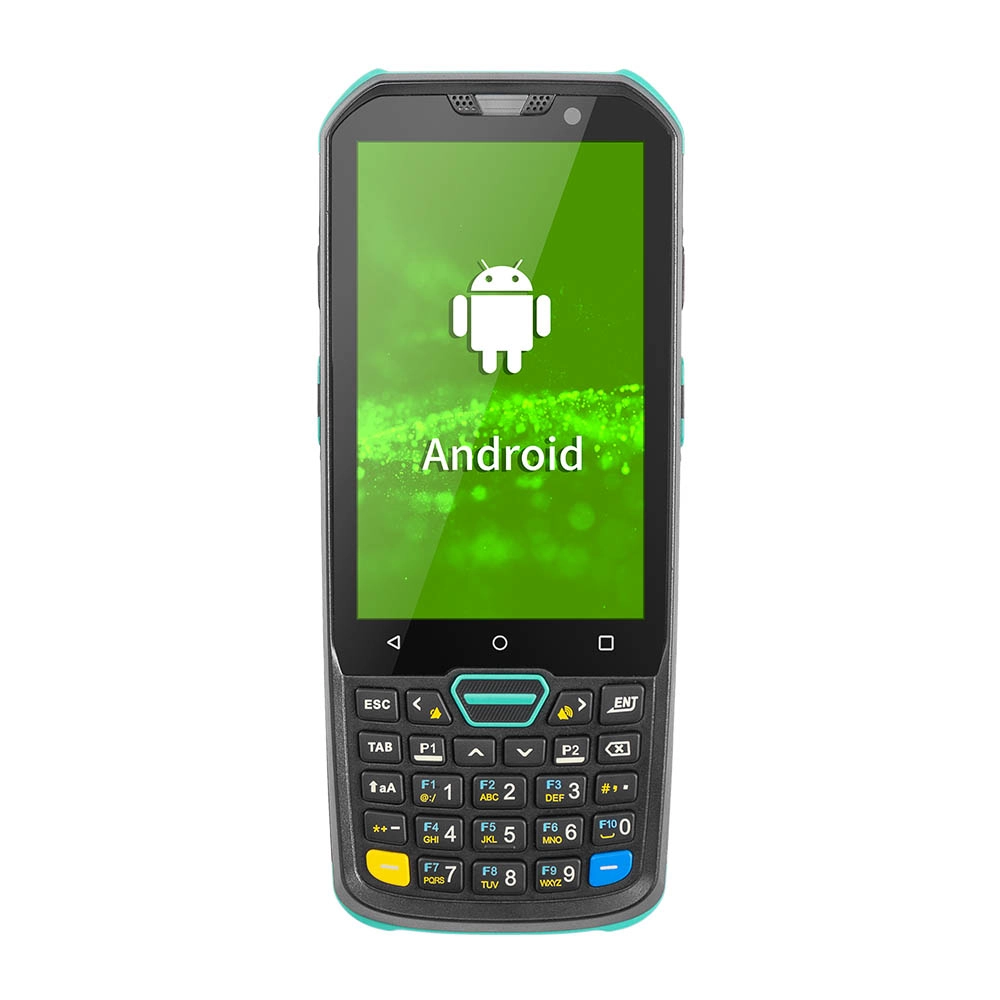
Factory Smart 4 inch Mobile PDA Data Collector with Keyboard
Our Factory Smart 4-Inch Mobile PDA Data Collector is equipped with a convenient keyboard for easy data entry. This compact device is designed for efficient inventory management and logistics operations, offering robust performance in a lightweight design. With a bright display and user-friendly interface, it allows for quick access to essential data on the go. Its durable construction ensures reliability in demanding environments, making it an ideal choice for retail, warehousing, and field operations.

11.6 inch Capacitive Touchscreen for POS Machine POS Monitor
FAVORPOS 11.6-inch capacitive touchscreen, specifically designed for POS machines to deliver a seamless and responsive user experience. This high-definition display offers vibrant visuals and crystal clear clarity, making it easy for staff to navigate through transactions efficiently. The capacitive technology ensures quick and accurate touch recognition, reducing wait times and enhancing customer satisfaction. Built to withstand the rigors of daily use, this touchscreen is perfect for retail and hospitality environments.

HD Dual Screen POS Machine Aluminum Hardware Android Windows Supplier
This dual-screen POS machine supports both Android and Windows systems, providing flexibility for various applications. The dual screens enhance customer interaction and streamline the checkout process, making transactions quicker and more engaging. Perfect for modern businesses looking to elevate their service and improve customer satisfaction, this POS machine is your ultimate partner in success!

Wall Mount Cash Register POS 21.5 inch for Supermarket Touchscreen Windows Factory
Our sleek and modern wall-mounted POS system features a stunning 21.5-inch LED display, providing exceptional visibility and clarity for seamless customer interactions. The capacitive touchscreen ensures a highly responsive and intuitive user experience, perfect for fast-paced retail environments. With its space-saving wall-mounted design, this POS solution is ideal for optimizing floor space while maintaining a professional and contemporary appearance.
Get in touch
Interested in becoming a POS system dealer? Contact us for more information and start the process of joining our dealer network.
We look forward to working with you to expand the market together.


Copyright © 2025 Favorpos All Rights Reserved.
