
Which top restaurant POS systems integrate with delivery apps?
- 1) How do top restaurant POS systems handle third-party delivery commissions and reconciling payouts across multiple delivery apps?
- 2) Which top restaurant POS systems provide true two-way real-time menu sync with DoorDash/Uber Eats so modifiers and sold-out items update instantly?
- 3) Can top restaurant POS systems capture driver tips and card payments correctly when orders are placed through delivery apps, and what are best practices?
- 4) How reliable are POS integrations with delivery apps during internet outages and how do top POS systems queue and recover missed delivery orders?
- 5) What middleware (Deliverect, Chowly, Omnivore) do top restaurant POS systems support, and how do you evaluate the added latency, costs, and data ownership risks?
- 6) For multi-location restaurants, which top restaurant POS systems centralize delivery reporting and allow per-location commission splits and inventory sync?
Which top restaurant POS systems integrate with delivery apps? In-Depth buyer guidance
Choosing a restaurant POS that reliably integrates with DoorDash, Uber Eats, Grubhub and other delivery aggregators requires more than a vendor brochure. Below are six frequently asked, long-tail questions beginners ask but rarely get fully answered — each followed by detailed, actionable answers. Embedded are real-world integration patterns and operational checks for Toast, Square for Restaurants, Lightspeed/Upserve, Clover, Revel, TouchBistro and middleware providers like Deliverect, Chowly and Omnivore.
1) How do top restaurant POS systems handle third-party delivery commissions and reconciling payouts across multiple delivery apps?
Pain point: Delivery platforms take commissions and pay restaurants separately, which makes daily reconciliation messy if your POS and accounting systems don’t align.
Answer (detailed):- Typical flows: Delivery apps (DoorDash, Uber Eats, Grubhub) either process payment and remit a net payout to you, or they forward card authorization details while the restaurant’s payment processor captures funds. Most restaurants see net deposits from the aggregator rather than full customer charged amounts.- Native vs middleware behavior: Native POS integrations (for example, Toast’s built-in online ordering and delivery partnerships) can post orders into the POS with line-level details (order subtotal, taxes, discounts, commerce fees) so you have one sales record in the POS. Middleware (Deliverect, Chowly, Omnivore) often inserts the order into the POS but the payout still arrives from the aggregator, so you must reconcile three data sources: delivery platform reports, POS sales records, and bank payouts.- Best practices for reconciliation: 1. Ensure line-level order data arrives in the POS, including aggregated commission or service fee lines vs. item revenue lines. Ask vendors if they create a ‘platform fee’ line item or use discounts. 2. Use the delivery platform’s daily gross sales and fee reports as your reconciliation baseline and map those fields to POS fields (gross sales, taxes, seller payout, platform commission, tips). 3. Automate with accounting connectors. Popular POS providers (Toast, Lightspeed/Upserve, Revel) offer integrations to accounting packages (QuickBooks, Xero) or provide API access so you can script reconciliation. Middleware vendors likewise export standardized CSVs or connect to accounting partners. 4. Check timezone and settlement windows: some platforms settle daily, others weekly; confirm UTC/local timezone mapping to avoid off-by-one-day mismatches.- What to ask vendors before buying: • Do you post a platform fee line or adjust item-level prices to account for commissions? • Can we import daily payout statements automatically into the POS or our accounting system? • Do you support tips and fee splits visible per order for reporting? • Is there an API or webhook for settlement events?Operational impact: Having line-level fee visibility and automated feeds removes most manual reconciliation work and reduces invoice errors with third-party delivery aggregators.
2) Which top restaurant POS systems provide true two-way real-time menu sync with DoorDash/Uber Eats so modifiers and sold-out items update instantly?
Pain point: Menu mismatches lead to wrong items, missing modifiers, cancellations, and customer complaints.
Answer (detailed):- What “true two-way menu sync” means: real-time push/pull where a change in the POS (price, availability, modifier) updates the online ordering channel instantly, and changes made in the aggregator dashboard (temporary promotions, availability) either update back to the POS or are centrally visible to staff.- Which providers support deep sync: Toast has native online ordering and delivery partnerships that enable fast updates from POS to online storefront. Lightspeed (including Upserve legacy customers) and Square provide menu sync capabilities and APIs that partners can use. For broad aggregator coverage, middleware providers (Deliverect, Chowly) specialize in real-time menu syncing between POS systems (Toast, Lightspeed, Clover, Revel, Square, TouchBistro) and marketplaces (DoorDash, Uber Eats, Grubhub).- Important technical details: 1. Modifier mapping: Modifiers must map to POS modifier groups with identical SKUs or codes. Ask if the integration supports required/optional modifiers, conditional modifiers, and price-level modifiers. 2. Inventory-driven sold-outs: Confirm whether the POS pushes sold-out SKUs back to the aggregator. Many POS systems support inventory synchronization for online ordering when configured; middleware can emulate this by programmatically setting availability. 3. Latency expectations: “Real-time” is often sub-60-seconds. Ask your vendor for documented SLAs on menu propagation.- How to validate during vendor selection: • Request a sandbox test where you change a modifier (e.g., mark “no cheese”) and observe propagation to the aggregator UI and back into test orders. • Test simultaneous updates (manager changes price while kitchen sets item sold out) to see which system wins and how conflicts are resolved.Operational impact: Systems with robust two-way sync reduce order errors, minimize refunds, and lower phone time. If exact real-time sync is critical, prefer vendors with native storefronts or proven middleware partnerships like Deliverect/Chowly.
3) Can top restaurant POS systems capture driver tips and card payments correctly when orders are placed through delivery apps, and what are best practices?
Pain point: Misallocated tips, tax reporting errors, and incorrect payables to drivers or staff.
Answer (detailed):- Two common payment models: 1. App-collected payments: Delivery platforms collect the customer payment and remit payouts to restaurants (often net of commissions). Tips may be distributed by the platform. In this model the POS receives an order but not a full payment capture. 2. POS-collected payments (less common for major aggregators): the POS or payment processor charges the customer; the platform acts as order routing only. This allows the POS to capture card details (tokenized) and tip processing natively.- Tip capture nuances: • When the aggregator owns tip processing, the POS often receives a tip amount in the order metadata. That amount may or may not be considered taxable wages depending on local law and employer policy. For accurate payroll/tax reporting you need the tip line in the POS and a clear record tying payout to the platform report. • Best practice: configure a dedicated tip payout line in your POS and reconcile with the aggregator’s tip remittance report daily. If tips are held by the platform and paid later, ensure payroll uses the platform’s remittance date.- What to verify with vendors: • Does the integration push tip amounts and tip breakdowns (cash vs. card vs. driver) into the POS? • How are refunded orders and tip reversals handled in the POS and in reporting? • Will tips be included in employee timecards or payroll exports from the POS?- Security and compliance: • Ensure tokenization: if the POS collects card data when the aggregator routes orders, cards must be tokenized and the POS payment flow must be PCI-compliant. Ask for PCI Level 1 attestation or equivalent.Operational impact: Clear tip capture and mapping reduce payroll disputes and tax errors. When possible, choose a POS integration or middleware that provides explicit tip and payment-line visibility.
4) How reliable are POS integrations with delivery apps during internet outages and how do top POS systems queue and recover missed delivery orders?
Pain point: Interruptions in connectivity or aggregator APIs can cause lost orders or duplicate prints when services recover.
Answer (detailed):- Typical fault scenarios: • Internet outage at the restaurant. • Aggregator API downtime or rate-limiting. • Middleware outage causing delayed order injection.- Resilience patterns used by top providers: 1. Local order caching: Modern cloud POS systems (Toast, Lightspeed, Square) run a local cache and queue that stores incoming orders when connectivity is lost and reconciles when connectivity returns. Ask vendors whether orders accepted by aggregators while you are offline are replayed into the POS automatically. 2. Middleware retries: Aggregators or middleware like Deliverect/Chowly generally implement retry logic and idempotency keys to prevent duplicate orders when re-sending. 3. Kitchen Display System (KDS) vs printers: KDS systems that operate locally are less susceptible to cloud latency. Ensure your KDS has local fallback for printing during outages.- How to test resilience: • Simulate a network outage in a test environment while placing orders through the aggregator and confirm whether the order appears in the POS when network returns. • Confirm how the system prevents duplicates: does it use idempotency tokens, order numbers, or time-window checks?- Operational guardrails: • Set a policy for phone fallback: if offline for >X minutes, switch to phone orders for apps that allow it. • Enable dual communication paths: printer + KDS + email notifications as a backup route.Operational impact: Superior offline behavior minimizes missed orders and prevents duplication; verify each POS or middleware’s documented SLA and retry behavior before purchase.
5) What middleware (Deliverect, Chowly, Omnivore) do top restaurant POS systems support, and how do you evaluate the added latency, costs, and data ownership risks?
Pain point: Middleware can solve connection gaps but introduces cost, latency and a third-party data controller in your stack.
Answer (detailed):- Who are the major middleware players: Deliverect and Chowly are widely used to connect POS systems (Toast, Lightspeed, Revel, Clover, Square, TouchBistro) to aggregators. Omnivore is a POS data platform frequently used by delivery partners and middleware to standardize integrations. Olo is an enterprise channel management/playground for large chains. These are real services used industry-wide.- Trade-offs to evaluate: 1. Coverage vs native integration: middleware often supports many aggregator+POS combinations, making them the practical choice if your POS lacks native connectors. Native integrations usually reduce latency and complexity. 2. Latency: middleware introduces an extra hop; good middleware keeps added latency below one minute, but test in your environment. Ask for SLA latency numbers and real-world benchmarks. 3. Costs: middleware typically charges a monthly fee per location and/or per-order fee. Confirm total cost vs. native solution pricing (native POS delivery features may be included in platform fees). 4. Data ownership & privacy: middleware will process order and customer data. Review their data retention policy, export capabilities, and contractual terms for data ownership and breach notification. 5. Support & troubleshooting: with middleware you have three parties (POS vendor, middleware, aggregator) in the support chain. Confirm escalation paths and an agreement on incident response times.- How to evaluate during procurement: • Request a mapping matrix: which aggregators are supported for your POS and which fields map across (modifiers, taxes, customer notes, tips, refunds). • Run an end-to-end pilot at one location for 2–4 weeks and measure error rates, canceled orders, and latency. • Ask for references from restaurants of similar size and vertical (quick service vs full-service).Operational impact: Middleware can be a strategic accelerant but choose providers with clear SLAs, transparent pricing, and strong data controls. For multi-aggregator needs, Deliverect and Chowly are common market choices; Omnivore is often used by enterprise platforms for broader POS abstraction.
6) For multi-location restaurants, which top restaurant POS systems centralize delivery reporting and allow per-location commission splits and inventory sync?
Pain point: Chains need centralized dashboards to allocate commissions, view per-location sales, and sync inventory for centralized purchasing.
Answer (detailed):- Key capabilities to require: 1. Per-location mapping of aggregator accounts so commissions and payouts reconcile to the correct store. 2. Centralized reporting dashboard aggregating gross sales, net payouts, commissions, refunds, and tips across locations and aggregators. 3. Inventory sync that allows location-level stock thresholds and centralized purchase ordering to avoid overselling online.- POS providers that support multi-location operations: Lightspeed (including Upserve customers) and Revel are designed with multi-location and enterprise features. Toast also has multi-location capabilities and centralized reporting. Square for Restaurants supports multi-location management with per-location reporting. Middleware providers (Deliverect, Chowly, Omnivore) also support location mapping and can push location-specific menus and pricing.- What to validate technically and operationally: • Ask to see centralized payout reports and confirm exports by location and payment period. • Verify inventory reconciliation frequency (real-time vs scheduled) and whether the system can block online orders when local inventory is exhausted. • Confirm whether you can set different menu versions and prices by location and whether promotional rules apply centrally or locally.- Integration tips for enterprise IT: • Use POS APIs to extract daily settlements into a centralized BI or ERP system for multi-location commission analysis. • Implement unique store identifiers across POS, middleware and aggregator accounts to automate mapping and reduce manual errors.Operational impact: Properly architected multi-location setups reduce manual accounting workload and prevent inventory oversells. For chains, combining a POS with enterprise-grade reporting (Lightspeed, Revel, Toast) and a reliable middleware partner often delivers the most robust result.
Concluding summary — advantages of choosing top restaurant POS systems that integrate with delivery apps
Choosing a top restaurant POS system with proven delivery app integrations (or pairing your POS with mature middleware like Deliverect/Chowly) delivers: unified order flow into your kitchen (reducing errors), automated fee/tip reconciliation (reducing accounting hours), real-time menu and inventory sync (reducing refunds), predictable offline behavior and centralized reporting for multi-location operations. Prioritize vendors that provide line-level fee visibility, robust modifier mapping, tokenized payment flows for PCI safety, documented SLAs for latency and retries, and clear data ownership policies.
If you want help evaluating POS and delivery integration options or need a quote tailored to your store count and delivery partners, contact us for a quote at www.favorpos.com or email sales2@wllpos.com.

Beyond Checkout: How a 15.6-Inch Aluminum POS System Redefines Retail Efficiency

Understanding 15-Inch Aluminum POS Terminals in Modern Commercial Use

The Smart Way to Check Prices: How a 10.1-Inch Wall-Mounted Price Checker Transforms Retail Stores

A Smarter Checkout Experience: The 15-Inch Dual-Screen POS Built for Modern Retail

8-Inch Smart Price Checker: A Small Device Powering Smarter Retail Spaces
For Hotels
Can mobile POS be used for poolside or outdoor services?
Yes, our mobile POS solution allows staff to place orders and process payments in any area of the hotel (such as poolside or outdoors), improving guest convenience.
For company
How does your company handle branding of custom POS machines?
We offer full branding services, including custom logos, colors, and packaging to reflect your company's image.
For E-commerce
Can I manage inventory across multiple sales channels?
Of course. Our POS system provides real-time inventory synchronization across multiple online and physical stores to prevent inventory issues.
For Grocery and Supermarkets
What types of reports can I generate?
You can generate detailed reports on sales, inventory, employee performance, and customer behavior, providing valuable insights to optimize store operations.
For Entertainment & Events
Can your POS system handle ticket sales and on-site catering at the same time?
Yes, our system can seamlessly manage ticket sales, catering services and merchandise, ensuring efficient and smooth online and on-site sales operations.

15.6 Inch Windows POS Terminal with VFD Display, Foldable Aluminum Stand Touch Screen POS for Retail & Hospitality
This 15.6-inch POS terminal is built to meet the needs of modern retail and hospitality environments. Powered by a stable Windows operating system, it ensures smooth performance for various point-of-sale applications. The device features a crisp, responsive touch screen and a built-in VFD customer display, allowing customers to view transaction details clearly. Its aluminum alloy stand offers a sleek, professional appearance while providing enhanced durability and stability for busy checkout counters. Ideal for retail stores, restaurants, and service-based businesses, this POS machine delivers a reliable and customer-friendly checkout experience.

Point of Sale System with Thermal Printer All in One Pos Dual Touchscreen Pos with Barcode Scanner Supplier
FAVORPOS presents the all-in-one Point of Sale System with Thermal Printer, featuring dual touchscreens and an integrated barcode scanner. As a leading POS with NFC factory and barcode scanner supplier, we deliver reliable, efficient solutions tailored for your business needs.

8 inch Wall Mount Price Checker with Scanner Android Windows Factory
Our 8-inch Wall Mount Price Checker is designed for optimal convenience in retail spaces, featuring a sleek design that fits seamlessly into any environment. Compatible with both Android and Windows, this unit includes an integrated scanner for quick and accurate price checks. Its wall-mounted design saves counter space while providing easy access for customers. Ideal for enhancing efficiency and improving the shopping experience.
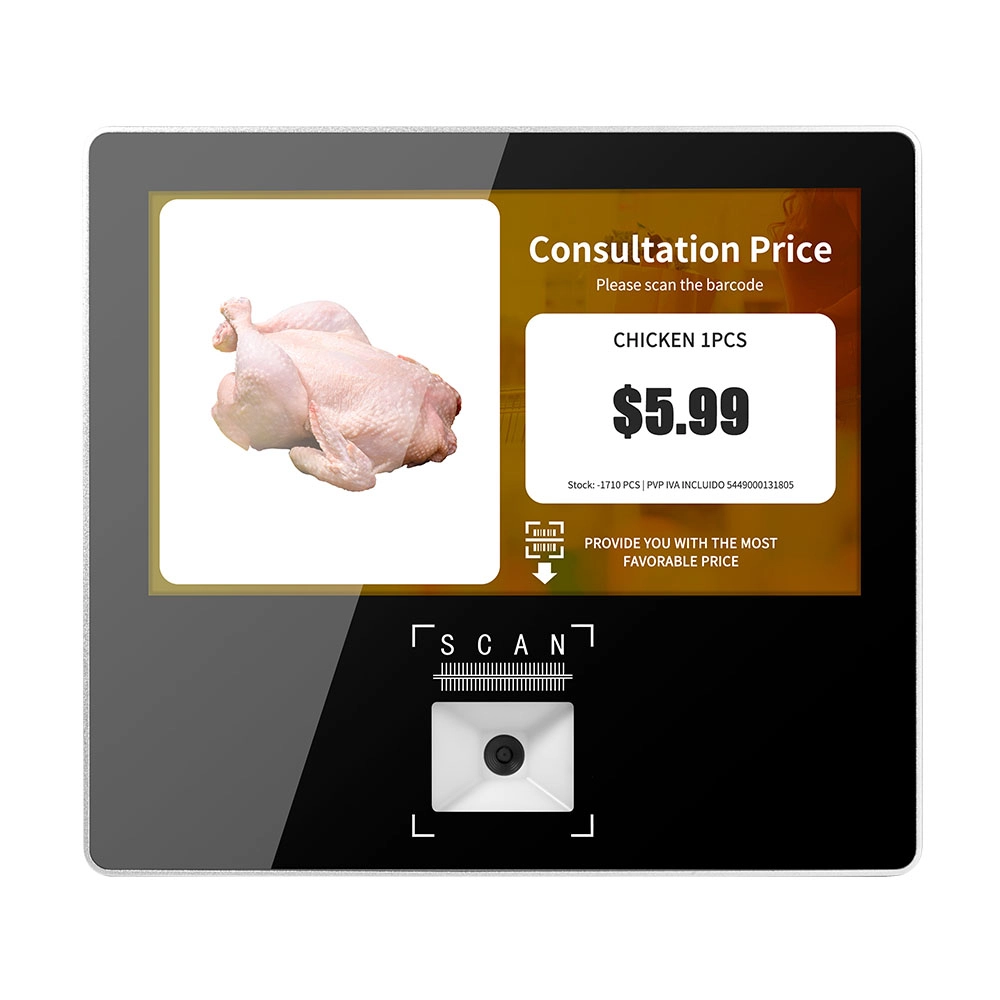
Metal 11.6 inch Price Scanner Machine Android Windows with Wifi Supplier
FAVORPOS Metal 11.6-inch Price Scanner Machine, designed for durability and efficiency in retail environments. This versatile device operates on both Android and Windows, providing seamless functionality for various applications. With built-in Wi-Fi connectivity, it allows for quick access to pricing data and updates. The 11.6'' display ensures clear visibility for easy operation, making it perfect for price checking and inventory management. Enhance your retail experience with this reliable and robust price scanner from a trusted supplier!
Get in touch
Interested in becoming a POS system dealer? Contact us for more information and start the process of joining our dealer network.
We look forward to working with you to expand the market together.


Copyright © 2025 Favorpos All Rights Reserved.
