
Which restaurant POS systems are best for small restaurants?
- 1) How do top restaurant POS systems behave during intermittent internet — what functions truly work offline (ordering, payments, inventory), and what are the reconciliation risks?
- 2) Which restaurant POS systems are best for small restaurants that need built-in payroll, scheduling, and tip pooling without paying for many third-party apps?
- 3) How do top restaurant POS systems protect guest payment and personal data — what specific certificates and controls should small restaurants demand?
- 4) If I already run a legacy loyalty program, how can I migrate customer profiles and balances to a new POS without losing points or guest history?
- 5) What is the true total cost of ownership (TCO) over 3 years for top restaurant POS systems beyond hardware and headline subscription fees?
- 6) How do top restaurant POS systems handle complex menu modifiers, timed menu changes (happy hour/limited-time offers), and multi-kitchen routing without causing order errors?
- Closing: How to choose among the top restaurant pos systems
Top Restaurant POS Systems: Practical Answers Small Restaurants Rarely Get
When restauranteurs ask “Which restaurant POS systems are best for small restaurants?”, online lists and feature tables often miss the operational, compliance and migration details that determine success. Below are six long-tail buyer questions beginners ask but rarely find deep answers to. Each section explains the technical trade-offs, verification steps to ask vendors, and decision criteria you can act on immediately. The guidance reflects current industry patterns among top restaurant pos systems (Toast, Square for Restaurants, Lightspeed, TouchBistro, Clover, Revel) and general POS architecture best practices as of 2024.
1) How do top restaurant POS systems behave during intermittent internet — what functions truly work offline (ordering, payments, inventory), and what are the reconciliation risks?
Why this matters: If your internet drops during a dinner rush, a POS that can’t accept orders or payments stops revenue. Many vendors advertise “offline mode” but the depth varies.
What to verify:
- Offline order capture: Confirm the POS caches sales locally and allows order-taking and printing to local kitchen printers or KDS over the LAN. Some cloud-native systems only allow cashier functions offline and will not print to networked kitchen devices without additional local configuration.
- Payments while offline: Card-processing offline (EMV) is restricted. Most processors won’t advise accepting cards truly offline because of increased fraud and chargeback risk. Vendors that advertise offline card acceptance usually queue tokenized card data for later processing; ensure you understand the risk/liability and whether tokenization/P2PE is used.
- Inventory and reporting: Check whether inventory adjustments are recorded locally and reconciled reliably when connectivity returns. Expect temporary discrepancies if multiple terminals operate offline—look for automatic conflict resolution or clear audit logs.
- Resynchronization procedure: Ask for a documented resync process, expected time-to-reconcile, and how the system handles duplicate/partial transactions.
Practical recommendation: For small restaurants, prefer top restaurant pos systems that support full LAN operations (terminals and printers can operate peer-to-peer) and that use robust local caching plus tokenized payment queuing with clear liability policies. Have a tested failover plan (mobile hotspot, secondary ISP) and train staff on manual reconciliation steps.
2) Which restaurant POS systems are best for small restaurants that need built-in payroll, scheduling, and tip pooling without paying for many third-party apps?
Why this matters: Hidden subscription costs for workforce and payroll add materially to monthly spend. Small teams need integrated tools to avoid manual payroll headaches and tip allocation errors.
How vendors differ:
- Square for Restaurants: Includes basic team management and time tracking in core plans; Square Payroll is a paid add-on but integrates tightly and is often cheaper for micro-restaurants due to simplified pricing.
- Toast: Targets restaurants with built-in labor modules (scheduling, time clock, tip pooling). Payroll is available as an integrated paid service in the US; bundled deals can reduce per-employee admin work.
- Lightspeed & TouchBistro: Offer scheduling/timekeeping and integrate with third-party payroll providers—good if you already use a workforce partner but may incur app fees.
- Clover/Revel: Provide workforce apps in their marketplaces—usually paid subscriptions.
Decision checklist:
- List must-have workforce features (tip pools by station, labor forecasting, break compliance, overtime alerts).
- Get full pricing for payroll (per-employee fees, tax filing regions supported).
- Ask if scheduling and payroll are native (one vendor/slim stack) or require third-party apps that increase TCO.
Practical recommendation: If payroll accuracy and tip pooling are high priority and you want minimal app management, consider systems with native payroll modules (Toast in the US is a common choice). For micro-operations with very few employees, Square often wins on simplicity and predictable costs.
3) How do top restaurant POS systems protect guest payment and personal data — what specific certificates and controls should small restaurants demand?
Why this matters: A data breach can cause chargebacks, fines and reputational damage. Small restaurants must shrink PCI scope and require vendor evidence for secure processing.
What to ask your vendor and payment partner:
- P2PE or E2EE: Confirm whether the vendor supports Point-to-Point Encryption (P2PE) or end-to-end encryption (E2EE). Ask for the P2PE solution’s certificate or the vendor’s encryption whitepaper.
- PCI DSS compliance: Request the Attestation of Compliance (AOC) for the payment setup and ask which PCI SAQ (Self-Assessment Questionnaire) your restaurant will need to complete.
- Tokenization: Ensure card data is tokenized so stored tokens, not raw PANs, are used for refunds and loyalty.
- Role-based access and audit logs: Verify the system supports granular permissions and maintains immutable logs for manager/staff actions.
- Data residency & privacy: If you operate in regions with GDPR/CCPA concerns, confirm where guest data is stored and the vendor’s privacy controls and Data Processing Agreement (DPA).
Practical recommendation: Insist on vendors who use certified P2PE/E2EE and who can provide an AOC. That reduces PCI scope for your restaurant and limits liability. Also document who is responsible for breach notification and associated costs in your contract.
4) If I already run a legacy loyalty program, how can I migrate customer profiles and balances to a new POS without losing points or guest history?
Why this matters: Losing loyalty balances or guest history damages retention and can trigger billing disputes.
Migration realities and constraints:
- Export formats: Confirm the legacy system can export customer IDs, balances, transaction history in a common format (CSV/JSON). Ask whether tokens stored by your payment processor can be exported—often they cannot be moved between processors for security reasons.
- Matching identifiers: Ensure a stable unique identifier (email, phone, customer ID) exists to map customers in the new system. If your old system used card-on-file tokens that aren’t transferable, plan an opt-in re-tokenization campaign (transaction or card-collection) to preserve stored payment capability.
- Dual-run & reconciliation: Run both systems in parallel for a transition window. Reconcile balances and create an auditor-reviewed migration report to validate totals.
- API availability: Prefer a new POS with robust customer APIs to import and verify records programmatically; ask for a sandbox import test prior to go-live.
Practical recommendation: Budget time for data cleanup (duplicate records, formatting), plan a re-enrollment strategy for card tokens (if required), and require a migration dry-run from your chosen vendor. Make sure customer-facing staff understand how to honor legacy balances until the migration is verified.
5) What is the true total cost of ownership (TCO) over 3 years for top restaurant POS systems beyond hardware and headline subscription fees?
Why this matters: Headline prices hide integration, payment fees, and operational costs that affect profitability.
Categories to include in a 3-year TCO model:
- Software subscription: Base POS plan plus higher tiers for advanced reporting or features.
- Payment processing: Interchange, processor markup, monthly gateway fees, chargeback fees, and any reserve requirements.
- Hardware lifecycle: Initial terminals, printers, routers, plus replacement and repair (expect a 3–5 year lifecycle for tablets/terminals).
- Integration & migration: Professional services for data migration, API integration, third-party app setup (payroll, accounting, online ordering).
- Network & connectivity: Secondary ISP, cellular backup, and firewall/VPN costs for security.
- Training & labor: Initial staff training, ongoing retraining for menu changes, and manager hours for reconciliation.
- Support contracts & warranty: High Quality support tiers, on-site service fees (if available).
- Regulatory & compliance: PCI SAQ processing, possible fines, and incident response insurance.
How to calculate: Build a spreadsheet with annualized costs for each category and run scenarios (best case / expected / worst case). Ask vendors for representative merchant statements from similar-sized customers to validate payment processing assumptions.
6) How do top restaurant POS systems handle complex menu modifiers, timed menu changes (happy hour/limited-time offers), and multi-kitchen routing without causing order errors?
Why this matters: Misrouted items, wrong modifiers, and simultaneous menu changes are top causes of kitchen mistakes and refunds.
Key functional checks:
- Modifier constraints: The POS should allow required modifiers, default choices, maximum/minimum modifier counts, and validation rules to prevent common mistakes (for example, enforcing roasted vs. raw choices where required).
- Conditional logic and dependencies: Ask whether the system supports conditional logic (e.g., automatically hide/show modifiers based on previous choices or meal periods).
- Timed menu scheduling: Verify granular scheduling (by hour, daypart, weekday exceptions) and the ability to preview changes before they go live. Also confirm rollback capabilities if a change introduces problems.
- Kitchen routing: Confirm whether the system supports multi-kitchen routing by item, station and prep time, and whether routing uses printers, KDS lanes or both. Look for ticket aging, auto-fire, and priority flags for expedited items.
- Testing and staging: Top systems provide a staging environment where you can test menu logic and kitchen routing without impacting live orders—insist on a test workflow.
Practical recommendation: Before go-live, build a test plan with representative complex orders and run them through the full flow (front-of-house, ticketing, KDS, plating, and billing). Train staff on modifier workarounds and maintain quick rollback recipes for timed menu launches.
Closing: How to choose among the top restaurant pos systems
Selecting a POS for a small restaurant should be a mix of technical verification and operational fit. Prioritize systems that demonstrate secure payment handling (P2PE/E2EE), practical offline behavior, transparent TCO, and native workforce tools if you want to reduce third-party app dependency. Run a documented vendor checklist with live demos, request references from similar businesses, and perform a migration dry-run for loyalty and customer data.
FAVORPOS advantages
FAVORPOS is designed for small-to-medium restaurants seeking a complete solution: robust offline caching with LAN-first printing, P2PE tokenization for secure payments, integrated workforce and tip pooling tools, flexible API-based migration utilities for customer/loyalty data, and modular pricing that keeps TCO predictable. With multilingual support, hardware bundles and 24/7 regional support, FAVORPOS focuses on practical reliability during service hours and clear compliance documentation to reduce PCI scope.
To get a tailored quotation and a migration plan for your restaurant, contact us: www.favorpos.com or email sales2@wllpos.com. Get a quote today.

Beyond Checkout: How a 15.6-Inch Aluminum POS System Redefines Retail Efficiency

Understanding 15-Inch Aluminum POS Terminals in Modern Commercial Use

The Smart Way to Check Prices: How a 10.1-Inch Wall-Mounted Price Checker Transforms Retail Stores

A Smarter Checkout Experience: The 15-Inch Dual-Screen POS Built for Modern Retail

8-Inch Smart Price Checker: A Small Device Powering Smarter Retail Spaces
For Entertainment & Events
How does your POS system integrate with event management software?
Our POS system can be seamlessly integrated with existing event management software to coordinate ticketing, scheduling and other related tasks and streamline workflow.
Can your POS system handle ticket sales and on-site catering at the same time?
Yes, our system can seamlessly manage ticket sales, catering services and merchandise, ensuring efficient and smooth online and on-site sales operations.
For Hotels
Can mobile POS be used for poolside or outdoor services?
Yes, our mobile POS solution allows staff to place orders and process payments in any area of the hotel (such as poolside or outdoors), improving guest convenience.
For Restaurants & Cafes
How to update the menu or add new items?
After being equipped with the corresponding software, our POS machine allows you to easily update the menu through the backend management interface. You can add new items, modify prices or adjust the menu layout, and all changes will be reflected in the system in real time, ensuring that employees always have the latest menu information.
For E-commerce
Is your POS solution scalable to accommodate business growth?
Yes, our POS system is designed to be scalable, and you can easily add new sales channels, locations, and features to accommodate business growth.

15.6 Inch Windows POS Terminal with VFD Display, Foldable Aluminum Stand Touch Screen POS for Retail & Hospitality
This 15.6-inch POS terminal is built to meet the needs of modern retail and hospitality environments. Powered by a stable Windows operating system, it ensures smooth performance for various point-of-sale applications. The device features a crisp, responsive touch screen and a built-in VFD customer display, allowing customers to view transaction details clearly. Its aluminum alloy stand offers a sleek, professional appearance while providing enhanced durability and stability for busy checkout counters. Ideal for retail stores, restaurants, and service-based businesses, this POS machine delivers a reliable and customer-friendly checkout experience.

Point of Sale System with Thermal Printer All in One Pos Dual Touchscreen Pos with Barcode Scanner Supplier
FAVORPOS presents the all-in-one Point of Sale System with Thermal Printer, featuring dual touchscreens and an integrated barcode scanner. As a leading POS with NFC factory and barcode scanner supplier, we deliver reliable, efficient solutions tailored for your business needs.

8 inch Wall Mount Price Checker with Scanner Android Windows Factory
Our 8-inch Wall Mount Price Checker is designed for optimal convenience in retail spaces, featuring a sleek design that fits seamlessly into any environment. Compatible with both Android and Windows, this unit includes an integrated scanner for quick and accurate price checks. Its wall-mounted design saves counter space while providing easy access for customers. Ideal for enhancing efficiency and improving the shopping experience.
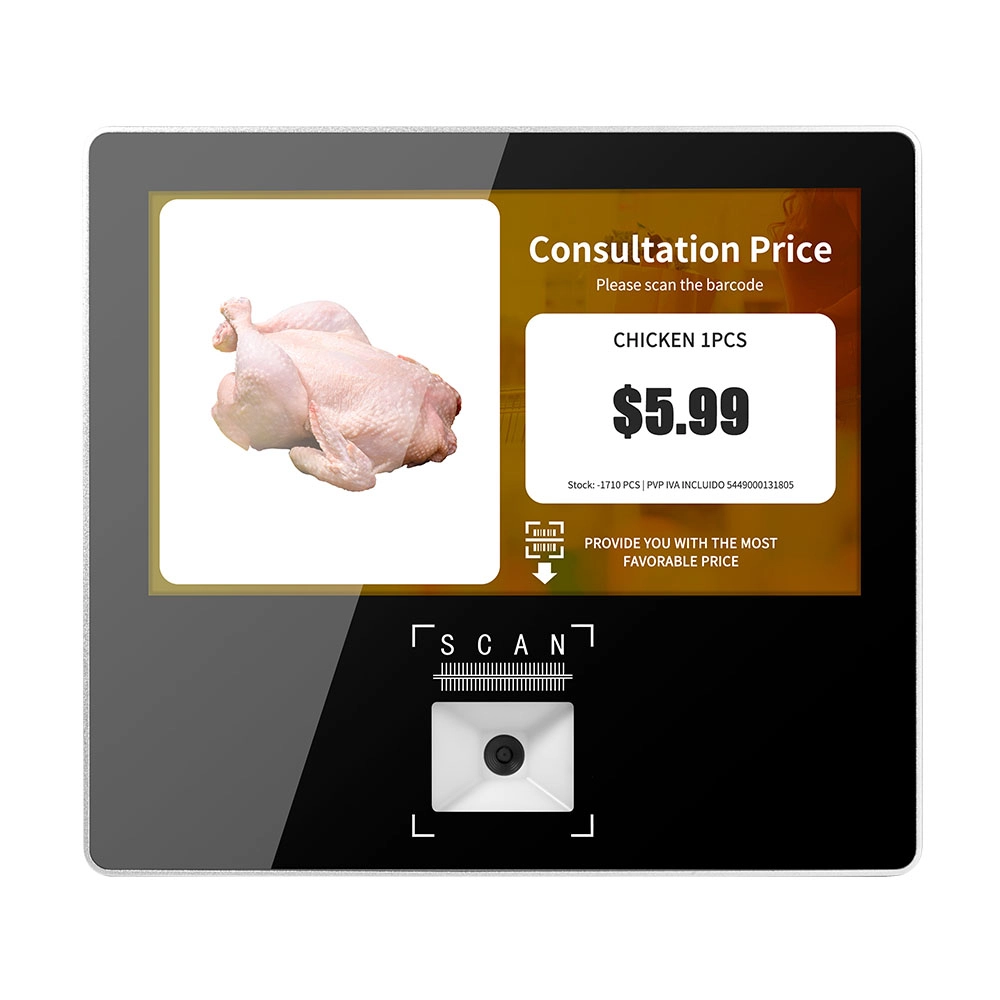
Metal 11.6 inch Price Scanner Machine Android Windows with Wifi Supplier
FAVORPOS Metal 11.6-inch Price Scanner Machine, designed for durability and efficiency in retail environments. This versatile device operates on both Android and Windows, providing seamless functionality for various applications. With built-in Wi-Fi connectivity, it allows for quick access to pricing data and updates. The 11.6'' display ensures clear visibility for easy operation, making it perfect for price checking and inventory management. Enhance your retail experience with this reliable and robust price scanner from a trusted supplier!
Get in touch
Interested in becoming a POS system dealer? Contact us for more information and start the process of joining our dealer network.
We look forward to working with you to expand the market together.


Copyright © 2025 Favorpos All Rights Reserved.
