
Are cloud-based mobile POS systems more secure for retailers?
- 1. How can I verify a mobile POS provider's PCI DSS compliance and tokenization/P2PE claims before signing?
- 2. If my store loses internet, how do cloud-based mobile POS systems handle EMV/contactless transactions and sync later without increasing chargeback risk?
- 3. Are cloud-based mobile POS systems more secure for retailers compared to on-premise systems?
- 4. What are the true ongoing costs (processing fees, software subscriptions, hardware replacement, PCI scans) I should expect when choosing the best mobile POS systems?
- 5. How can I migrate inventory, customers, and sales history from a legacy POS to a modern mobile POS without data loss or prolonged downtime?
- 6. How do integrated payments, merchant accounts, and gateways differ across mobile POS providers, and how will that affect my chargeback liability and reporting?
- Conclusion: Advantages of choosing a modern cloud-based mobile POS
Best Mobile POS Systems: Practical Answers for Retailers
This guide answers six specific, high-value long-tail questions beginners and small retailers struggle to find up-to-date, practical answers to when evaluating the best mobile POS systems and whether cloud-based mobile POS systems are more secure for retailers. It includes step-by-step checks, security controls (PCI DSS, tokenization, P2PE, TLS/AES), real-world cost ranges, migration tactics, and device management best practices so you can buy with confidence. Semantic terms like mobile POS, mPOS, cloud POS, EMV, PCI DSS, tokenization, end-to-end encryption, offline mode, inventory sync, integrated payments, and SOC 2 appear naturally below.
1. How can I verify a mobile POS provider's PCI DSS compliance and tokenization/P2PE claims before signing?
Pain point: many vendors claim PCI compliant or tokenization/P2PE but merchants are unsure how to validate those claims and what actually limits liability.
Step-by-step verification checklist (do these before you sign):
- Ask for written evidence: request the provider's latest Attestation of Compliance (AoC) or a third-party P2PE solution listing. PCI DSS AoCs and P2PE solution registrations are formal documents—do not accept a sales slide as proof.
- Confirm scope: PCI DSS compliance can apply to different components. Verify whether the vendor's cloud services, payment processing, and mobile app are in-scope or if compliance depends on your configuration (e.g., whether you handle card data locally).
- Tokenization vs P2PE: Tokenization replaces card PANs with tokens; P2PE (Point-to-Point Encryption) secures card data from the card reader to a validated decryption environment. Ask whether the vendor uses a PCI-validated P2PE solution and whether tokenization is performed by a PCI-compliant vault.
- Look for independent audits and attestations: SOC 2 Type II reports, PCI DSS AoCs, and P2PE solution registry entries are meaningful. Reputable cloud POS vendors will provide these on request and explain which responsibilities remain with you (shared responsibility model).
- Technical proof points: request the vendor's network transport and storage details—TLS 1.2+ for data-in-transit, AES-256 (or AES-128 minimum) for data-at-rest, and whether they support E2EE (end-to-end encryption) for card-present transactions.
- Operational checks: confirm whether the vendor performs regular internal/external vulnerability scans, uses a WAF (web application firewall), and offers features you need for compliance (e.g., SCA/multi-factor admin login, logging and audit trails, remote wipe for lost devices).
Why this matters: PCI DSS 4.0 (published by the PCI Security Standards Council) increases emphasis on risk-based controls and continuous compliance. A vendor's claim without formal attestations, SOC 2 reports, or P2PE validation means you still carry more operational risk and scope for compliance.
2. If my store loses internet, how do cloud-based mobile POS systems handle EMV/contactless transactions and sync later without increasing chargeback risk?
Pain point: retailers are afraid of losing sales when connectivity drops, but also afraid of offline transactions increasing fraud or chargeback exposure.
Key realities and configuration steps:
- EMV offline mode exists but is uncommon for retail mPOS. Most contactless and EMV chip transactions expect online authorization. Offline EMV requires special terminal and issuer support and typically is used in constrained networks (transit, remote kiosks).
- Common approach for cloud POS: allow an offline mode that stores encrypted transaction data locally (in a secure local database such as an encrypted SQLite store) and transmits upon reconnection. These systems should use local transaction sequence numbers, idempotency keys, and receipts with unique transaction IDs so reconciliation is deterministic.
- Risk controls for offline modes: limit offline transaction amounts and count per device, require PIN entry for certain cards, log device/geolocation, and require manager approval for higher-value offline sales. These mitigations reduce exposure to chargebacks and fraud.
- EMV liability: offline EMV can shift liability differently depending on card networks and issuer policies. Verify your processor's rules—some processors disallow accepting offline-authorized EMV transactions for merchant types where risk is high.
- Reconciliation best practices: when online, the POS must re-submit stored transactions with original timestamps, local sequence numbers, and full payment tokens so the gateway can match them against receipt data. Verify that the vendor uses idempotent APIs to avoid duplicate captures and provides detailed offline-to-online sync logs for audit.
Implementation tip: ask any vendor for a documented offline-mode policy and a technical whitepaper explaining how it encrypts local storage, limits exposure, and reconciles transactions once connectivity is restored. Without these details, offline mode is a liability rather than an advantage.
3. Are cloud-based mobile POS systems more secure for retailers compared to on-premise systems?
Pain point: retailers hear both arguments—cloud POS vendors say they are safer due to centralized security, while some merchants worry that a cloud outage or breach means total exposure.
Short answer: cloud-based mobile POS systems can be more secure for most retailers if the provider follows modern security standards (PCI DSS, P2PE, SOC 2), implements strong encryption and key management, and the retailer enforces device/identity controls. However, security depends on both vendor practices and merchant operations.
Factors where cloud usually wins:
- Centralized security investment: reputable cloud POS vendors invest in full-time security teams, vulnerability management, and 24/7 monitoring—capabilities many small merchants cannot afford on-premise.
- Continuous updates and patching: cloud POS systems push security patches, TLS upgrades, and app fixes centrally; on-premise solutions require manual updates, which often lag and increase risk.
- Data protection: cloud providers typically use tokenization and AES encryption for stored PANs and TLS for transit. Using a validated P2PE and token vault reduces the merchant's PCI scope.
- Redundancy and backups: cloud infrastructure (when properly architected) offers geographic redundancy, automated backups, and faster disaster recovery than a single on-premise server.
Where on-premise can be better:
- Data locality and control: some merchants subject to strict data residency laws or specific contractual constraints may prefer physical control of servers and keys, though modern cloud providers can meet many data residency needs through regional hosting.
- Offline-only environments: in environments where connectivity is impossible, a hardened local solution might be necessary—but such setups require strong operational security (regular patches, local firewalling, physical server security).
Practical security checklist to decide between cloud and on-premise:
- Verify vendor attestations (PCI DSS AoC, P2PE registry entry, SOC 2 Type II) and ask for the shared responsibility matrix.
- Confirm support for tokenization/E2EE and modern TLS; insist on role-based access control and MFA for admin access.
- Require device management: remote wipe, app lockdown, and enforced app updates on Android/iPad POS devices. MDM (mobile device management) or an enterprise device profile reduces theft risk.
- Review incident response: ask the vendor for an incident response plan, SLA for breach notification, and a history of past incidents and remediations.
Conclusion: For most retailers, a cloud POS from a vendor with validated security controls will be more secure and easier to maintain than a small on-premise deployment. But validate the vendor's security artifacts and retain a clear understanding of merchant responsibilities.
4. What are the true ongoing costs (processing fees, software subscriptions, hardware replacement, PCI scans) I should expect when choosing the best mobile POS systems?
Pain point: vendors advertise low upfront costs or free apps but many merchants are hit with unexpected ongoing fees.
Breakdown of typical cost components and realistic ranges (2024 market norms):
- Hardware (one-time): mobile card readers and terminal devices range from $49 for simple Bluetooth magstripe/contactless readers to $200–$800 for robust Android/iPad POS terminals with printers and cash drawer integrations.
- Software subscription (monthly): entry-level mPOS software often runs $29–$79/month per location; advanced POS with inventory, multi-store, and analytics can be $99–$299+/month per location.
- Payment processing fees: card-present rates typically range 1.6%–2.9% + $0.05–$0.30 per transaction for standard retail—interchange-plus or flat-rate models vary. High-risk categories or keyed-in transactions are higher.
- Payment gateway / merchant account fees: some vendors require you to use their processor (bundled), while others allow your merchant account. Bundling can simplify billing but may increase rates. Independent merchant accounts often have monthly minimums or gateway fees ($10–$30/month).
- PCI compliance & security: annual ASV scans or PCI questionnaire support may cost $100–$400/year if outsourced. If your vendor reduces scope with P2PE/tokenization, your costs will be lower.
- Chargeback fees and reserves: expect chargeback fees typically $15–$100 per chargeback depending on processor and potential holds/reserves for higher-risk merchants.
- Integrations & custom work: API integrations, custom receipts, or third-party app subscriptions (accounting, loyalty) add ongoing costs—budget for occasional development or integration fees.
How to compare vendors fairly:
- Request a full TCO spreadsheet from the vendor including hardware replacement cycles (3–5 years), typical transaction volumes, and a processing-rate quote for your expected mix of card-present vs card-not-present sales.
- Ask whether the vendor locks you into their payment processor, whether rates are interchange-plus, and whether virtual terminal or keyed-entry fees apply.
- Factor in operational savings the POS will deliver (reduced manual entry, faster checkout, fewer stockouts through inventory sync) and estimate ROI over 12–36 months.
5. How can I migrate inventory, customers, and sales history from a legacy POS to a modern mobile POS without data loss or prolonged downtime?
Pain point: migration projects fail because of poor planning, format mismatches, and lack of reconciliation steps.
Proven migration plan (minimal downtime, minimal data loss):
- Audit legacy data: export SKUs, product descriptions, variants, supplier codes, pricing, layaway/fiscal records, customer accounts, open orders, and sales history. Document field mappings and quality issues (duplicate SKUs, missing barcodes).
- Clean data before import: normalize SKUs, remove duplicates, ensure barcodes are valid (UPC/EAN length), and decide on SKU structure. The cleaner the import file, the fewer errors downstream in inventory sync.
- Use vendor migration tools or API: many cloud POS vendors provide migration scripts or professional services. Use their tools for bulk imports and to preserve IDs that matter for historic reporting where possible.
- Pilot import and reconcile: pick a subset of inventory and customers and test the full sales cycle (sale, return, refund, inventory decrement, reporting). Verify costs, margins, and aggregated sales figures match within acceptable variance.
- Schedule the final cutover: choose low-traffic hours, take an end-of-day backup of the legacy system, freeze writes in legacy POS, perform final incremental export, import to cloud POS, and test critical workflows (payments, receipt printing, inventory decrement).
- Validate and reconcile: run parallel reports for the first day(s) to check sales totals, payments, and inventory levels. Prepare a rollback plan if critical mismatches occur (keep legacy system available for short window).
Data retention and compliance: ensure that your migration preserves any fiscal or tax reporting requirements in your jurisdiction (some countries require certain archived formats). Keep backups of both systems for the legally required retention period.
6. How do integrated payments, merchant accounts, and gateways differ across mobile POS providers, and how will that affect my chargeback liability and reporting?
Pain point: merchants don’t understand whether they control the merchant account, who is liable for disputes, and how reporting will look.
Key differences explained:
- Bundled (proprietary) processing: many mPOS vendors bundle payment processing. You get simplified billing and single-vendor support but less control over rates, reserves, chargeback handling policies, and sometimes slower access to merchant funds if the vendor holds them in a pooled account.
- Direct merchant account + gateway: some vendors let you connect your own merchant account and payment gateway (or work with multiple gateways). This gives you rate negotiation leverage, clearer chargeback ownership, and often faster access to funds, but increases setup complexity.
- Tokenization and liability: when the vendor uses tokenization and a PCI-validated P2PE flow, your exposure to PAN storage is reduced; however, you still manage dispute processes and must provide required evidence for chargebacks (receipt logs, AVS/CVV records where applicable, timestamps, and device IDs).
- Reporting and reconciliation: integrated payments typically provide end-of-day batch reports that map settlements to transactions. If you use a third-party gateway, ensure the POS can import settlement batches or that the gateway offers an API for reconciliation. Look for automatic deposit matching features.
How this affects liability and operations:
- Chargeback handling: with bundled processors, the vendor often handles initial dispute processing but may pass costs to you. With your own merchant account, you interact directly with the acquiring bank and have clearer evidence chains.
- Evidence collection: ensure the POS stores immutable transaction logs, digital receipts, signature capture (where legal), and AVS/CVV metadata for CNP transactions—these items materially affect chargeback outcomes.
- Settlement timing: check the vendor’s settlement timing (T+1, T+2) and whether disputes or reserves impact payouts. Faster settlements improve cash flow but may come with higher fees.
Practical steps when evaluating offers:
- Get written terms on chargeback fees, reserves, and who is responsible for dispute handling.
- Request a sample settlement report and a demo of the reconciliation workflow in the POS back office. Make sure the POS shows both gross transaction detail and net deposit grouping.
- If you have an existing merchant account, ask whether the vendor supports gateway integration and whether any features are limited under that configuration.
Conclusion: Advantages of choosing a modern cloud-based mobile POS
Cloud-based mobile POS systems, when provided by vendors with validated security controls (PCI DSS compliance, P2PE/tokenization, SOC 2), offer retailers strong advantages: centralized security investment, continuous patching, streamlined device management (remote wipe, app lockdown), reliable inventory sync across locations, faster feature updates (loyalty, analytics), and the ability to scale without large on-premise capital expense. For most small and medium retailers, a cloud POS reduces operational burden and improves security posture—provided you validate attestations, enforce device policies, and understand processing terms.
If you want a hands-on review of vendors that meet PCI, P2PE, SOC 2, and offline-mode requirements, or a tailored quote comparing total cost of ownership across hardware and processing models, contact us for a quote — visit www.favorpos.com or email sales2@wllpos.com.

The Smart Way to Check Prices: How a 10.1-Inch Wall-Mounted Price Checker Transforms Retail Stores

A Smarter Checkout Experience: The 15-Inch Dual-Screen POS Built for Modern Retail

8-Inch Smart Price Checker: A Small Device Powering Smarter Retail Spaces

Built for Retail Precision: Manufacturing Excellence Behind the 11.6” Smart Price Checker

Building Stability in an Unstable Market: A 15.6-Inch All-in-One POS Designed for the Long Term
For OEM
How long is the delivery time for customizing POS machines?
The delivery time depends on the complexity of the order and the production scale. Generally speaking, the whole process from confirming the design to delivery may take 6 to 12 weeks. We will provide a detailed delivery schedule at the beginning of the project and try our best to meet your time requirements.
For Grocery and Supermarkets
Can your POS system handle the high volume of transactions in a supermarket?
Yes, our POS system is designed for high-volume environments like supermarkets, ensuring transactions are processed quickly and efficiently even during peak hours.
For E-commerce
Can your POS system integrate with my existing e-commerce platform?
Yes, our POS system is compatible with major e-commerce platforms (such as Shopify, WooCommerce, Magento) and supports custom platforms through API integration.
For Restaurants & Cafes
If there is a problem with the device, how can I get technical support?
You can contact our technical support team by phone, email or online customer service. We provide 24/7 support to ensure that your issues are resolved promptly and the system is up and running.
For Hotels
Does your POS system support room service billing?
Absolutely, our system allows guests to charge services such as food and beverage, spa treatments, etc. directly to the room account, and all charges will be settled at the time of checkout.
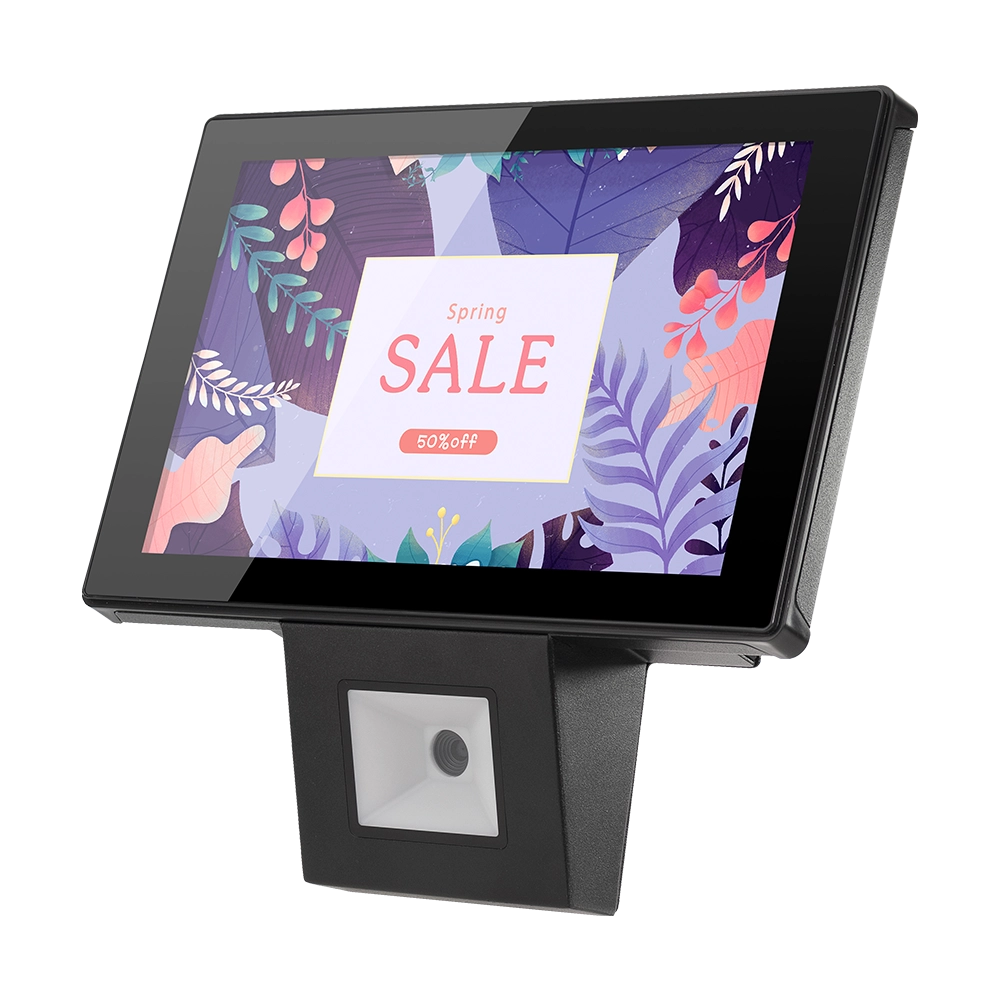
10 inch Price Checker Device Supplier Barcode Scanner for Sale Price Check for Supermarket
FAVORPOS offers 10 inch Price Checker Device, perfect for supermarkets. This wall mounted 10 inch touch screen barcode scanner ensures fast, accurate price checks, enhancing customer experience and operational efficiency. Durable, user-friendly, and perfect for high-traffic retail environments.

Aluminum Dual Screen Pos Terminal Pos Systems 15.6 inch Touchscreen Pos
FAVORPOS Aluminum Dual Screen POS Terminal features a 15.6-inch touchscreen, ideal for seamless transactions. As a trusted OEM Windows POS manufacturer, we deliver durable, high-performance solutions tailored for retail and hospitality businesses.

Android Handheld Pos Device Touch Screen Pos Terminal Manufacturer

All in One POS Terminal Metal 11.6'' Touchscreen Android Windows with Printer
The All-in-One POS Terminal features an 11.6'' touchscreen display, compatible with both Android and Windows. This metal-constructed terminal combines durability with style, making it a perfect fit for any retail or hospitality environment. Equipped with a built-in printer, it streamlines transactions by allowing for instant receipt printing.
Get in touch
Interested in becoming a POS system dealer? Contact us for more information and start the process of joining our dealer network.
We look forward to working with you to expand the market together.


Copyright © 2025 Favorpos All Rights Reserved.
