
How to choose liquor store POS systems for multi-store chains?
- Introduction
- 1) How can I enforce state-by-state liquor compliance (pricing, restricted SKUs, deposit rules) across 30+ stores using a POS?
- 2) What's the most reliable way to automate bottle-deposit (CRV/DPF) collection and returns across multiple storefronts?
- 3) How to design POS-based loss-prevention workflows to reduce internal theft of high-value bottles across a chain?
- 4) How to integrate age verification and ID scanning into both in-store POS and online ordering to prevent underage sales?
- 5) What POS inventory architecture supports keg/draft tracking, transfers, and tap yield calculations for multi-store liquor & beer outlets?
- 6) How to evaluate vendor lock-in, scalability, and total cost of ownership (TCO) when choosing a cloud POS for a 50-store liquor chain?
- Conclusion: Advantages of choosing the right liquor store POS systems for multi-store chains
Introduction
Choosing the right liquor store POS system for a multi-store chain requires more than picking a touchscreen and card reader. Chains need centralized reporting, SKU-level compliance, reliable age verification, keg and bottle-deposit workflows, and strong loss-prevention controls — all while maintaining PCI/EMV payment security and minimizing vendor lock-in. Below are six specific long-tail questions beginners frequently ask but rarely find in-depth answers to, followed by practical, implementable guidance tailored to liquor store multi-store operations.
1) How can I enforce state-by-state liquor compliance (pricing, restricted SKUs, deposit rules) across 30+ stores using a POS?
Pain point: Chains operating in multiple states face different minimum pricing, restricted product lists, bottle deposit (CRV/DPF) rules, and return/recall procedures. A generic retail POS won’t manage these nuances reliably.
In-depth answer and steps:
- Per-location rule engine: Choose a liquor store POS system with a per-store tax and rule profile so taxes, deposits, and restricted SKU availability can be enforced at the terminal level while controlled centrally.
- SKU metadata and tags: Maintain SKU attributes that include state restrictions (e.g., controlled brands, limited editions), deposit codes (CRV-eligible), and required age verification flags. The POS should block or flag sales when a restricted SKU is sold in a non-authorized state or store.
- Policy propagation and staging: Use a staging environment (sandbox) where new pricing, promotions, or compliance rules can be QA’d and then pushed to a subset of stores (pilot) before roll-out to all locations. This minimizes errors and regulatory exposure.
- Automated audits and logs: The system must log who changed compliance settings and when, and generate periodic compliance reports for each state — essential for audits and license renewals.
- Centralized master data with local overrides: Maintain a single source of truth for SKUs/pricing but permit per-store overrides for required local adjustments. This structure balances consistency and legal compliance.
- Integration with POS partners or APIs: If your POS lacks built-in state rules, use its API to connect to a compliance engine or third-party service that manages state-specific regulations and deposit rates.
Operational tip: Assign a compliance owner on the retail operations team to confirm that rule sets are updated whenever state laws change (bottle-deposit rates, age rules, or banned SKUs), and schedule quarterly compliance audits using POS logs.
2) What's the most reliable way to automate bottle-deposit (CRV/DPF) collection and returns across multiple storefronts?
Pain point: Bottle-deposit schemes (CRV, deposits, recycling fees) vary by state and product, and manual handling causes reconciliation headaches and customer friction.
In-depth answer and implementation:
- Item-level deposit flags: Ensure each returnable SKU includes deposit metadata. The POS must automatically calculate deposit at the point of sale and tag returns for reconciliation.
- Return and refund workflows: Implement a returns module that scans returned bottles and automatically issues credit or cash refunds based on original deposit data and store-specific rules. The return workflow must support multiple return types (full crate, individual bottle, damaged) and record technician/associate handling.
- Hardware and counting: Use barcode or RFID scanning for handling bulk returns and automated counting. For high-volume locations, dedicate a returns kiosk to speed throughput and log transactions in the POS for inventory adjustments and deposit reconciliation.
- Central reconciliation: The POS should produce deposit liability reports (outstanding deposits by store and chain-wide) and automated daily batch exports for accounting to reconcile bottle deposit liability to cash or liability accounts.
- Inventory linkage and recycling partners: Track whether returned bottles are available for resale, recycle, or vendor return. Integrate with supplier/vendor EDI where applicable to automate credits on vendor-eligible returns.
Operational tip: Train staff on the return workflow and maintain a dedicated deposit reconciliation process at month-end to match POS liability against physical returns and cash flow.
3) How to design POS-based loss-prevention workflows to reduce internal theft of high-value bottles across a chain?
Pain point: High-value bottles and limited releases are attractive targets for internal theft; weak POS controls make it hard to detect or prevent.
In-depth answer and controls to implement:
- Role-based permissions: Restrict price overrides, voids, returns, and comping to specific roles and require manager approval for high-risk item actions. Ensure approvals are recorded with user ID and timestamp.
- Item-level audit trails: A liquor store POS system must maintain immutable, itemized logs for every transaction line — who sold it, who voided it, or who returned it. These logs are essential for investigations.
- Blind and scheduled counts: Implement scheduled blind cycle counts for high-value SKUs and require discrepancy workflows that trigger automated investigations or manager alerts when variance thresholds are exceeded.
- Point-in-time camera integration: Integrate POS transaction events with CCTV (time-stamped) so managers can instantly pull surveillance for suspicious transactions. Many modern POS systems support hooks to capture video segments tied to a transaction ID.
- Transaction daily close and exception reports: Enforce a daily close process where store managers must reconcile cash/credit, high-dollar SKUs, and deposit liabilities. Exception reports should list voids, refunds, and comped items for manager review.
- Analytics and anomaly detection: Use centralized reporting to track store-level KPIs (shrink per store, comp rate, void frequency). Anomalies across stores or by employee should trigger automated alerts for audit.
Operational tip: Rotate approval responsibilities among managers, limit the number of keys/access tokens, and perform unannounced audits on high-risk SKUs monthly.
4) How to integrate age verification and ID scanning into both in-store POS and online ordering to prevent underage sales?
Pain point: Age verification gaps occur when in-store systems differ from online ordering and delivery workflows, exposing chains to fines and license suspension.
In-depth answer and integration checklist:
- Unified ID verification: Select a POS with built-in ID scanning or robust API support for ID scanners. Scanners should capture birthdate, issue/expiry, and provide OCR verification where permitted. Store the minimum legally required tokenized data to prove age checks without retaining sensitive PII longer than necessary.
- Online ordering age checks: For e-commerce, implement real-time ID capture at checkout (photo ID upload + selfie or 3rd-party age verification) and tie the online order to a unique verification token stored in the POS. The driver or store should see the verification status when handing off the order.
- Delivery and pickup workflows: For curbside and delivery, require the courier to scan ID at handoff using a mobile POS app that validates the original verification token. The POS should block finalization of the sale until a valid match is made.
- Compliance and data protection: Follow local laws on storing ID images and PII. Use tokenization and follow PCI DSS for payment and relevant privacy laws (state data laws) on ID storage. Where possible, store only a non-identifying verification hash and timestamp to demonstrate compliance without holding sensitive images.
- Training and enforced prompts: Configure forced prompts in the POS to check ID based on SKU flags (for example, any alcohol SKU forces an ID scan if the purchaser is unknown or flagged). Use mandatory employee training traceability within the POS as proof for regulators.
Operational tip: Pilot your online ID verification paired with store pickup at a single site and validate end-to-end (checkout, token match, handoff) before wide rollout. Maintain procedures for false negatives and staff escalation.
5) What POS inventory architecture supports keg/draft tracking, transfers, and tap yield calculations for multi-store liquor & beer outlets?
Pain point: Kegs and draft systems require different inventory logic than bottled SKUs — you need pour-by-ounce tracking, yield rates, and transfer management for chain operations.
In-depth answer and recommended architecture:
- Container-based inventory model: The POS should support container-style SKUs where a keg is tracked as a unit with metadata (size, original volume, ABV, batch/lot number). Sales should decrement by ounce or serving size, not by container unit once tapped.
- Pour and yield integration: Integrate with flow meters or pour-tracking hardware at the bar. POS should accept measured pours (or manual pour entry) and calculate yield percentage (actual poured volume vs. theoretical) to monitor waste and variance per tap.
- Transfer workflows: For multi-store chains, support an internal transfer request and approval process that adjusts inventory at both source and destination stores with timestamps and responsible users logged. Transfers should reconcile with expected keg volume and update lot/serial data.
- Waste and spoilage handling: Provide wastage categories (spillage, overpour, spoilage) and require manager approvals for write-offs. Track these against yield KPIs per store and per tap.
- Reports and forecasting: The POS should produce tap-level reports (average pours per keg, days-on-tap, wastage%) and integrate with demand forecasting to schedule replenishment and staffing.
Operational tip: Use a short pilot with hardware integration (flow meters) at a high-volume store to validate pour-tracking workflows and calibrate waste thresholds before chain-wide deployment.
6) How to evaluate vendor lock-in, scalability, and total cost of ownership (TCO) when choosing a cloud POS for a 50-store liquor chain?
Pain point: Chains often sign long contracts and discover hidden fees, integration limits, or scaling problems. Evaluating TCO beyond license fees is essential.
In-depth evaluation checklist:
- Pricing breakdowns: Compare license (per-terminal vs. per-store), payment processing rates, hardware costs, support tiers, API access fees, and recurring module fees (age-verification, e-commerce, loyalty). Model costs over 3–5 years, including hardware refresh cycles.
- API and data portability: Demand robust, documented APIs and an export process for your full dataset (transactions, customers, SKUs). Confirm that you can migrate data without vendor-specific locks. Ask for sample export of your data during contract negotiations.
- SLA and uptime: For cloud systems, require an uptime SLA and clear remediation steps. Ask about average monthly uptime, maintenance windows, and disaster recovery — especially for stores where connectivity interruptions would stop sales.
- Integration ecosystem: Ensure the POS integrates with your accounting system, e-commerce platform, delivery partners, and ID verification vendors. Limited integrations force custom work and added costs.
- Sandbox and pilot access: Negotiate a pilot period across representative stores (urban, suburban, high-volume) with full support to surface issues. Use the pilot to test real-world workflows (returns, transfers, age-checks, deposit handling).
- Support and training: Confirm response times for support, availability of local implementation specialists, and training resources. Hidden support costs can quickly erode savings.
- Security and compliance: Verify PCI DSS compliance, EMV-capable terminals, and vendor SOC2 or equivalent certifications for cloud data security. These reduce regulatory risk and possible fines.
- Contract terms and exit clauses: Clarify early-termination, data ownership, and post-termination data export costs. Favor vendors with clear, vendor-neutral exit provisions.
Operational tip: Build a TCO spreadsheet including hardware amortization, projected shrink reduction from better controls, labor savings from faster workflows, and incremental revenue from loyalty and online ordering — this will show ROI beyond license fees.
Conclusion: Advantages of choosing the right liquor store POS systems for multi-store chains
Picking a liquor store POS system designed for multi-store chains delivers centralized compliance, automated bottle-deposit handling, precise keg and draft tracking, tight loss-prevention, and unified age-verification across in-store and online channels. The right cloud POS reduces manual reconciliation, enforces state-by-state regulations, and provides real-time inventory sync and analytics to drive profitable decisions at scale. Prioritize systems with per-location rule engines, robust APIs, EMV/PCI-compliant payments, and strong audit trails to protect your licenses and margins.
For a tailored quote and to discuss how these features map to your operational needs, contact us: www.favorpos.com or sales2@wllpos.com.

The Smart Way to Check Prices: How a 10.1-Inch Wall-Mounted Price Checker Transforms Retail Stores

A Smarter Checkout Experience: The 15-Inch Dual-Screen POS Built for Modern Retail

8-Inch Smart Price Checker: A Small Device Powering Smarter Retail Spaces

Built for Retail Precision: Manufacturing Excellence Behind the 11.6” Smart Price Checker

Building Stability in an Unstable Market: A 15.6-Inch All-in-One POS Designed for the Long Term
For Hotels
Does your POS system support room service billing?
Absolutely, our system allows guests to charge services such as food and beverage, spa treatments, etc. directly to the room account, and all charges will be settled at the time of checkout.
For E-commerce
Does your POS system provide real-time analytics?
Yes, our system provides detailed real-time analytics to help you track sales performance, customer behavior, and inventory levels.
For Healthcare
What payment methods does the POS system support?
Our POS system supports a variety of payment methods, including credit/debit cards, mobile payments, contactless payments, and integration with insurance bills.
For Government and Public
Can your POS system handle various types of public sector payments?
Yes, our system is designed to handle a wide range of public sector payments, including fines, utility bills and service charges, ensuring secure and efficient processing.
For Bakeries
Can your POS system handle both retail and wholesale orders?
Yes, FAVORPOS's system can manage both retail sales and wholesale orders and offer different price structures for each customer type.
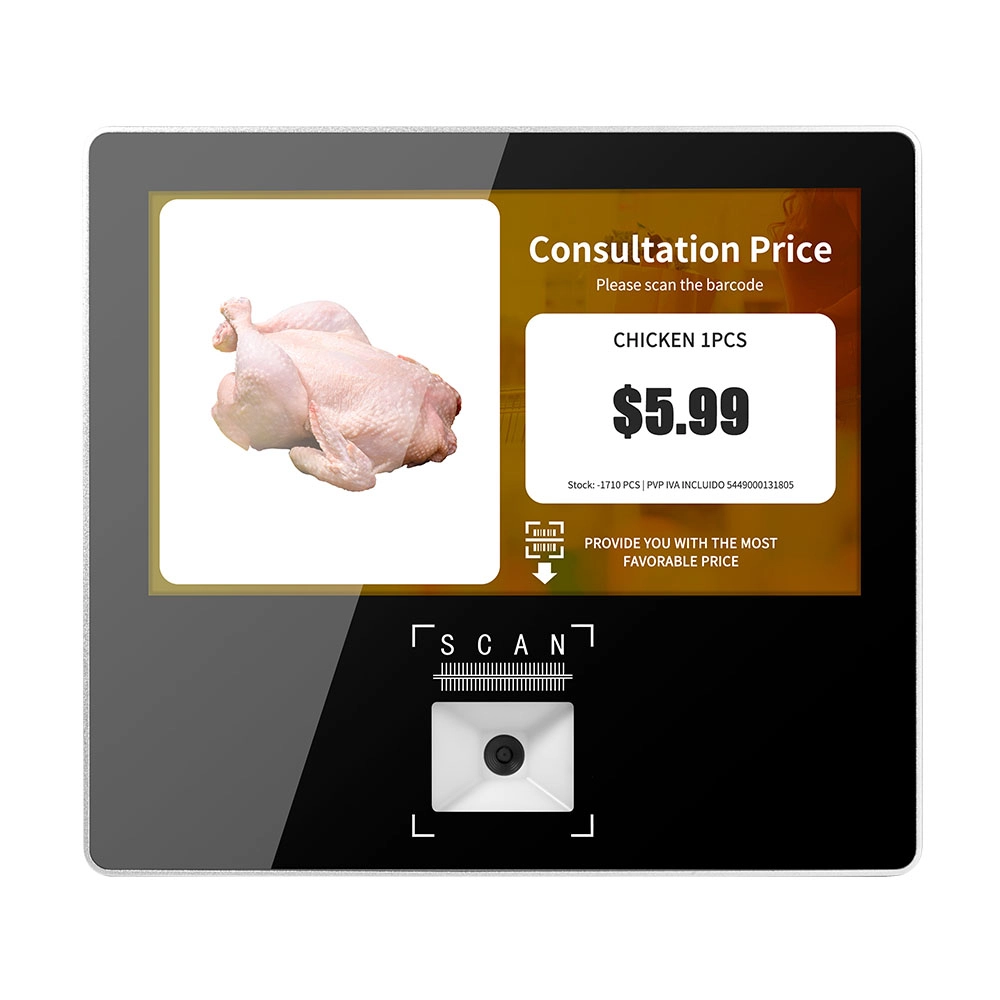
Metal 11.6 inch Price Scanner Machine Android Windows with Wifi Supplier
FAVORPOS Metal 11.6-inch Price Scanner Machine, designed for durability and efficiency in retail environments. This versatile device operates on both Android and Windows, providing seamless functionality for various applications. With built-in Wi-Fi connectivity, it allows for quick access to pricing data and updates. The 11.6'' display ensures clear visibility for easy operation, making it perfect for price checking and inventory management. Enhance your retail experience with this reliable and robust price scanner from a trusted supplier!

10 inch Price Checker Device Supplier Barcode Scanner for Sale Price Check for Supermarket
FAVORPOS offers 10 inch Price Checker Device, perfect for supermarkets. This wall mounted 10 inch touch screen barcode scanner ensures fast, accurate price checks, enhancing customer experience and operational efficiency. Durable, user-friendly, and perfect for high-traffic retail environments.

Aluminum Dual Screen Pos Terminal Pos Systems 15.6 inch Touchscreen Pos
FAVORPOS Aluminum Dual Screen POS Terminal features a 15.6-inch touchscreen, ideal for seamless transactions. As a trusted OEM Windows POS manufacturer, we deliver durable, high-performance solutions tailored for retail and hospitality businesses.

Android Handheld Pos Device Touch Screen Pos Terminal Manufacturer
Get in touch
Interested in becoming a POS system dealer? Contact us for more information and start the process of joining our dealer network.
We look forward to working with you to expand the market together.


Copyright © 2025 Favorpos All Rights Reserved.
