
Which POS systems cash register features save time for restaurants?
- 1. Which POS systems cash register features reduce order-to-kitchen time for full-service restaurants?
- 2. How do POS cash register offline modes and local caching prevent lost sales during internet outages?
- 3. Which POS cash register inventory features minimize food waste and save prep time for restaurants?
- 4. What cash register reporting and shift-closing features save managers hours every day?
- 5. Which POS cash register payment features speed up table turnover and reduce chargebacks?
- 6. How do integrations between POS cash register and kitchen hardware (printers, KDS, scales) cut food prep time and errors?
- Conclusion
1. Which POS systems cash register features reduce order-to-kitchen time for full-service restaurants?
A fast order-to-kitchen workflow depends on more than button speed. Look for: a dedicated Kitchen Display System (KDS) with routing and ticket prioritization; course management (appetizer/entrée timers and auto-course firing); modifier presets and forced modifiers to avoid re-entry; table mapping with floor plans for accurate routing; and bi-directional order confirmations from kitchen to server.
How they save time: a KDS replaces paper tickets and groups items by station (grill, expo), reducing misrouted tickets and prep lag. Course management ensures appetizers and mains aren’t sent together unless intended, improving pacing and eliminating manual communication. Modifier presets prevent repeated typing of common requests (no onion, extra sauce) so servers can take orders in under 40–60 seconds on average versus several minutes with legacy registers.
Implementation tips: choose a restaurant POS like Toast or Lightspeed that supports multi-screen KDS and customizable routing rules. Configure modifiers as toggles rather than free-text fields. Use table-based order timers and audible alerts for delayed tickets. Integrate tablet or handheld ordering devices for expediting large sections.
2. How do POS cash register offline modes and local caching prevent lost sales during internet outages?
Restaurants often lose revenue and create reconciliation headaches when connectivity drops. The key features are offline transaction caching, local receipt printing, EMV-capable offline authorization for keycards where available, and robust sync reconciliation once the cloud reconnects.
How they save time and revenue: offline mode allows staff to continue ringing sales, accept cash, print receipts, and—depending on the provider—capture card payment data for later authorization. Local caching eliminates manual write-downs and reduces double-entry reconciliation. After reconnection, the POS should auto-sync sales, inventory deductions, and shift closures.
Operational notes: ensure your POS supports hybrid-cloud architecture (local database + cloud backup). Test the system’s reconciliation flow and error logs; some systems require batch settlement for offline-card captures which increases chargeback risk if not handled properly. Maintain a clear SOP for staff to mark orders taken during a connectivity outage to simplify later auditing.
3. Which POS cash register inventory features minimize food waste and save prep time for restaurants?
Ask for recipe-level (ingredient) inventory, par-level alerts, automatic vendor purchase orders, batch/lot tracking, and real-time usage reports integrated with menu items. These features turn a cash register from a sales terminal into an operations hub.
How they save time and reduce waste: recipe-level tracking decrements ingredient quantities each time a menu item sells, so prep teams know what to produce for the shift and what to freeze or discard. Par alerts trigger reorder suggestions and auto-generate POs to preferred vendors, removing manual counting and phone ordering. Batch tracking helps with FIFO rotation and compliance for perishable items.
Practical setup: configure all menu items with ingredient recipes, set realistic par levels per daypart, and enable low-stock notifications for managers. Systems like Lightspeed and Toast offer strong inventory modules; integrate with procurement tools or distributor EDI when possible to automate restocking.
4. What cash register reporting and shift-closing features save managers hours every day?
Focus on automated end-of-day reporting, configurable shift templates, cash reconciliation with drawer variance reports, labor forecasting and scheduled report delivery (email or Slack). Also look for sales-by-modifier, sales mix, and COGS reports tied to recipes.
How they save time: automated Z-reports and scheduled manager reports remove the manual CSV exports and spreadsheet reconciliations. Labor forecasting linked to historical POS sales helps managers schedule correctly, reducing overstaffing. Cash reconciliation features that match expected vs actual drawer totals highlight variances immediately, making nightly audits faster.
Best practices: configure scheduled reports (e.g., 15 minutes after closing) to be emailed to GM and accountant. Use role-based permissions so only managers can perform cash drops and shift closes. Choose a POS with built-in payroll/labor integration (or a certified integration partner) to avoid manual timekeeping exports.
5. Which POS cash register payment features speed up table turnover and reduce chargebacks?
Critical payment features include EMV chip acceptance, contactless/NFC (Apple Pay/Google Pay), integrated tip prompts, split-bill workflows, pay-at-table hardware (Bluetooth card readers or pay terminals), tokenization, and PCI-compliant hosted payments.
How they save time and protect revenue: contactless and EMV speed authorization and reduce declined transactions due to magnetic-stripe issues. Pay-at-table devices eliminate walking to the POS, reducing table dwell time by several minutes. Tokenization and pre-authorization for tabs reduce PCI scope and chargeback risk because stored card data is protected.
Operational guidance: enable contactless and EMV by default, configure tip suggestions to minimize disputes, and use integrated payment processors to avoid manual reconciliation between gateway statements and POS sales. Confirm your processor supports tokenization and quick settlement windows.
6. How do integrations between POS cash register and kitchen hardware (printers, KDS, scales) cut food prep time and errors?
Look for flexible hardware routing rules, label and ticket printing for prep and to-go, scales integration for portion-controlled dishes, and two-way KDS communications (ticket callbacks). The POS should let you assign printers/KDS by menu category, order type (dine-in, takeout, delivery), and station.
How they save time: automatic printing for expo and prep stations reduces staff walking and miscommunication. Scales that integrate with the POS enforce portion sizes and can log weights into recipes, improving consistency and limiting over-portioning. KDS callbacks (chef marks item ready) sync to the front-of-house tablet, cutting unnecessary runner trips.
Hardware planning: use kitchen-grade thermal printers for blinding-heat stations, label printers for to-go and food-labelling compliance, and consider industrial tablets for KDS usage. Confirm that your POS vendor certifies the hardware (Epson, Star printers, Bixolon) for plug-and-play reliability.
Conclusion
Adopting a modern restaurant POS cash register with KDS, reliable offline mode, recipe-level inventory, automated reporting, fast integrated payments, and certified hardware integrations substantially reduces order errors, prep time, and managerial overhead. These features together increase table turnover, reduce food waste, and simplify daily reconciliations—translating directly into saved labor hours and higher margins. FavorPOS specialists can evaluate your floorplan, menu complexity, and hardware needs to recommend a tailored solution that includes PCI-compliant payments, EMV/contactless support, and cloud backups.
Contact us for a quote at www.favorpos.com or email sales2@wllpos.com.

Understanding 15-Inch Aluminum POS Terminals in Modern Commercial Use

The Smart Way to Check Prices: How a 10.1-Inch Wall-Mounted Price Checker Transforms Retail Stores

A Smarter Checkout Experience: The 15-Inch Dual-Screen POS Built for Modern Retail

8-Inch Smart Price Checker: A Small Device Powering Smarter Retail Spaces

Built for Retail Precision: Manufacturing Excellence Behind the 11.6” Smart Price Checker
For Healthcare
How do you ensure data security and patient privacy?
We implement advanced encryption, user authentication and access control to protect sensitive data and follow industry best security practices.
For Solutions Retail
How long is the warranty period of the equipment?
We provide a standard warranty period of at least one year, and the specific time can be agreed upon according to the terms of the contract.
For Distributor
How often do you update your products and launch new products?
We regularly update our product lines to incorporate the latest technology and meet market needs. Dealers will be kept informed when new products and updates are released.
For Hotels
Can mobile POS be used for poolside or outdoor services?
Yes, our mobile POS solution allows staff to place orders and process payments in any area of the hotel (such as poolside or outdoors), improving guest convenience.
For Grocery and Supermarkets
What types of reports can I generate?
You can generate detailed reports on sales, inventory, employee performance, and customer behavior, providing valuable insights to optimize store operations.

Foldable Touch Screen POS Cash Register 15.6'' Windows Supplier Aluminum
This innovative cash register combines portability with advanced functionality, making it ideal for retail environments. Its aluminum construction ensures durability while maintaining a lightweight design for easy transport and setup. The foldable feature allows for convenient storage and flexibility in various business settings.

Point of Sale System with Thermal Printer All in One Pos Dual Touchscreen Pos with Barcode Scanner Supplier
FAVORPOS presents the all-in-one Point of Sale System with Thermal Printer, featuring dual touchscreens and an integrated barcode scanner. As a leading POS with NFC factory and barcode scanner supplier, we deliver reliable, efficient solutions tailored for your business needs.

8 inch Wall Mount Price Checker with Scanner Android Windows Factory
Our 8-inch Wall Mount Price Checker is designed for optimal convenience in retail spaces, featuring a sleek design that fits seamlessly into any environment. Compatible with both Android and Windows, this unit includes an integrated scanner for quick and accurate price checks. Its wall-mounted design saves counter space while providing easy access for customers. Ideal for enhancing efficiency and improving the shopping experience.
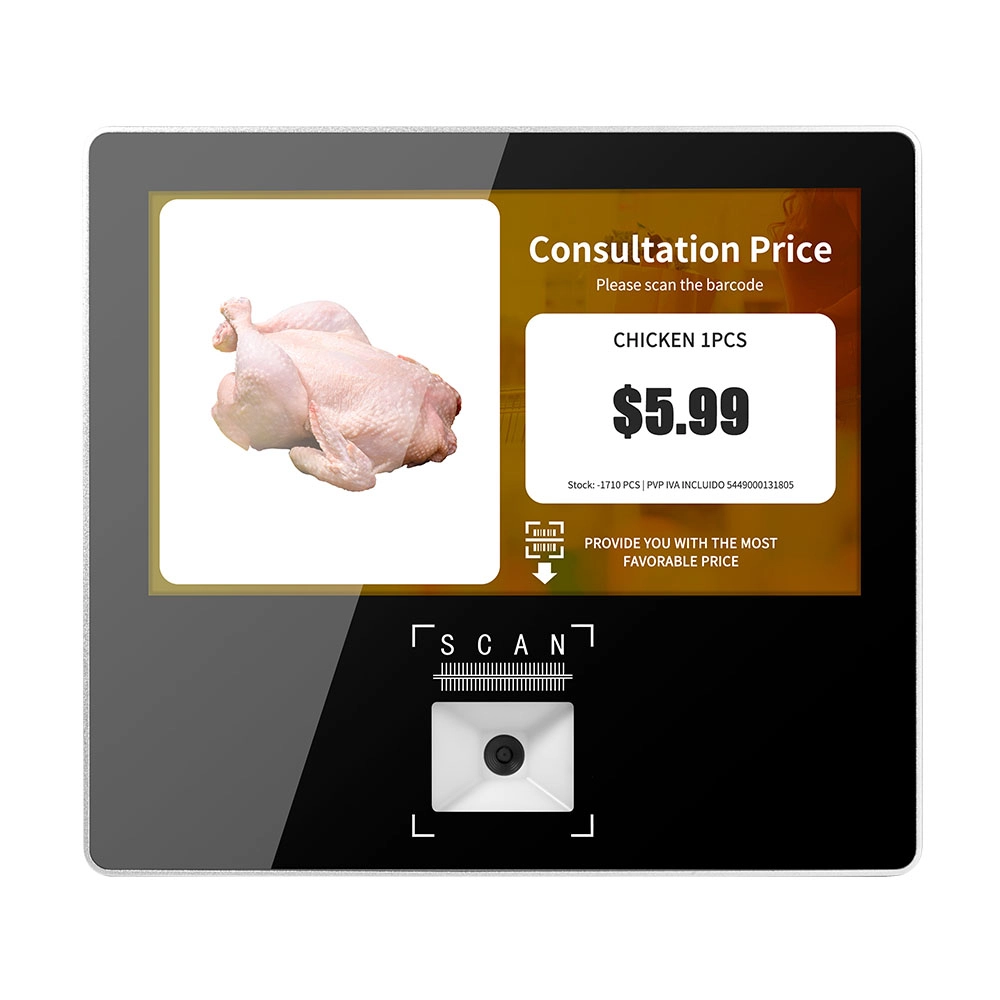
Metal 11.6 inch Price Scanner Machine Android Windows with Wifi Supplier
FAVORPOS Metal 11.6-inch Price Scanner Machine, designed for durability and efficiency in retail environments. This versatile device operates on both Android and Windows, providing seamless functionality for various applications. With built-in Wi-Fi connectivity, it allows for quick access to pricing data and updates. The 11.6'' display ensures clear visibility for easy operation, making it perfect for price checking and inventory management. Enhance your retail experience with this reliable and robust price scanner from a trusted supplier!
Get in touch
Interested in becoming a POS system dealer? Contact us for more information and start the process of joining our dealer network.
We look forward to working with you to expand the market together.


Copyright © 2025 Favorpos All Rights Reserved.
