
Which POS systems for supermarkets offer the best inventory control?
- 1) How can I ensure real-time perishable inventory and expiry-date tracking across multiple supermarket locations with POS and scale integration?
- 2) Which POS systems for supermarkets support automated supplier order generation based on forecasted sales, vendor catalogs and EDI?
- 3) What POS hardware and configuration do I need to reliably integrate floor scales, label printers, and barcode scanners for high-volume produce lanes?
- 4) How do supermarket POS systems handle mixed units and nested products (by weight, unit, and pack) for accurate inventory and margin tracking?
- 5) Which POS systems for supermarkets offer the best shrinkage and loss-prevention analytics tied to inventory movements and POS anomalies?
- 6) How can I migrate legacy supermarket inventory from a desktop POS to a cloud-based supermarket POS without disrupting daily operations?
Choosing the right grocery POS and supermarket inventory system is one of the most consequential decisions for margin, shrink, and operational uptime. Below are six long-tail, practitioner-focused questions supermarket teams frequently ask but rarely find modern, detailed answers to online. Each question is answered with concrete features, implementation steps, hardware/software notes, and vendor patterns (based on vendor documentation, GS1 barcode standards, and industry practice).
1) How can I ensure real-time perishable inventory and expiry-date tracking across multiple supermarket locations with POS and scale integration?
Challenge: Perishable inventory (produce, deli, bakery) demands batch/lot tracking, expiry management, FIFO valuation, and scale-integrated weighted PLUs so sales decrement the correct lot and trigger replenishment or markdown workflows.
Key system capabilities you must require:
- Batch/lot and expiry-date fields on receipts, receiving, and transfers (GD: GS1-128 support for encoded lot/expiry).
- Per-location shelf-life rules and automatic FIFO/FEFO (first-expiry-first-out) issue logic.
- Integration with retail scales that publish weigh data to the POS (JavaPOS / OPOS / TCP socket or scale middleware) and support variable-weight PLUs.
- Real-time stock sync (sub-minute or near-real-time) and conflict resolution for multi-checkout environments.
- Expiry alerting and markdown automation tied to promotion engines and inventory reservations.
Implementation steps:
- Map product master to include: SKU, GTIN/PLU, lot number, manufacture date, expiry date, shelf-life days, yield factors, and cost by lot.
- Choose scale models validated by your POS vendor—common choices are Mettler-Toledo, Bizerba and Dibal; confirm connectivity (serial, USB-to-serial, TCP/IP).
- Configure receiving workflows to capture lot and expiry via scanner or printed lot labels (GS1-128 or GS1 DataBar where applicable).
- Set FIFO/FEFO rules at store and warehouse level. Test by receiving three lots and running sales to confirm the POS decrements the oldest-expiry lot first.
- Enable near-real-time replication to a central ERP or Commerce system (if multi-store): set sync frequency and conflict rules (e.g., last-scan wins vs. reservation-first).
- Implement automated markdown rules: e.g., 5-day-to-expiry triggers 20% markdown; 1-day-to-expiry triggers manager approval list.
Operational tips and pitfalls:
- Use barcode label printers (Zebra, Sato) to print lot/expiry labels during receiving; rely on GS1-128 where trading partners require encoded data.
- Validate weight/PLU pairing at the POS: ensure the scale reports weight and the POS multiplies by unit price in the same transaction to avoid rounding and margin leakage.
- Avoid long sync intervals: >15 minutes increases risk of oversell in multistore/express lanes.
Vendors with strong supermarket perishable features: LS Retail (LS Central built on Microsoft Dynamics), Epicor Eagle, and specialized grocery solutions such as ECRS Focus. Many cloud EPOS providers support scale integration, but validate lot/expiry workflows in vendor docs and pilot stores.
2) Which POS systems for supermarkets support automated supplier order generation based on forecasted sales, vendor catalogs and EDI?
Challenge: Manual ordering causes stockouts or overstocks. Supermarkets need POs generated from real-time POS sales, supplier lead times, vendor price catalogs, and safety-stock rules—ideally feeding directly via EDI or supplier punchout.
Essential capabilities:
- Demand forecasting engine (min/max, day-of-week seasonality, lead-time-aware reorder point, and safety stock calculation).
- Automated PO creation with supplier catalog mapping, vendor SKUs, cost-change alerts, and landed-cost support.
- EDI/CSV or API connectivity for sending POs and receiving ASN (Advanced Shipping Notice) and invoice reconciliation.
- Purchase order approval workflows and PO consolidation by vendor to reduce freight costs.
How it works (data flow):
- POS captures real-time sales; inventory service recalculates on-hand and projected days of cover.
- Forecast module computes suggested POs using historical sales, promos, and lead times.
- POs are merged/validated against vendor catalogs (unit of measure conversions and vendor SKUs) and submitted via EDI/API or human-reviewed within the procurement module.
- Receiving uses ASN to auto-apply receipts to POs, reconciling quantities and lot/expiry where present.
Implementation considerations:
- Confirm the POS/retail system supports vendor catalog imports and mapping (many SMB cloud POS platforms do not support EDI natively).
- For large suppliers, require EDI 850/856/810 support; mid-sized vendors often accept CSV or API endpoints.
- Integrate landed cost and freight into unit cost for accurate margin and reorder triggers.
Vendors & patterns: Full retail ERPs such as LS Central (Dynamics Business Central), Epicor Eagle and Retail Pro provide automated PO features and EDI integrations. For smaller chains, third-party procurement engines (e.g., ReposiTrak, SPS Commerce) can be paired with a cloud POS that exposes APIs.
3) What POS hardware and configuration do I need to reliably integrate floor scales, label printers, and barcode scanners for high-volume produce lanes?
Challenge: High-volume produce lanes require robust hardware and a reliable network to avoid transaction delays and mis-weighs during peak hours.
Recommended hardware stack and configuration:
- POS terminal: industrial-grade touchscreen terminal or all-in-one EPOS with Intel i5 or better, 8+ GB RAM, SSD.
- Retail scale: Mettler-Toledo, Bizerba or Dibal models validated by your POS vendor; choose model supporting TCP/IP or serial protocols with known drivers.
- Label printer: Zebra ZD or ZT series or Sato for shelf/produce labels; consider peel-and-present for fast scanning.
- Barcode scanner: omnidirectional scanners (Honeywell Xenon or Zebra DS series) for fast PLU scanning and GS1 barcode reads.
- Network: segmented VLAN for POS and scales/printers with PoE where supported; redundant internet (primary and failover LTE) for cloud POS availability.
Integration tips:
- Use middleware (scale service) when a POS lacks native driver support: middleware maps scale output to the POS weight field and handles reconnections.
- Prefer TCP/IP or USB-to-serial adapters over native serial cables for easier device replacement and remote troubleshooting.
- Label format: encode GTIN, lot, expiry, and price in human-readable and GS1-128 where trade partners require it. Print on durable thermal labels suitable for refrigeration.
- Test end-to-end load: weigh, label, print, scan and complete sale within target seconds-per-transaction to validate throughput.
Common pitfalls:
- Mixing multiple vendor scale drivers creates maintenance overhead. Standardize on 1–2 validated models.
- Not setting up UPS and surge protection for terminals and printers—thermal printers are sensitive to power dips.
4) How do supermarket POS systems handle mixed units and nested products (by weight, unit, and pack) for accurate inventory and margin tracking?
Challenge: Grocers sell items by piece, by weight, by pack, and as kits (e.g., fresh-pressed juice: 250ml bottle sold individually or in 6-packs). Accurate cost/margin and on-hand inventory require unified unit-of-measure (UoM) and yield handling.
Capabilities to demand:
- UoM conversion tables and case-to-each relationships (case pack sizes, kilograms-to-count).
- Kit/BOM management to treat nested products as assemblies (ingredients consumed from raw inventory) or as packaged SKUs with separate stock records.
- Yield and trim factors for butcher/deli to calculate finished product quantities and cost-of-goods sold (COGS).
- Variable-weight PLUs for scale-sold items and price scale synchronization for per-unit selling price calculations.
How to configure:
- Define master UoM and alternate UoMs for each SKU (e.g., case = 12 each; kg = 2.2 lb).
- Set up product BOMs for nested products; decide whether to track the assembled SKU stock separately or consume components on-sale.
- Implement yield factors for processed goods to convert raw weight to sellable units and allocate cost appropriately.
- Define valuation method: FIFO is recommended for perishables; weighted average may be acceptable for stable-packaged goods—configure your POS/ERP accordingly.
Reporting and margin tracking:
- Ensure reports show margin by UoM, with conversion back to procurement UoM. Reconcile shrink at the component level for assemblies.
- Use cycle-count dashboards that allow counts by UoM and flag inconsistencies between assembled SKU quantities and component on-hand.
5) Which POS systems for supermarkets offer the best shrinkage and loss-prevention analytics tied to inventory movements and POS anomalies?
Challenge: Shrinkage stems from scanning errors, theft, administrative mistakes, and supplier discrepancies. The best systems link inventory ledger events to transaction-level data and provide actionable exception reporting.
Features to evaluate:
- Audit trail linking every sale/return/void/price override to cashier ID, timestamp, transaction station, and, where available, CCTV clip ID.
- Exception reporting for unusual void patterns, refund velocity, price override frequency, negative inventory events, and high-spend single transactions.
- Cycle count automation that prioritizes high-risk SKUs (perishables, high-value non-foods) and compares expected vs. counted with drill-down to transactions.
- Integration with analytics/BI tools (Power BI, Tableau) or built-in dashboards for shrink attribution and trend analysis.
Practical deployment:
- Enable cashier-level permissions and require manager approval for price overrides and refunds. Log approvals in the POS audit trail.
- Configure daily exception reports: top voiding employees, high-value returns without receipt, and mismatches between register sales and inventory decrements.
- Connect POS timestamps to store cameras via POS/CCTV integration or manual reference tagging to quickly retrieve evidence for high-value exceptions.
- Run weekly cycle counts for top SKUs and monthly deep counts; use automated variance workflows to create shrinkage tickets for investigation.
Vendors and integrations: Retail ERP solutions (LS Central with Dynamics/Power BI, Epicor Eagle) often provide richer shrink analytics; cloud EPOS vendors may need third-party BI or loss-prevention add-ons. Confirm the ability to export a full audit trail for forensic analysis.
6) How can I migrate legacy supermarket inventory from a desktop POS to a cloud-based supermarket POS without disrupting daily operations?
Challenge: Migration risks include data loss, pricing errors, scale incompatibility, training gaps, and downtime during cutover—each can cost sales and customer trust.
Migration roadmap (phased approach):
- Discovery & data profiling: extract product master, inventory on-hand, pricing, vendors, open POs, historical sales, and PLU/scale mappings from the legacy system.
- Data cleansing & mapping: normalize SKUs, remove duplicates, standardize GTINs/PLUs, map UoMs and nested-BOMs, and reconcile inventory counts to a single snapshot date.
- Pilot store: choose 1–2 low-risk stores to run the cloud POS in parallel for 2–4 weeks. Validate receiving, scale integration, promotions, and end-of-day reports.
- Cutover planning: schedule during low traffic, ensure full backups, plan for a short read-only period on legacy system to finalize counts, and migrate final snapshot.
- Parallel reconciliation: run both systems in parallel for the first day (or week) and reconcile sales and inventory nightly; have rollback steps defined.
- Training & runbook: provide role-based quick reference cards for cashiers, receiving clerks, and managers; train IT staff on device pairing and support flows.
- Post-go-live optimization: expect 30–90 days of tweaks (price rounding, PLU collisions, label formats); set a dedicated team to address tickets.
Data and technical notes:
- Export formats: CSV or XML for product master and inventory. For transactional history, export POS transactions for at least 13 months to preserve forecasting data.
- Scale remapping: ensure new POS supports the same scale protocols or use middleware; test common PLUs and label printing before opening.
- Regulatory and payments: confirm the new cloud POS supports EMV, PCI-DSS compliance, EBT/SNAP where applicable, and tax configuration per jurisdiction.
Common pitfalls to avoid:
- Rushing cutover without a reconciled inventory snapshot—always reconcile physical inventory immediately prior to final migration.
- Failing to test promotions and loyalty interactions which often behave differently in cloud environments.
Vendors: Many supermarket chains choose purpose-built retail ERPs or hybrid cloud solutions (LS Central, Epicor Eagle, NCR Counterpoint for mid-market) due to scale and feature depth. For small-to-medium grocers, modern cloud POS vendors can work if validated against the list above.
Conclusion — Advantages of modern supermarket POS with advanced inventory control
Modern supermarket POS systems that combine real-time stock sync, batch/expiry tracking, scale and label integration, automated procurement, and robust shrink analytics reduce out-of-stocks, protect perishable margins, and lower labor costs. They enable precise promotions, faster checkout, better supplier collaboration (via EDI/catalogs), and actionable reporting for loss prevention. Whether you choose a full retail ERP or a cloud EPOS, ensure the solution supports weighted PLUs, UoM conversions, PO automation, and an auditable transaction trail.
For a tailored assessment and a no-obligation quote, contact us at www.favorpos.com or email sales2@wllpos.com — we’ll map your hardware, inventory and supplier needs into a migration and ROI plan.

Why a 15.6” Touch POS Terminal Is Becoming the New Standard in High-Traffic Retail

Beyond Checkout: How a 15.6-Inch Aluminum POS System Redefines Retail Efficiency

Understanding 15-Inch Aluminum POS Terminals in Modern Commercial Use

The Smart Way to Check Prices: How a 10.1-Inch Wall-Mounted Price Checker Transforms Retail Stores

A Smarter Checkout Experience: The 15-Inch Dual-Screen POS Built for Modern Retail
For Solutions Retail
If there is a problem with the device, how can I contact your after-sales support?
You can contact our after-sales team by phone, email or online customer service. We provide 7x24 hours of technical support to ensure timely response and resolution of your problems.
For ODM
Can we provide our own designs?
Of course. We welcome customers to provide their own design concepts and specifications. Our design team will work with you to ensure that your design is implemented in the manufacturing process and make necessary optimizations.
For Beauty and Wellness
What payment methods does the system support?
Our system supports a variety of payment methods, including credit cards, digital wallets and contactless payments, providing customers with a convenient payment experience.
For OEM
Can the POS machine be customized with multiple functions?
Yes, we provide a wide range of functional customization options, including hardware configuration, software functions, brand design, etc. You can choose different processors, screens, connection options, payment modules, etc. according to your business needs.
For Grocery and Supermarkets
Can your POS system handle the high volume of transactions in a supermarket?
Yes, our POS system is designed for high-volume environments like supermarkets, ensuring transactions are processed quickly and efficiently even during peak hours.
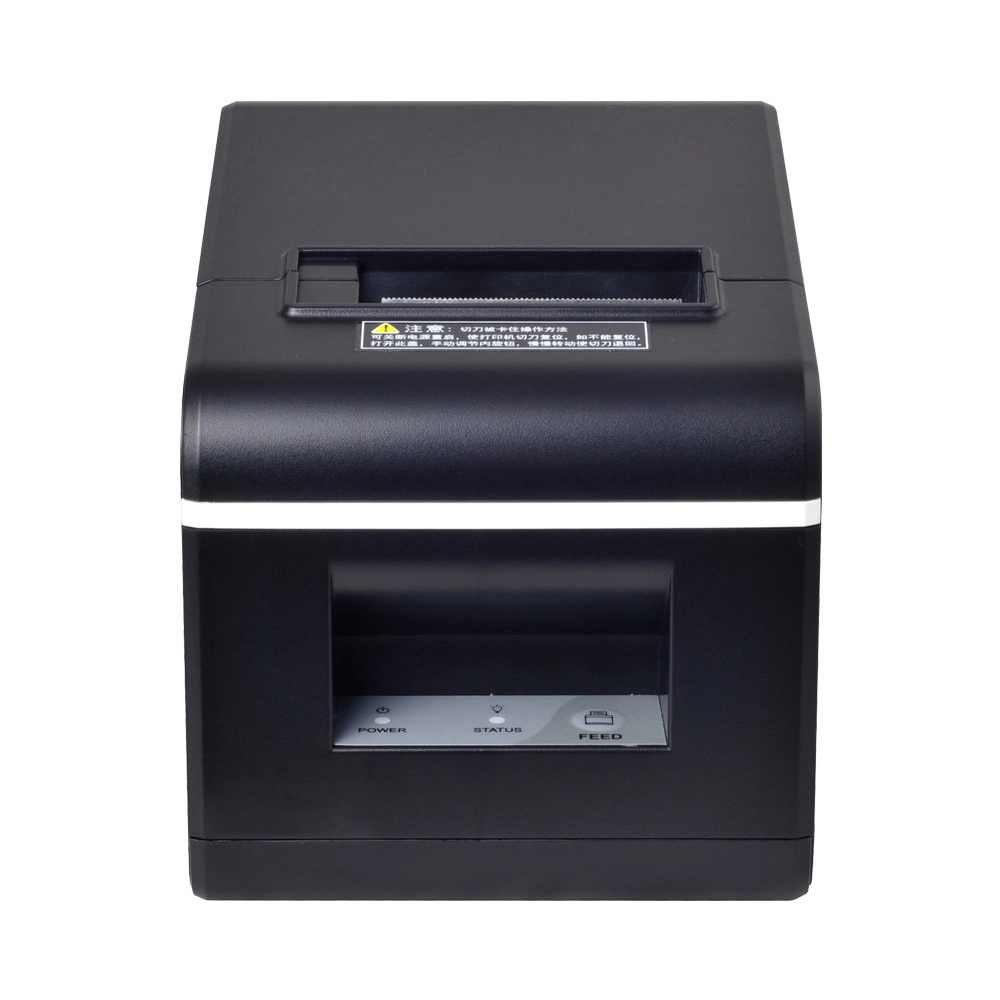
New Model Thermal Printer Bill Printer Manufacturer Portable Printer for Receipt
New Model Thermal Printer, a state-of-the-art bill printer designed for modern retail and hospitality environments. This printer combines advanced technology with user-friendly features, ensuring fast and efficient printing of high-quality receipts. Its sleek design complements any workspace, while multiple connectivity options make it easy to integrate into your existing POS systems.

Desktop Touch Screen POS Systems 12.1'' Android Windows Manufacturer
Our Desktop Touch Screen POS Systems feature a 12.1'' display, supporting both Android and Windows platforms. Engineered for high performance. The intuitive touch interface simplifies transactions and enhances customer engagement. With a sleek design and robust construction, our POS systems are perfect for businesses looking to improve efficiency and elevate the shopping experience.

15.6 Inch Windows POS Terminal with VFD Display, Foldable Aluminum Stand Touch Screen POS for Retail & Hospitality
This 15.6-inch POS terminal is built to meet the needs of modern retail and hospitality environments. Powered by a stable Windows operating system, it ensures smooth performance for various point-of-sale applications. The device features a crisp, responsive touch screen and a built-in VFD customer display, allowing customers to view transaction details clearly. Its aluminum alloy stand offers a sleek, professional appearance while providing enhanced durability and stability for busy checkout counters. Ideal for retail stores, restaurants, and service-based businesses, this POS machine delivers a reliable and customer-friendly checkout experience.

Point of Sale System with Thermal Printer All in One Pos Dual Touchscreen Pos with Barcode Scanner Supplier
FAVORPOS presents the all-in-one Point of Sale System with Thermal Printer, featuring dual touchscreens and an integrated barcode scanner. As a leading POS with NFC factory and barcode scanner supplier, we deliver reliable, efficient solutions tailored for your business needs.
Get in touch
Interested in becoming a POS system dealer? Contact us for more information and start the process of joining our dealer network.
We look forward to working with you to expand the market together.


Copyright © 2025 Favorpos All Rights Reserved.
