
What are budget-friendly restaurant POS systems for small eateries?
- 1. Which restaurant POS systems reliably process offline transactions and sync without data loss for venues with intermittent internet?
- 2. What are the realistic total first-year costs (software + hardware + payment processing + installation) for budget-friendly POS setups under $2,000?
- 3. How to evaluate a POS vendor's merchant account and who owns the PCI liability when using an integrated processor like Toast, Square, or Clover?
- 4. Can a low-cost POS support kitchen display systems (KDS) and real-time menu item-level inventory for small kitchens?
- 5. How to migrate historical sales and menu modifiers from a legacy POS to a new cloud POS with minimal downtime and accurate reporting?
- 6. Which POS systems offer granular user permissions and audit logs sufficient to prevent internal theft in a 10-table bistro?
1. Which restaurant POS systems reliably process offline transactions and sync without data loss for venues with intermittent internet?
Why this matters: Restaurants on cellular or unstable wired networks (pop-ups, food trucks, rural cafés) need a POS that takes orders, accepts EMV/contactless payments, and later reconciles without losing sales, modifiers, or tips.
How to evaluate: look for three technical guarantees in the product documentation and demos—local transaction queueing, durable local storage, and automatic conflict resolution when syncing:
- Local queue and durable storage: The terminal/tablet must write transactions to local encrypted storage (not only RAM). Ask the vendor whether the device supports encrypted SQLite or equivalent local databases and whether writes are atomic.
- Offline payments support: True offline EMV is rare because of chargeback risk. Many systems offer offline-card capture with merchant-configurable limits (amount, card-present-only) and require later settlement when online. Confirm the vendor's policy on offline EMV and any liability shift.
- Conflict resolution and audit trail: When connectivity returns, the POS should produce a reconciliation report showing locally queued transactions, timestamps, and sync results. This prevents duplicate orders and supports chargeback defense.
Vendors & real-world examples: Square, Toast, Lightspeed, and TouchBistro document offline-order queues. Square’s offline mode queues sales and syncs modifiers/authors automatically; Toast provides local-order caching for terminals but has vendor-specific limitations for card processing offline. For mission-critical use (food truck with slow cellular), choose a system that explicitly documents offline card-capture behavior and provides a manual sync + reconciliation log. Test this in a live field trial before committing.
2. What are the realistic total first-year costs (software + hardware + payment processing + installation) for budget-friendly POS setups under $2,000?
Why this matters: Vendors often advertise low monthly fees but omit hardware, onboarding, payment processing, integrations, and optional features like KDS or loyalty that push up the first-year total.
Typical line items and realistic ranges (U.S., 2024 market patterns):
- Software subscription: Free to $99/month per terminal for entry-to-mid tiers. Many budget-friendly packages offer pay-as-you-go processing with no monthly for basic plans (e.g., Square's baseline), while restaurant-focused platforms (Toast, Lightspeed) commonly start $69–$119/month.
- Hardware: Card reader $49–$299; POS tablet $199–$499; terminal/countertop unit $399–$999; receipt printer + cash drawer + router $150–$400. A minimal single-station setup is often $400–$900; a more robust small-restaurant bundle (terminal + printer + cash drawer + kitchen printer) typically runs $800–$1,800.
- Payment processing: Rates vary: percentage+cent or interchange-plus. Expect 1.6%–3.5% per card-present sale depending on your processor and contract; monthly processing fees or minimums sometimes apply. For budgeting, estimate 2.5% average effective rate for card-present sales.
- Onboarding & installation: DIY setup is often free; professional installation/configuration ranges $150–$800 depending on complexity and vendor.
- Integrations and add-ons: Delivery integrations, advanced reporting, or loyalty can be $10–$150+/month.
Sample first-year budget scenarios:
- Bare-minimum café (single tablet, receipt printer): Software-free plan, $300 hardware, $500 processing/year → ≈ $800 first-year total.
- Small bistro (single counter terminal + KDS printer + installed): $79/month software, $1,200 hardware bundle, $1,500 processing/year → ≈ $3,148 first year (exceeds $2,000 unless you choose lower-cost hardware or pay-as-you-go plans).
Actionable buying tip: Get a full written quote with itemized hardware SKUs, expected monthly processor rates, and onboarding fees. Ask vendors for a 12-month total cost of ownership (TCO) document that includes expected processing volume assumptions so comparisons are apples-to-apples.
3. How to evaluate a POS vendor's merchant account and who owns the PCI liability when using an integrated processor like Toast, Square, or Clover?
Why this matters: Payment processing structure determines fee transparency, PCI scope, and who handles chargebacks. Beginners often assume the POS vendor is always the processor; that’s not always true.
Processor models and implications:
- Proprietary integrated processor (one-stop): Vendors like Square and Toast act as the payment facilitator (PayFac). They underwrite, process, and provide the merchant account. This simplifies onboarding and tokenization/EMV support. PCI responsibilities are often reduced for the merchant because the vendor handles much of the stack, but merchants still must complete SAQ-A or equivalent and adhere to POS security best practices.
- Third-party integrated processor: Some POS vendors integrate with independent merchant account providers (e.g., Fiserv/Clover ecosystem). Here, merchant agreements, dispute handling, reserve policies, and pricing negotiation are managed by a separate processor. Liability for PCI compliance may be shared and depends on how cards are handled (direct entry vs. tokenized readers).
- Merchant liability and chargebacks: If the vendor is a PayFac, their underwriting policies can include reserve holds or account freezes on suspected fraud. If you use a separate ISO/processor, standard merchant agreement terms apply, which can be more negotiable for high-volume merchants.
Questions to ask each vendor:
- Are you the payment processor (PayFac) or do you connect to third-party processors?
- Who is the merchant of record on credit card transactions?
- How is cardholder data protected (tokenization, end-to-end encryption, EMV certified readers)?
- What PCI Self-Assessment Questionnaire (SAQ) will I need to complete?
- Policy on rolling reserves, account holds, and chargeback management?
Practical recommendation: For small eateries that want simpler onboarding and less PCI scope, a PayFac like Square or Toast is often easier. For restaurants with higher volume or complex pricing needs, negotiating a separate merchant account with a processor while using an open POS that supports it can reduce processing costs but increases contract complexity.
4. Can a low-cost POS support kitchen display systems (KDS) and real-time menu item-level inventory for small kitchens?
Why this matters: Small kitchens need fast order flow and accurate ingredient-level decrementing (e.g., tracking 4oz chicken portions per plate). Many cheap POSes have inventory counts only at the menu-item level, not ingredient-level or recipe-based inventory.
What to verify:
- Inventory granularity: Ingredient-level or recipe-level inventory lets the system decrement stock by component (e.g., 6 oz of chicken per plate). Confirm the vendor supports recipe BOM (bill of materials) and gives alerts when ingredient thresholds are hit.
- KDS capability: Some low-cost POS vendors offer a basic KDS (printer replacement) for free or low cost; others charge for KDS modules or require a cloud subscription. Check for multi-priority lanes, touch-to-acknowledge, and item modifiers display.
- Performance under load: Cheap setups using consumer tablets may crash or slow during service. Validate real-world throughput—number of tickets/hour—during demos or references.
Vendor realities: Entry-level vendors like Square and Clover provide basic item-level inventory; recipe-based inventory is typically in higher-tier plans or add-ons (Lightspeed, Toast, TouchBistro have stronger kitchen/inventory feature sets). If budding kitchens need recipe-level control but must stay budget, consider a hybrid: low-cost POS for front-of-house plus a third-party inventory app (some integrate through APIs), though this increases integration complexity.
Buying checklist for small kitchens:
- Confirm ingredient-level inventory and depletion rules.
- Request a demo showing kitchen screens during peak orders.
- Ask for vendor case studies of similar-size kitchens.
5. How to migrate historical sales and menu modifiers from a legacy POS to a new cloud POS with minimal downtime and accurate reporting?
Why this matters: Historical data (sales, refunds, employee hours, menu modifier performance) matters for forecasting, accounting, and inventory. Poor migration breaks reporting continuity and can harm bookkeeping.
Migration steps and best practices:
- Scope and export: Export raw data from the legacy system: sales transactions, product SKUs, menu modifiers, customer/loyalty accounts, employee records, and payout/batch data. Prefer CSV/Excel exports to preserve data fidelity.
- Data mapping: Map legacy fields to new POS fields. For modifiers, ensure multi-tier modifiers map to the new system’s modifier groups. Keep a mapping document and note differences (e.g., tax categories, revenue centers).
- Use vendor migration tools or managed services: Many POS vendors offer migration services (often paid) to import menu items, inventory counts, and sales history. For critical data (e.g., multi-year sales), export to your accounting system and only import recent 6–12 months for operational continuity.
- Test on a sandbox terminal: Import data to a test account and run reconciliation checks: sample checks, VOID/refund flows, daily sales totals vs. legacy reports.
- Plan cutover window carefully: Choose a low-volume day/time, freeze menu/pricing changes 24–48 hours before cutover, and keep both systems in read-only mode for historical reference after go-live.
- Reconciliation post-cutover: Re-run key reports (daily sales, category mix, tips) and reconcile payouts to bank deposits for the first 7–14 days. Retain legacy system access for at least 30–90 days.
Expected downtime and costs: With proper planning and vendor support, downtime can be limited to 1–3 hours for cutover. Full historical imports may take longer and incur professional services fees. Always budget time for training staff on modifier entry and reporting differences.
6. Which POS systems offer granular user permissions and audit logs sufficient to prevent internal theft in a 10-table bistro?
Why this matters: Internal theft often occurs through voids, comping, or manual price overrides. Small teams need role-based access and tamper-proof audit trails.
Minimum security features to require:
- Role-based permissions: Ability to restrict actions (voids, price overrides, refunds, driver tips adjustments) by user or role. Ensure kitchen staff cannot perform manager-only actions.
- Forced manager auth: For sensitive actions (refunds > $X, comp > X%), require separate manager PIN or login rather than a peer override.
- Audit logs with immutability: POS must log user ID, device, timestamp, original transaction, and action (void/modify), and exportable audit reports for accounting review. Look for tamper-evident logs (read-only export or hashed logs).
- Shift-level reporting: Shift close reports showing sales, cash drops, expected vs actual cash, and exceptions help spot anomalies quickly.
- Inventory variance alerts: Automated alerts where usage vs. expected sales exceeds thresholds can flag theft or waste.
Vendor capabilities: Toast, Lightspeed, Revel, and TouchBistro provide granular roles and detailed audit logs in their core products. Square offers basic staff permissions and activity logs in its ecosystem. When comparing vendors, request a sample audit log export and walk through a simulated internal-theft scenario to ensure the POS detects and documents the issue.
Operational controls to pair with POS features:
- Daily manager review of voids/refunds with explanations attached.
- Random reconciliation of drawer counts against POS reports.
- Limit cash handling privileges to trained staff and use end-of-shift CCTV or smart safes where practical.
Concluding summary: Choosing the right restaurant POS from a restaurant pos systems list — especially when you need budget-friendly restaurant POS systems for small eateries — requires testing offline handling, calculating realistic first-year TCO, understanding payment processing liability, confirming KDS and ingredient-level inventory, planning a controlled migration, and insisting on granular permissions plus immutable audit trails. These checks help you avoid surprise costs, reduce fraud risk, and ensure reliable service during busy periods.
Advantages of this approach include reduced downtime during cutover, predictable costs, stronger fraud controls, and a future-proofed platform that supports delivery integrations, tableside ordering, and menu engineering as you scale.
For a tailored equipment and pricing quote based on your venue size and expected card volume, contact us for a quote—visit www.favorpos.com or email sales2@wllpos.com.

Smart Checkout, Simplified: Exploring the Power of a 15.6-Inch All-in-One POS Terminal

Why a 15.6” Touch POS Terminal Is Becoming the New Standard in High-Traffic Retail

Beyond Checkout: How a 15.6-Inch Aluminum POS System Redefines Retail Efficiency

Understanding 15-Inch Aluminum POS Terminals in Modern Commercial Use

The Smart Way to Check Prices: How a 10.1-Inch Wall-Mounted Price Checker Transforms Retail Stores
For E-commerce
Can I manage inventory across multiple sales channels?
Of course. Our POS system provides real-time inventory synchronization across multiple online and physical stores to prevent inventory issues.
Is your POS solution scalable to accommodate business growth?
Yes, our POS system is designed to be scalable, and you can easily add new sales channels, locations, and features to accommodate business growth.
For ODM
Does the product comply with international standards and certifications?
Our POS machines comply with various international standards and certification requirements, including safety, electrical performance and environmental standards. We ensure that all products comply with relevant regulations during the production process so that they are suitable for the global market.
For Entertainment & Events
Does the system support the management of multiple venues or locations?
Yes, our system supports multi-location management, allowing you to monitor and manage sales and inventory for all venues from a centralized dashboard.
For OEM
Can I upgrade or add features to the existing POS machine?
We can upgrade or add features to the existing POS machine as needed. The specific upgrade services and costs depend on the design of the original device and the required functions. Please contact your account manager to discuss the upgrade options.
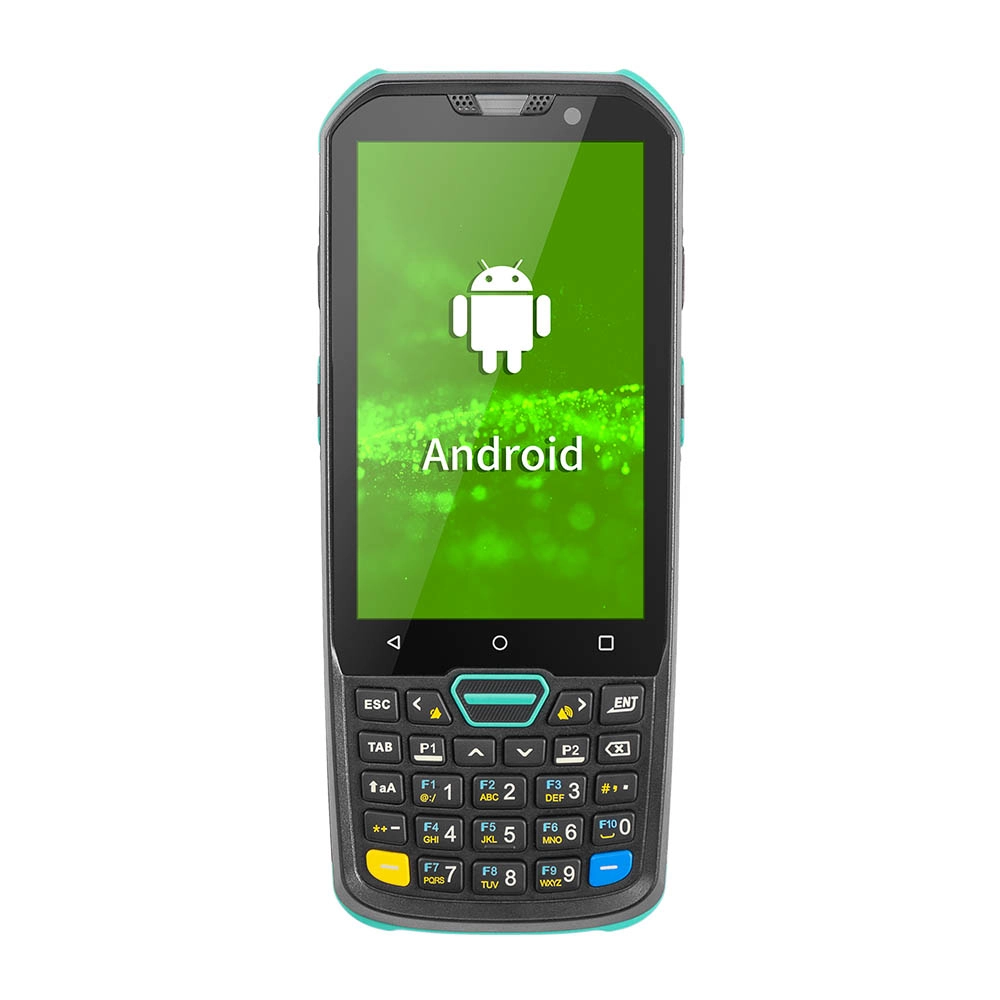
Factory Smart 4 inch Mobile PDA Data Collector with Keyboard
Our Factory Smart 4-Inch Mobile PDA Data Collector is equipped with a convenient keyboard for easy data entry. This compact device is designed for efficient inventory management and logistics operations, offering robust performance in a lightweight design. With a bright display and user-friendly interface, it allows for quick access to essential data on the go. Its durable construction ensures reliability in demanding environments, making it an ideal choice for retail, warehousing, and field operations.

11.6 inch Capacitive Touchscreen for POS Machine POS Monitor
FAVORPOS 11.6-inch capacitive touchscreen, specifically designed for POS machines to deliver a seamless and responsive user experience. This high-definition display offers vibrant visuals and crystal clear clarity, making it easy for staff to navigate through transactions efficiently. The capacitive technology ensures quick and accurate touch recognition, reducing wait times and enhancing customer satisfaction. Built to withstand the rigors of daily use, this touchscreen is perfect for retail and hospitality environments.

HD Dual Screen POS Machine Aluminum Hardware Android Windows Supplier
This dual-screen POS machine supports both Android and Windows systems, providing flexibility for various applications. The dual screens enhance customer interaction and streamline the checkout process, making transactions quicker and more engaging. Perfect for modern businesses looking to elevate their service and improve customer satisfaction, this POS machine is your ultimate partner in success!

Wall Mount Cash Register POS 21.5 inch for Supermarket Touchscreen Windows Factory
Our sleek and modern wall-mounted POS system features a stunning 21.5-inch LED display, providing exceptional visibility and clarity for seamless customer interactions. The capacitive touchscreen ensures a highly responsive and intuitive user experience, perfect for fast-paced retail environments. With its space-saving wall-mounted design, this POS solution is ideal for optimizing floor space while maintaining a professional and contemporary appearance.
Get in touch
Interested in becoming a POS system dealer? Contact us for more information and start the process of joining our dealer network.
We look forward to working with you to expand the market together.


Copyright © 2025 Favorpos All Rights Reserved.
