
What hardware do restaurant POS systems require for setup?
- 1) Which POS hardware components are required to run a full-service restaurant floor with split checks, table management, and a KDS in a single-vendor deployment?
- 2) How do I calculate true upfront and recurring costs when choosing a restaurant pos systems list for a 100-seat, high-turnover dinner service?
- 3) Which receipt printers and cash drawers reliably integrate with cloud POS systems using Ethernet vs USB vs Bluetooth in high-traffic restaurants?
- 4) Can I mix-and-match POS terminals, mobile handhelds, and a KDS from different vendors without losing features like modifiers and void audit trails?
- 5) What network and power redundancy (PoE, managed switches, UPS) does a multi-terminal restaurant POS setup require to avoid downtime during peak hours?
- 6) What hardware do restaurant POS systems require for setup, including EMV/contactless readers, and how do I ensure PCI and local EMV certifications are met?
Choosing from a restaurant pos systems list and specifying hardware for your restaurant setup is a high-stakes decision. Below are six specific, pain-point-focused questions beginners ask but rarely find deep answers to online. Each answer gives clear, actionable guidance on terminals, receipt printers, kitchen display systems (KDS), integrated payments, network design, PCI/EMV compliance, and cost factors.
1) Which POS hardware components are required to run a full-service restaurant floor with split checks, table management, and a KDS in a single-vendor deployment?
Core components for a full-service deployment: POS terminals (stationary or tablet-based), handheld order-entry devices (mobile POS), receipt printers, cash drawers, a kitchen display system (KDS) or kitchen printers, integrated payment terminals (EMV/contactless/NFC), a robust local network (managed switch/router + Wi‑Fi access points), and power redundancy (UPS). For a single-vendor approach you should confirm that the vendor supports:
- Table management with sections and server permissions—so floor plans, split checks, and transfers work without workarounds.
- KDS integration that maps modifiers, course timing and ticket firing rules from the POS without manual CSV imports.
- Real-time inventory and menu syncing between POS terminals, handhelds, and online ordering channels.
- Integrated payments that tokenize card data so refunds and voids are tracked consistently across terminals and receipts (important for audit trails).
Checklist before purchase: verify peripheral compatibility (receipt printers, cash drawer models), supported interfaces (Ethernet/USB/Serial/Bluetooth), and vendor-provided drivers. If the vendor's own hardware bundle (terminals + KDS + payment readers) is available, it usually minimizes integration friction and simplifies PCI scope, but may raise upfront cost.
2) How do I calculate true upfront and recurring costs when choosing a restaurant pos systems list for a 100-seat, high-turnover dinner service?
Many guides list software subscription fees but ignore peripherals, integration, and ongoing costs. For a realistic total cost of ownership (TCO), calculate:
- Upfront hardware: terminals/tablets, receipt printers, KDS displays, cash drawers, payment terminals, barcode scanners, mounts, and PoE injectors. Get vendor quotes and confirm warranty lengths.
- Installation and network: professional network configuration, VLANs, managed switches, Wi‑Fi access points sized for concurrent devices, and labor for physical installs.
- Software subscription: monthly/annual POS licenses, per‑station fees, and add-on modules (inventory, reservations, loyalty, reporting).
- Payment processing: transaction rates, interchange pass-through vs bundled, monthly gateway fees, and rental vs buy options for EMV readers.
- Maintenance and support: extended warranties, onsite service SLAs, and software support tiers (24/7 vs business hours).
- Depreciation and replacement: assume key hardware life of 3–5 years; budget for replacements and OS upgrades.
Example approach: create a 3-year TCO spreadsheet with rows for each cost category (hardware, installation, software, payment processing, support). Use conservative traffic and average ticket figures to estimate payment fees. Ask vendors for itemized quotes and written compatibility lists for each peripheral to avoid hidden integration fees.
3) Which receipt printers and cash drawers reliably integrate with cloud POS systems using Ethernet vs USB vs Bluetooth in high-traffic restaurants?
Printer and drawer choice depends on speed, reliability, and interface. Ethernet (TCP/IP) receipt printers are preferred in high-traffic settings because they centralize printing, are easier to manage on a network, and keep printing independent of a single tablet/terminal. USB and Bluetooth are simpler for single-terminal setups but introduce single-point-of-failure risks. Points to consider:
- Receipt printers: choose fast thermal printers with reliable feed mechanisms (widely used models include Epson TM and Star Micronics lines). For kitchen use, choose kitchen-rated models or use protected enclosures for heat/humidity.
- Cash drawers: ensure your chosen cash drawer supports the printer-triggered kick (drawer opens when the printer sends an open code) or has a USB/Ethernet controller. APG-style drawers are industry standard for durability.
- Interfaces: Ethernet for multi-terminal environments (use static IPs or DHCP reservations); USB for direct-attached devices to a terminal; Bluetooth for mobile handhelds but expect pairing and range limitations; Serial (RS-232) is legacy but still used in some kitchens.
Operational tip: test receipt printer cut speed and reliability under peak load prior to full deployment. For high-volume kitchens, group routing (kitchen station printers or KDS) reduces congestion and paper waste.
4) Can I mix-and-match POS terminals, mobile handhelds, and a KDS from different vendors without losing features like modifiers and void audit trails?
Short answer: sometimes—if the systems use robust APIs and share the same back-end or middleware. In practice, mixing vendors often causes feature gaps and data consistency issues unless you carefully verify integration depth. Main risks:
- Feature parity: modifiers, course timing, and void/void-reason capture may not transmit identically between vendor A's terminal and vendor B's KDS.
- Audit and reporting: split systems can fragment audit trails; refunds or voids processed at one system may not be reflected properly in another, complicating reconciliation and compliance.
- Latency and reliability: API-based integrations depend on network uptime and vendor-server performance; local LAN-based communication is typically faster and more resilient.
Best practice: if you must mix vendors, require a written integration spec showing which data fields (order items, modifiers, ticket IDs, timestamps, server IDs, void reasons) are synchronized in real time. Run an acceptance test covering peak scenarios: split checks, modifier-heavy orders, manager voids, and offline modes. If integrations are shallow, the safer route is to pick a single vendor or use a certified partner integration documented by both suppliers.
5) What network and power redundancy (PoE, managed switches, UPS) does a multi-terminal restaurant POS setup require to avoid downtime during peak hours?
Uptime depends heavily on network and power architecture. A resilient design includes:
- Separate POS VLANs: isolate POS traffic from guest Wi‑Fi and back-office systems to reduce interference and simplify firewall rules.
- Managed switches with QoS: prioritize POS and KDS packet traffic to prevent dropouts under load. Use PoE (Power over Ethernet) if terminals or access points support it, to reduce cable clutter and centralize power control.
- Redundant internet: dual WAN connections (primary + failover LTE or secondary ISP) with automatic failover for cloud POS operations and payment gateway connectivity.
- Local offline mode: ensure POS supports full local functionality (order entry, printing, card capture with tokenization) when cloud connectivity is lost; confirm synchronization behavior when connectivity returns.
- UPS for critical devices: place terminals, switches, routers, and KDS displays on a UPS sized to handle at least one peak service period (30–60 minutes is common planning practice). For larger operations, consider generator-capable infrastructure for extended outages.
- Network monitoring: use simple monitoring to alert staff to WAN or switch failures—early detection avoids order losses and payment problems during peak service.
Work with a certified network integrator or your POS vendor’s installation team to create a site diagram listing switch ports, VLAN IDs, PoE budgets, IP address assignments, and UPS runtimes.
6) What hardware do restaurant POS systems require for setup, including EMV/contactless readers, and how do I ensure PCI and local EMV certifications are met?
Hardware list for PCI/EMV-ready setup:
- EMV/contactless payment terminals (certified for your region): devices from manufacturers such as Ingenico, Verifone, Pax, or vendor-specific terminals like Square or Clover. Choose terminals that support EMV chip, contactless (NFC), and mobile wallets.
- Integration model: ensure the terminal supports either an integrated (SDK/API) or semi-integrated (tokenized) model. Semi-integrated/tokenized approaches minimize the POS system’s PCI scope because card data flows directly from the terminal to the payment processor.
- Network segmentation and TLS: keep payment traffic on a segmented VLAN and use TLS-encrypted connections for payment gateways. Verify that the gateway and terminal firmware are on supported, up-to-date versions.
- Receipt printers and cash drawers: placed on the same reliable network or locally attached—ensure receipt printers do not expose raw PANs on logs or printed reports.
To ensure compliance:
- Confirm EMV certification: ask your payment processor for the list of supported terminal models and confirm they are certified for your country and processor. Processor or acquirer approval is mandatory before taking EMV payments live.
- PCI DSS scope reduction: use tokenization and point-to-point encryption (P2PE) where possible. Ask your vendor for a P2PE or validated payment module statement to reduce the environment under PCI review.
- Firmware and patch policy: maintain a documented patch and firmware upgrade policy for terminals and network gear. Unpatched devices are common vectors for compliance failures.
- Third-party audits: when in doubt, request written compliance guidance from your processor or an acquirer; high-volume or multi-location restaurants should engage a Qualified Security Assessor (QSA) for formal PCI validation.
Operationally, require vendors to supply the exact terminal model numbers, firmware versions, and EMV certification references as part of your contract. This reduces surprises during payment processor certification.
Conclusion
Picking the right restaurant pos systems list and matching hardware reduces friction on the floor, improves kitchen throughput with a reliable KDS, protects payments with EMV and tokenization, and lowers long-term costs through fewer integration headaches. Advantages include faster service, more accurate reporting, simplified PCI scope with semi-integrated payments, and improved guest experience via mobile ordering and contactless payments. For deployment success: insist on written compatibility matrices, network diagrams, and a multi-year TCO before signing.
If you want a tailored hardware and software recommendation or a custom quote for your restaurant, contact us at www.favorpos.com or email sales2@wllpos.com — we’ll prepare a detailed proposal and site checklist.

Smart Checkout, Simplified: Exploring the Power of a 15.6-Inch All-in-One POS Terminal

Why a 15.6” Touch POS Terminal Is Becoming the New Standard in High-Traffic Retail

Beyond Checkout: How a 15.6-Inch Aluminum POS System Redefines Retail Efficiency

Understanding 15-Inch Aluminum POS Terminals in Modern Commercial Use

The Smart Way to Check Prices: How a 10.1-Inch Wall-Mounted Price Checker Transforms Retail Stores
For Grocery and Supermarkets
How secure is your POS system?
Our POS system is PCI-DSS compliant and uses advanced encryption technology to protect the security of all transactions and customer data.
Can your POS system be integrated with weighing equipment?
Yes, our POS system can be integrated with weighing equipment to facilitate the management of goods sold by weight, such as fresh produce or bulk goods.
For ODM
What is the lead time for ODM production?
The lead time depends on multiple factors, including product complexity, production volume and material availability. Generally speaking, the time from design confirmation to delivery may range from a few weeks to a few months. We will provide a detailed schedule at the start of the project and try our best to deliver on time.
For OEM
Can I upgrade or add features to the existing POS machine?
We can upgrade or add features to the existing POS machine as needed. The specific upgrade services and costs depend on the design of the original device and the required functions. Please contact your account manager to discuss the upgrade options.
For Entertainment & Events
What payment methods does your system support?
Our POS system supports multiple payment methods, including credit cards, digital wallets and contactless payments, providing customers with a convenient payment experience.
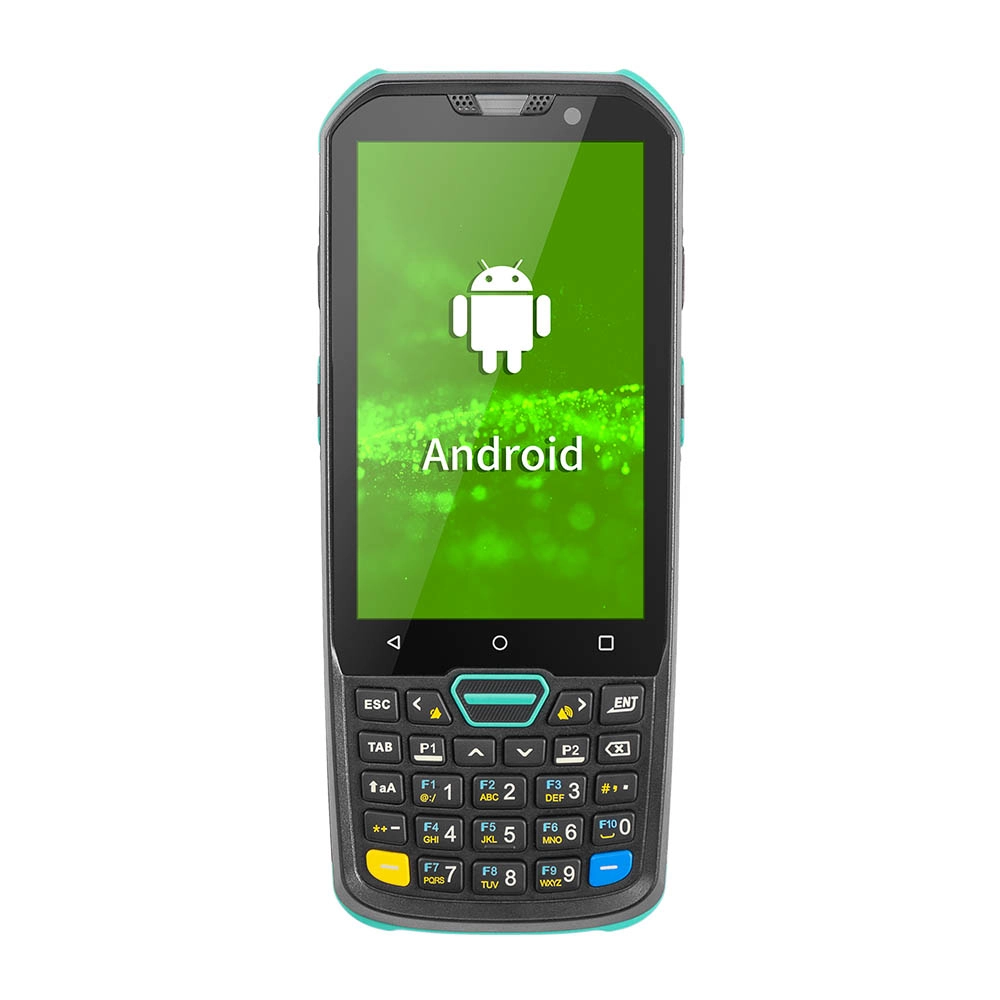
Factory Smart 4 inch Mobile PDA Data Collector with Keyboard
Our Factory Smart 4-Inch Mobile PDA Data Collector is equipped with a convenient keyboard for easy data entry. This compact device is designed for efficient inventory management and logistics operations, offering robust performance in a lightweight design. With a bright display and user-friendly interface, it allows for quick access to essential data on the go. Its durable construction ensures reliability in demanding environments, making it an ideal choice for retail, warehousing, and field operations.

11.6 inch Capacitive Touchscreen for POS Machine POS Monitor
FAVORPOS 11.6-inch capacitive touchscreen, specifically designed for POS machines to deliver a seamless and responsive user experience. This high-definition display offers vibrant visuals and crystal clear clarity, making it easy for staff to navigate through transactions efficiently. The capacitive technology ensures quick and accurate touch recognition, reducing wait times and enhancing customer satisfaction. Built to withstand the rigors of daily use, this touchscreen is perfect for retail and hospitality environments.

HD Dual Screen POS Machine Aluminum Hardware Android Windows Supplier
This dual-screen POS machine supports both Android and Windows systems, providing flexibility for various applications. The dual screens enhance customer interaction and streamline the checkout process, making transactions quicker and more engaging. Perfect for modern businesses looking to elevate their service and improve customer satisfaction, this POS machine is your ultimate partner in success!

Wall Mount Cash Register POS 21.5 inch for Supermarket Touchscreen Windows Factory
Our sleek and modern wall-mounted POS system features a stunning 21.5-inch LED display, providing exceptional visibility and clarity for seamless customer interactions. The capacitive touchscreen ensures a highly responsive and intuitive user experience, perfect for fast-paced retail environments. With its space-saving wall-mounted design, this POS solution is ideal for optimizing floor space while maintaining a professional and contemporary appearance.
Get in touch
Interested in becoming a POS system dealer? Contact us for more information and start the process of joining our dealer network.
We look forward to working with you to expand the market together.


Copyright © 2025 Favorpos All Rights Reserved.
